
bnigjefadhmhkncnahnafmehfednjljl

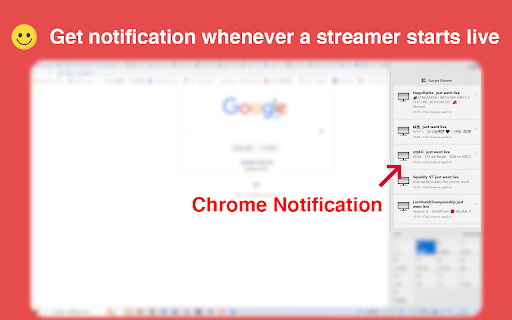
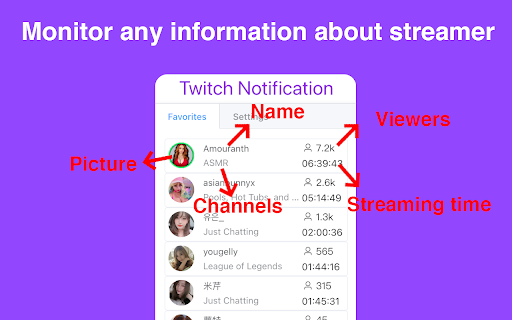
Get instant notifications when your favorite twitch streamers come online! Get instant notifications when your favorite twitch streamers come online! Twitch Notification is a Chrome extension that will greatly improve the way to manage your favorite now streamers. In addition to having all live streamers in one place, you will enter your favorite Twitch streams with one click! Features: - Get notification whenever a streamer you follow starts live - access to your favorite streamers quickly - Enable or disable notifications How to use: 1. Click “Add to Chrome” and install Twitch Notification 2.log in with your account(extension has access only "your follow") 3. Click the extension icon, you can watch the live streamers that you follow 4. In addition, you can get instant notifications when your favorite streamers come online 5. Have fun! Q&A Why do I need Twitch account authorization? We need to capture the information of the streamers you follow at all times, so we need your account authorization. Please rest assured that we will not obtain any other information from the account. Where do I get the streamer's go-live notification? You can receive his online notification in your chrome browser, just click the notification window, and you can jump directly to the live page If you like it, recommend it to others and give a nice review. It really helps.

Twitch Live
Twitch Live is an extension that brings your followed Twitch streamers into a clean, modern, Twitch-styled interface. - Available for both Chrome and Firefox - Dark and light mode - Get Twitch notifications when streamers go live. - Choose which streamers you want to get notified for. - Create favorite lists to keep streamers at the top for easier access. - Add Kick streamers. …and more

NowStreaming - Twitch
Manage your favorite Twitch streamers, get instant notifications when they come online, and much more! NowStreaming is an extension that will greatly improve the way you manage your favorite Twitch streams. In addition to having all your favorite streamers in one place, NowStreaming will instantly notify you whenever they go online. First Steps: - Install the extension! :) - Hit the NowStreaming icon - Authenticate with Twitch - Start following a channel using the text box or import your follow list from Twitch in the Options tab. - Those channels will now appear on your NowStreaming Streams tab when they are live and you will get notifications every time that happens! If you don't want to receive notifications, you can always disable it in the Options Menu. Anything you do on NowStreaming *WILL NOT* affect your Twitch account. Feel free to comment about things you like/don't like, I'll give it a look. If you like this extension and want to support me, you can Donate through PayPal, I'll be very grateful: https://paypal.me/joaopsys Big thank you to Joca64 for the visual improvements and overall contributions: https://github.com/Joca64 Big thank you to Pedro for the new logo: https://github.com/pedroordep 3.5: - Add more game icons. Special thanks to Lykrast (https://github.com/Lykrast) for their contribution. 3.4: - Fix/Update the "Import From Twitch" button: Due to Twitch's new API limitations, from now on this function will only be able to read and import your own user's followed channels. It will not be possible to import the list of other user's followed channels. For 99% of users, this will not be a significant change. - Update Twitch OAuth permissions accordingly - You will need to disconnect from twitch (in the Options menu) and re-authenticate for these changes to take effect - Bring back the functionality of following the stream you are watching with the click of a button 3.3: - Remove the tabs permission completely. NowStreaming will no longer allow you to follow the stream you are currently watching with the click of a button, due to absurd permission wording. 3.2: - Replace the activeTab permissions with tabs in hopes to restore NowStreaming to the Chrome Store 3.0: - Major update for Twitch Helix API compatibility - Update to Manifest v3 (Chrome version) - Fix limitation of maximum of 100 online streamers - Implement OAuth authentication with Twitch - Code cleanup and slight optimization - Allow sorting on the following list page - Fix bug when parsing a stream URL with referrals - Update JQuery, Pure CSS and FontAwesome - Fix minor typos - Update game icons 2.2: Remember last sorting method and sorting order Hotfix sync/import from twitch due to a twitch API bug reported in https://github.com/twitchdev/issues/issues/237 2.1.2: Set a fixed max height for the popup window Fix a bug where spaces could be added to streamer's usernames 2.0.0: - Visual and functional improvements to the popup layout - Implements sorting on streamer name, game, viewers and uptime by clicking the respective column - Fixes a bug that caused the stream's uptime to be miscalculated - Fix various sanitization issues - Other minor bug fixes 1.8.0: - Firefox version released! - Fix a bug where clicking on notifications would open an about:blank tab - Update some functions to cope with deprecations 1.7.4: - Edit notifications title so it has more space for the channel name 1.7.3: - Adapt the following button for the new Twitch Beta URL 1.7.2: - Update extension name and description. 1.7.1: - Change the way icons are loaded to avoid errors - Fix wrapping on uptime - Fix wrong popout URLs 1.6.2 - Fixed a bug when persisting notification state per channel after an extension reload 1.6.1: - Added game icons and fixed a typo 1.4: - Major code improvements and code cleanup - Removed all XHR requests - Fixed bug when syncing Twitch follows (API inconsistency) - Updated all Twitch API calls for API v5 - Updated all CDNs - jquery, pure CSS, fontawesome - Fixed insecure (http) Twitch URL - Fixed and added more game icons 1.2: - Corrected font path in the following list - Added more game icons and NS icons for the extensions page - Fixed a case sensitive situation when following streamers 1.1: - Changed the font to a more suitable one. (Public Release) 1.0: - Redesign of the popup window (Thanks JN!) - Fixed a rare bug where the stream title and url would be undefined - Added game icons for some recently popular games (Public Release) 0.81: - Brand new and more polished logo (Thank you Igor! https://www.behance.net/igorcarraco) - Major bug fix (Thank you JN) - More game icons (Public Release) 0.7: - Updated description - Added a Fast Follow option - Added a Stream Popout option - Added a donate button at the end of the popup window :) - Changed the submit buttons - 'Sync with Twitch' renamed to 'Import from Twitch' - Updated some messages and tips - Fixed a bug where some notifications would be sent after importing data (Open Beta) 0.6: - Version number added to the popup - New Logo! - Some improvements to icon loading - Minor bug fixes - Improved help messages - You can now go to the streamer's twitch channel even if they're not streaming - Improved follow functions - Fixed notifications being sent more than once for the same stream - More game icons :D - Added hidden easter egg - Stream title now shows when you mouse hover an online streamer (Closed Beta) 0.5: - Minor bug fixes - Added export/import local data. You can now keep your favorite streamers even if you format your hard drive :) - Major bug fix for users following tons of people on twitch - Fixed a major core bug - Online streams limit raised to 100 - Added options - you can now choose what the Sync button does and opt to not get notifications. (Closed Beta) 0.4: - Many core changes to how/what data is stored - Popup window got a facelift (added css, game, viewers, unfollow options) - Some minor bug fixes - Added some error/help messages that were missing - Added option to Sync with Twitch - Added option to unfollow everyone (Closed Alpha) 0.3: - Badge text added to the icon, now it shows the number of online streamers - Alpha popup page (not to say ugly) when user clicks icon, showing current streamers and follows - Full refresh when user follows or unfollows (Closed Alpha) 0.2: - 'background' permission removed - This was non-sense - Notifications are now awesome - Sync storage is only used at start and on follow/unfollow, everything else is local - 1 request to twitch API per minute (instead of 1 per follow) - Updates and notification when user starts chrome - LOTS of bug fixes (Closed Alpha) 0.1: - First Alpha version - Notifications 'kinda' working (super ugly, 2 buttons, urls not matching notification when there's more than 1 simultaneously) - Lots of bugs in sync and local storages - Follow/Unfollow working but totally out of sync - Lots of requests, lots of storage writes - Lots of nulls everywhere

Twitch Stream Notifier
Track the status of your favorite Twitch.tv streamers no matter where you are. Use the extension to see which streamers are online and get a notification of when they do go online. You can add streamers one at a time or bulk add via your Twitch username. Not affiliated with Twitch.tv. Powered by TheoryCraft.gg

Previews (For Twitch & YouTube & Kick)
Live hover previews for Twitch & YouTube & Kick | A bunch of quality of life improvements for Twitch & YouTube & Kick Hover previews, sidebar favorites, multi-stream, FlashBang Defender, auto-refresh on errors, fast-forward and dozens more Quality-Of-Life features — all for Twitch & YouTube & Kick. Previews is a browser add-on for people who watch a lot of streaming content. Peek at any channel before you click. Pin your favorites to the top. Watch multiple streams at once. Stop the video from breaking. Snipe predictions. Catch up to the action with one click. Fast-Forward. Record streams. Maintained since 2020 and rated 4.8/5 stars! 🖱️ HOVER PREVIEWS Live video or image thumbnails appear when you hover over channels — in the side panel, directories, and clips. Adjustable size and audio. ⭐ SIDEBAR FAVORITES A dedicated Favorites list pinned to the top of your sidebar, just for the streamers you actually care about. Optional custom categories. Show offline favorites too if you want. 🔆 FLASHBANG DEFENDER For 2 AM moments when the streamer opens a white browser tab. One click dims the video so your eyes survive. 🔁 AUTO REFRESH ON PLAYER ERRORS Automatically refreshes the player on errors #1000, #2000, #3000, #4000, and #5000. No more dead streams. 🎚️ AUTO SET PLAYER QUALITY Forces the video to your selected quality on every page load and channel change, with a fallback if your first choice isn't available. 🛡️ PREVENT QUALITY DROPS IN BACKGROUND Stops the video from sliding to 160p when you switch tabs. Also kills 99% of #1000 and #2000 errors before they happen. 🚀 FAST-FORWARD One-click jump back to the live edge — perfect when the stream is delayed or the buffer pulled you behind. Shows in the player controls. ⌨️ KEYBOARD SEEK Use SHIFT + left/right arrow keys to seek 5 seconds back or forward through the live buffer. Shortcuts are customizable in settings. 🎤 VOICE TYPING IN CHAT Click the mic icon to dictate your messages — speech-to-text powered by AI. Multi-language support. 🎯 PREDICTIONS SNIPER A few seconds before each prediction closes, the sniper picks the option leading in votes — based on configurable rules for bet size, max points, vote-margin, and timing. 🎬 CLIP DOWNLOADER Download Twitch clips straight from the video controls. No third-party sites. 📺 MULTI-STREAM & MULTI-CHAT Watch and message across multiple channels at once on Twitch, YouTube, and Kick. Save layout presets. Switch between them on the fly. 🎞️ FULLSCREEN WITH CHAT OVERLAY Theater or fullscreen mode with a transparent or solid messaging overlay. Fully customizable. 📸 SCREENSHOT & RECORD Capture stills at the stream's native resolution, or record at 60fps. ⚡ AUTO CHANNEL POINTS CLICKER Clicks the bonus claim button for you. Works in background tabs too. PLUS many more: predictions notifications, leave raids automatically, raid to random favorite, incognito chat, clear chat, sidebar search, expand sidebar, YouTube + Kick channels in the side panel, streamer self-preview, hide platform overlays, mute videos that play in the background, layout presets, cloud sync for settings + favorites, playback speed controls, copy URL at current time, and more. WHY USERS LOVE IT ✓ 60,000+ active users ✓ 4.8/5 ★ rating ✓ Maintained since February 2020 ✓ Featured by the Chrome Web Store ✓ Recommended by the Mozilla Add-ons team ✓ Praised by Dexerto ✓ Translated into 7 languages: English, German, Spanish, French, Portuguese (Brazil), Japanese, Korean ✓ Actively maintained and updated regularly © MarkM. - If you are a content creator or a developer in the sphere, have a look at the Affiliates Program -> https://previews-app.com/affiliate
