
knllbjmieejiihihaecdhamhcfadaadc

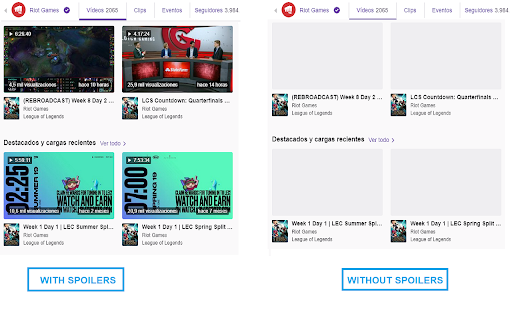


No more spoilers watching TWITCH VODS and YOUTUBE videos. Enjoy watching twitch vods and youtube videos by preventing spoilers… No more spoilers watching TWITCH VODS and YOUTUBE videos. Enjoy watching twitch vods and youtube videos by preventing spoilers ruining the experience of matches or tournaments. Twitch, features: - Hide timebar - Hide video duration. - Hide related videos thumbnails images and timestamps - Added new video controls, navigate quick and easy with them avoiding spoilers! Youtube features: - Hide timebar - Hide video duration. - Hide related videos thumbnails images - Added new video controls, navigate quick and easy with them avoiding spoilers! Easy configuration with extension's popup menu Share your experience at the Chrome Store and rate Twitch Vod Spoiler Free extension Extension made by Adrián Arbizu Donoso (Spain). Framework used: Angular 12.

Hide video duration on YouTube by Denis
Hide the duration of YouTube videos to prevent spoiling the ending. In particular, a Let’s Play video of a rogue-like coming to an end suggests the player will make a crucial mistake soon. With this extension a duration can be hidden at the start of a video manually, and also all videos matching a particular title can have their durations hidden automatically.

Spoilerproof: The 1-Click Spoiler Block
Introducing Spoilerproof, the one-click spoiler block! Simply select the title you want to avoid spoilers for, and our Spoiler… Introducing Spoilerproof, the one-click spoiler block! Simply select the title you want to avoid spoilers for, and our Spoiler Engine will detect spoiler terms on social media sites and block them for you. Once you've finished watching a title, the spoiler block is removed. With over 2,000 titles across movies, TV shows, and video games, Spoilerproof ensures the internet will never ruin enjoyment of your favourite media. Happy browsing!

Infinity for Youtube
This extension hides video duration on youtube videos, in order to avoid spoilers. Unlike existing similar extensions, this doesn't hide the duration for all the videos, but only for the videos in the selected YouTube channels. Hiding the video duration is currently working in: * the video player * the recommended videos on the side-bar * the YouTube homepage * the search page * a user's page. You can select the channels in which to hide the video length in the extension's options page.

Video spoilerless
Prevent spoilers by removing the progress bar and video duration from the Youtube™ player. Remove the video duration, progress bar & time of related videos on your favorite Youtube™ channels to prevent spoilers. Navigate easily with new controls while avoiding spoilers. Never get spoiled by the video length anymore ! By hiding the duration information, you won't be able to guess the result of any sport/e-sport match (or any kind of vod). -- HOW TO USE THIS EXTENSION -- 1) Click on the Video Spoilerless extension in order to configure the extension (you can pin the extension for an easier use) 2) Enable the extension to hide the duration of all Youtube™ videos 3) Activate the white list then add your favorite Youtube™ channels in order to only hide the selected channels 4) Use the new controls of the Youtube™ player to easily navigate while avoiding spoilers ! Note : Refresh the page if the extension does not apply.
