
knbbkbdoocppfbcdbblbleiahidnmlnk
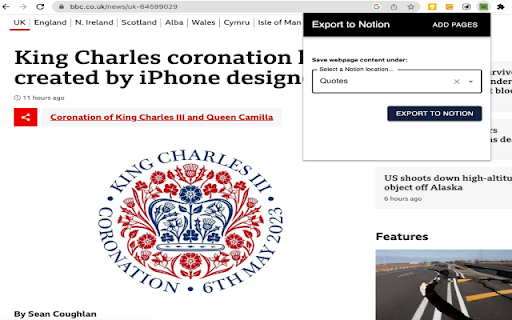
Export web page content to Notion. Exports web page content to Notion so you can read and edit it later.

NotionMark - AI Bookmark to notion
Bookmark tabs to notion with AI-generated properties e.g Summary, Categories, Description, Tags. Capture screenshot. Sync bookmarks 📢 NotionMark: AI-Powered Bookmarking for Notion Effortlessly save your browser tabs to Notion with enhanced organization, thanks to AI-generated properties like summaries, categories, descriptions, and tags. **NotionMark** ensures your bookmarks are not just stored but structured for easy access and better management in Notion. ✪ **AI-Powered Organization:** Automatically add useful properties to your bookmarks such as tags, categories, and detailed summaries for easier classification and retrieval. ✪ **Multiple Databases & Workspaces:** Save bookmarks to various databases within multiple Notion workspaces, keeping your projects neatly separated. ✪ **Webpage and YouTube Summaries:** Automatically insert concise summaries of webpages or YouTube videos into your Notion bookmark pages. ✪ **Article Clipping:** Clip articles directly into your Notion bookmark pages, making it easier to reference the key content later. ✪ **Custom Cover Images:** Use captured screenshots or webpage thumbnails as the cover image for your Notion bookmark pages, making visual recognition of your saved content effortless. ✪ **Sync Existing Bookmarks:** Easily sync all your current browser bookmarks with your Notion databases in just one click. ✪ **Privacy First:** We only insert data into your Notion account – we don’t read, track, or store any data from your Notion workspace. ✪ **No Ads, No Tracking:** Enjoy a clutter-free, ad-free experience with complete control over your data. NotionMark doesn’t use any third-party libraries to ensure maximum privacy. ⌨️ Keyboard Shortcuts for Quick Access: - **Alt + B**: Instantly open the NotionMark popup window for bookmark to notion. ✅ **AI-Generated Properties for Better Organization** With AI, NotionMark categorizes your bookmarks automatically by adding tags, identifying the type of website, and generating a useful summary of the content. This makes it easier to search, sort, and use your saved bookmarks. ✅ **Solving the 'URL Only' Problem** Do you struggle to remember why you saved a bookmark just by looking at its URL or title? NotionMark helps by automatically adding a webpage thumbnail or screenshot as the cover image for the Notion bookmark page, making it easier to visually recall the content. ✅ **Sync Your Existing Bookmarks** Sync your current browser bookmarks to newly created databases in Notion with a single click, making the transition to NotionMark seamless and efficient. ✅ **Your Privacy, Our Priority** NotionMark values your privacy and security. We do not read or access your Notion data. We will insert the content which you choose to insert. There’s no tracking, no ads, and no third-party libraries involved, so you can bookmark confidently. ℹ️ Support You can mail us: noterailhelp@gmail.com - We respect your privacy: We do not access or read your Notion content. - Your data stays private: All data processing occurs within your browser, ensuring that it never leaves your device. - Your personal data is safe: We do not store, share, or sell any personal information you provide. ⚠️ This extension still in beta

Notion Sidebar Expander
Expands Notion Sidebar items to reveal the current page Automatically expands Notion sidebar to reveal the current page

Text to Notion
Boost your productivity with this powerful Chrome extension designed to streamline your research and content organization process.… Boost your productivity with this powerful Chrome extension designed to streamline your research and content organization process. With just one click, you can instantly copy any selected text from a webpage along with its source URL and send it directly to your Notion workspace. Whether you're gathering information for projects, collecting quotes, or organizing web content, this extension eliminates the hassle of manual copying and pasting, saving you valuable time. Perfect for students, researchers, writers, and professionals who use Notion to stay organized, this tool ensures that you capture not only the content but also the source for easy reference later. Say goodbye to juggling between multiple tabs or losing track of your web sources—this extension keeps your workflow efficient and your notes well-structured

Notion Cover
A Notion Cover to generator a cover for Notion note cover or the others cover. - Unlimited generation and download. - Custom background image. - Multiple fonts to choose from, custom font colors, custom font styles and sizes. - Title and subtitle position customization. - Export the synthesized image in “png/jpeg/webp” format to the local. - Click on the Chrome extension app. - Click ‘Begin to Make Your Notion Cover’ Button, open the ‘Make Your Notion Cover’ page. - Select the background image, fill in the title and subheadings, and set relevant parameters. - Click ‘Generate and Download’ button to download image. Indeed, Notion Cover is available for free. You can access the basic features and choose to upgrade for more functionalities. All data processing occurs locally on your computer, and it never traverses our servers.
