
kmijndmdcmdfhajeagolfiepokkdoilg

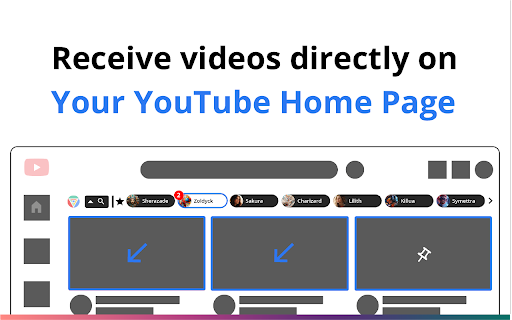


Discover, Share & Connect directly on YouTube. Go beyond the limits of your YouTube algorithm to find new videos and channels. Explore a new dimension of YouTube content with YouShare 🌌 Access Friends' YouTube Feeds: Discover content beyond your own algorithm. 🔍 One-Click Sharing: Share videos with friends directly on YouTube in a single, elegant click. 👆 Pins: Put a spotlight on your favorite videos by pinning videos to your YouShare feed 📌 Public Likes: Endorse videos and influence your friends' choices. 👍 Does your YouTube homepage feel a bit repetitive at times? Craving some fresh content? Why not explore that cool friend of yours' homepage instead and find an exciting new video to watch right now? Or how about checking out the feed of your favorite influencer? YouShare is a Chrome extension that enhances how we explore and share content on YouTube. It allows you to see your friends’ YouTube homepage videos directly from Your home page via a friends list. You can also send any YouTube video to all your YouShare followers in a single click and they’ll receive it on their YouTube home page. Discover New Content with YouShare 🌍 YouShare is not just an extension; it's a new way to experience YouTube. By allowing friends to access each other's YouTube homepages, YouShare presents a wealth of content that transcends individual algorithms. Explore new dimensions of YouTube, uncover hidden gems, and immerse yourself in diverse content, tailored by the interests of your friends and favorite influencers. One-Click Sharing 🚀 Send and Receive videos directly on and from YouTube. YouShare's one-click sharing functionality redefines video sharing. With a single click, send videos to friends who receive them directly on their YouTube homepage. No more copying links or navigating to other sites than YouTube. Sharing videos has never been so fast and efficient. Mutual Promotion 📈 YouShare empowers influencers to collaborate and support each other. They can share each other's content with their YouShare followers, and grow together on YouTube. Different People, Different Algorithms 👥 YouShare takes your YouTube experience to new heights by allowing you to explore content through different algorithms tailored by your friends and favorite influencers. Experience YouTube like never before, as YouShare brings together different people, different algorithms, and the same YouTube platform you know and love. Your Privacy Matters To Us! 🚩 We do not sell user data. We value your privacy and are committed to safeguarding your personal information. All YouShare functionalities are set to private by default, and we EXCLUSIVELY use the information we collect to enable your YouShare experience. 🔒 Privacy Control: All sharing settings are set to private by default. 🔒 You can manually choose to make your YouTube homepage feed visible to: - Your followers - The users you follow If you stay with the default setting “Private”, you will still be able to browse feeds of users who manually choose to share their home page feed with others. ✅ You will also still be able to use the 1-Click-Sharing functionality to send videos to your followers. The standard YouShare experience offers a robust suite of features designed to enhance your YouTube journey: - 🖱️ On any video page, click on the YouShare logo to share the current video with all your YouShare followers in a single click, twice per day. 🔄 - 📤 Use single one-click sharing for up to 10 videos per day. - 👀 Access the 50 most recent videos that were passively shared by each user per feed. - 🕒 View the history of the last 10 videos you've exchanged via one-click sharing. - 📌 Take advantage of 1 pin slot to highlight your favorite content. These features are designed to get you started on a path of discovery and sharing, bringing you closer to content and creators that resonate with your interests. Get More with YouShare+ ✨ For those who seek the ultimate YouShare experience: At just $4.99 a month, with a 7-day free trial, YouShare+ offers unlimited access to all features, including an expanded 4 pin slots to showcase your must-watch videos, as well as premium skins. Your subscription not only unlocks the full potential of YouShare but also supports our small team in continuing to develop and enhance the platform, ensuring a constantly evolving and improving experience for our community. As a YouShare+ subscriber, you'll also receive 2 golden tickets, allowing you to grant premium access to two users of your choice, sharing the wealth of unlimited discovery as long as your subscription is active. Join YouShare today and revolutionize your YouTube experience with fast, non-intrusive sharing, and the power of passive discovery. Explore, share, and enjoy YouTube in a whole new way. Connect with us 📢 Follow us on Linkedin: https://www.linkedin.com/in/you-share-766641281/ Support: 💬 Have any questions or feedback? Please get in touch with us: support@youshare.media

YouTube channel location
Show info about the YouTube channel location(country) in the video description. The extension adds a label with the region(location) information of the YouTube channel near the video description.

YouTube Refined: Improve's YouTube UI
Updates the Desktop YouTube UI to have rounded corners and further enhancements and tweaks. Refine and enhance the desktop experience of YouTube with more consistent UI, rounded corners and general tweaks. This extension does not change any functionality of YouTube, this is simply an UI polish and enhancement. The UI tweaks will work in both light and dark mode and will adapt accordingly. Below is a list of the UI tweaks that have been currently made: SUBSCRIPTIONS: - Increased spacing between each video - Added a hover animation to each video, making it clear which video you are clicking and to add some flare. - Video thumbnails now use rounded corners VIDEO PLAYER: - Adds rounded corners to video player - Increased the roundness of corners on action buttons - Adds rounded corners to the individual flyout cards - Adds a hover animation to the individual flyout cards - Fixes the flyout menu appearing below end slate elements - Adds a background colour to the Share, Download, Clip and Save buttons to make them more consistent with other action buttons - Increased the spacing of elements within the channel strip and top comment strip - Adds rounded corners to the channel strip and top comment sections - Adds rounded corners to the hover boxes of end slate items and video thumbnails COMMENTS - Adds clear separation of each comment by adding a faint border and increased padding - Increases the spacing between comments and the "See more replies" button. - Adds clear separation to each comment within the reply chain including a faint border RELATED VIDEOS - Adds a hover animation to each video (slight slide out) - All thumbnails have rounded corners - Made the progress indicator bar of unfinished videos slightly transparent - Adds a background colour and CONTINUE WATHCING label to videos that have been previously watched but not yet finished. This makes it super clear what is a new recommendation and what is a previously watched item. VIDEOS (Displayed anywhere) - Added a red background colour to the Live and Premiere indicators with white text. Also increased the rounded corners and padding. - Increased the roundness of corners of video length indicator - Slightly increased the padding of video length indicator SEARCH BAR - Adds rounded corners to the top search bar - Reduced the width of the search button v1.0.1 - Updated the extension to support the latest version of YouTube's UI

NewTube (YouTube Customizer & Enhancement)
Customize your YouTube website with a lot customizable. *For simple! you just download and try new Youtube looking!!!*

Highlights for YouTube
View highlights on the video player, that are generated from timestamps found in the description and top comments. ✨ UPDATE: Added controls for navigating between highlights. 🎬 See chapters or interesting moments without the need to scroll to the comment/description section. You can toggle the highlights directly from the video player options. ⚠️ Not all videos will have highlights on them since they are generated from timestamps. 🔗 Open Source: View code and report issues on GitHub: https://github.com/Ermag/yt-highlights-chrome 💭 Feedback is greatly appreciated!
