
lagfgccfpnemkkekoonccjidinipogpd
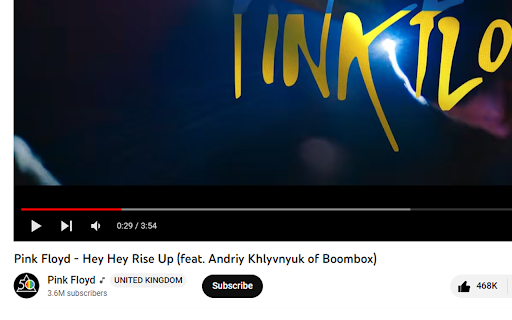
Show info about the YouTube channel location(country) in the video description. The extension adds a label with the region(location) information of the YouTube channel near the video description.

stopRU for YouTube
Remove Russian videos from your YouTube. Install once — it works on its own. stopRU — a YouTube cleaner that removes Russian videos from your feed and recommendations. Every time you open a YouTube page, stopRU scans video and channel titles. When it detects Russian-specific letters (ё, ъ, ы, э) without any Ukrainian (ґ, є, і, ї) or Belarusian (ў) letters present, it takes one of these actions: * clicks "Not interested" (default) * clicks "Don't recommend channel" * highlights the video without taking any action With every visit, fewer Russian videos will appear in your feed. You clean up your account and signal to YouTube that this content is unwanted. You need to be signed in to YouTube for the extension to work. Where stopRU works: * Home page — removes * Search results — dims * What's new — dims * Watch page recommendations — removes * Watch page comments — dims * YouTube Kids — home page — removes * YouTube Kids — watch page — removes * YouTube Kids — search — removes * YouTube Kids — watch again — removes Every time you open YouTube, you take a stand. Let's stop Russian content together! If the extension accidentally removes a video from a channel you like — don't worry, you can still visit the channel page directly to watch it. But take a moment to ask yourself if it's really worth your time. *We're constantly improving. The extension occasionally misses videos or makes mistakes, but overall it does a great job of clearing Russian content from your feed. Send us your feedback.* 0.0.49: * YouTube Kids — recommendation removal on the home page 0.0.48: * YouTube Kids support added — removes recommendations on the watch page 0.0.42: * Added Allowlist — channels that will be ignored * Fixed a bug where stopRU didn't work correctly on fast YouTube page loads 0.0.40: * Added the Belarusian letter ў to the filter 0.0.28: * Added the ability to enable/disable stopRU on different page types 0.0.27: * Added removal of recommended Russian videos on the watch page 0.0.26: * Added highlighting of Russian videos on the trending page, without removing * Added highlighting of Russian comments on the watch page 0.0.19: * Added highlighting of Russian videos on the search page, without removing 0.0.12: * Added animation when highlighting videos, with the option to disable * Another attempt to fix removal errors (when videos don't get removed) 0.0.8: * Don't block videos that contain Russian letters when Ukrainian letters are also present in the title or channel name * Save info on screen about the video and channel after removal * Added a mode where Russian videos are highlighted with no action taken * Sped up the extension and fixed several errors

SimilarTube - Find Similar YouTube Channels
AI Scanner & Analytics for Finding Niche YouTube Channels SimilarTube is a tool powered by AI (LLM) to scan and find similar channels on YouTube based on a given channel. Unlike searching through third-party influencer databases, which often lag updating information about nano and micro influencers. Our AI bot scans YouTube directly to deliver real-time results in just seconds. FOR MARKETERS SimilarTube helps you find similar influencers using a "look-alike" algorithm, displaying key metrics such as ER(engagement rate) and VVR(video view rate) for quick screening and targeting. AI automatically extracts public email addresses and other social media accounts (Facebook, Instagram, TikTok, etc.), enabling you to find their contact information quickly. With automatic email matching and template filling, you can get the outreach job done 10x faster. FOR SALES Enrich your database with new leads and get more sales. With automatic email match and outreach mail merge, you can get the outreach job done 10x faster. FOR YOUTUBERS SimilarTube helps you find competitors. If you are a new YouTuber hoping to identify ideas or niches, it can help you analyze the competitive landscape and determine if it's worth investing in. If you are a marketer looking to find influencers, you can use it to expand your targets. FOR ANALYSTS The AI Insight feature automatically assesses the value of the niche and highlights differences in core metrics among YouTubers of various tiers. Its filtering and sorting capabilities facilitate convenient analysis.

YouTube Full Title For Videos
This extension shows the headlines of the video entirely without hiding them partially, as by default. This extension shows the headlines of the video entirely without hiding them partially, as by default. It add a CSS that change height of title, so it is easier to use YouTube.com, because you can see all title and don't need to hover on a title to see it all. The plugin doesn't have any JS, just simple CSS.

YouTube Russian Content Filter
Antirus (YouTube Russian Content Filter) is a powerful and user-friendly Chrome extension designed to help users stay safe from Russian propaganda and misinformation by automatically detecting and removing Russian content from YouTube. With the increasing number of cyber attacks and disinformation campaigns, it's more important than ever to protect yourself from exposure to potentially harmful content. Automatic detection and removal of Russian content: Antirus uses advanced language detection algorithms to identify Russian content on YouTube and instantly removes it from your view. The plugin works seamlessly on the YouTube main page, search results page, and subscriptions page. Real-time protection: The plugin constantly monitors your YouTube browsing experience and removes Russian content as soon as it is detected. You can enjoy a cleaner and safer browsing experience without any manual intervention. Easy-to-use controls: Antirus provides simple ON/OFF controls to enable or disable the plugin as per your preference. You can easily switch between the modes with just a click. Efficient and lightweight: The plugin is optimized for performance and consumes minimal system resources, ensuring a smooth and uninterrupted browsing experience. Install the Antirus extension from the Chrome Web Store. The plugin is active by default. Browse YouTube, and Russian content will be automatically removed from your view. To disable the plugin, click the extension icon in the toolbar, and then click the OFF button. To re-enable, click the ON button. Stay informed and protect yourself from disinformation with Antirus, the ultimate Russian content blocker for YouTube. Download and install the extension now to enjoy a safer and cleaner browsing experience. Note: Antirus is not affiliated with or endorsed by YouTube or Google. It is an independent extension developed to help users stay safe from exposure to Russian propaganda and misinformation. Disclaimer: This plugin relies on third-party translation services for language detection. While the plugin is designed to be accurate in detecting and removing Russian content, there may be occasional false positives or negatives. The developer is not responsible for any unintended consequences resulting from the use of this plugin.
