
kmecdokmgpkbfgcdhmogfodjaccjjbbc
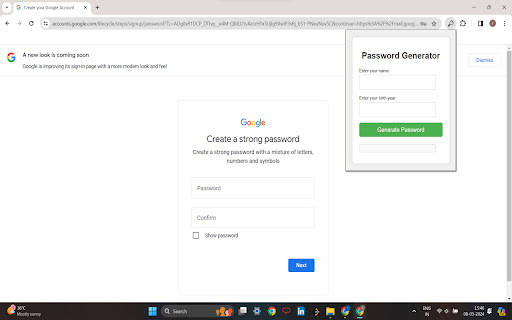
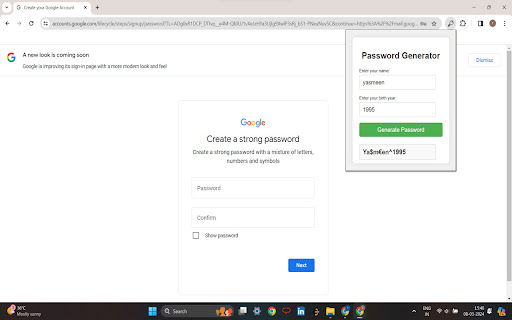
Introducing our Password Generator Chrome extension – the ultimate solution for enhancing your online security effortlessly. With just a few clicks, you can generate strong, unique passwords that are virtually uncrackable, protecting your sensitive information from cyber threats. Customize your passwords to meet your specific security needs, adjusting parameters such as length, character types, and personal touches like your name or birth year. Our extension promotes password hygiene by encouraging unique passwords for each account, minimizing the risk of security breaches. Designed with user convenience in mind, our extension features a user-friendly interface that makes password generation quick and intuitive. Plus, it prioritizes user privacy by processing all password generation locally on your device, ensuring your personal data remains secure at all times. Forget the hassle of remembering complex passwords – our extension offers mnemonic devices and memory aids to help you recall your passwords easily without compromising security. Take control of your online security today with the Password Generator Chrome extension and enjoy peace of mind knowing your accounts are protected.

IDM - Serial Number 2026
Creating and managing strong, unique passwords for every account is one of the most important steps you can take to protect your online privacy. The IDM - Serial Number 2026 extension makes this effortless by putting a powerful, customizable password generator right in your browser's toolbar. Whether you need a quick 12-character login or a complex 32-character master key, you can instantly generate passwords that are virtually impossible to crack. Fully Customizable: Tailor your password to meet any website's specific requirements. You have full control over the password length (from 6 up to 32 characters). Character Selection: Choose exactly what goes into your password. Toggle uppercase letters, lowercase letters, numbers, and special symbols on or off with a single click. One-Click Copy: No more tedious highlighting. Generate your secure password and click the "Copy" button to instantly send it to your clipboard for quick pasting. Lightning Fast: Access the generator instantly from your Chrome toolbar whenever you are on a sign-up or password reset page. Clean & Intuitive UI: A lightweight, modern interface that stays out of your way and gets the job done without unnecessary bloat. 🔒 Privacy & Security First: We believe your security tools should be trustworthy. This extension is designed with a strict privacy-first approach: 100% Offline Generation: All passwords are mathematically generated locally on your own device. No Data Tracking: We do not store, log, or transmit your generated passwords. No External Servers: The extension never connects to an external server to create your credentials. What happens on your computer, stays on your computer. Take the guesswork out of your online security. Install today and start creating bulletproof passwords in seconds!

Memorable Password Generator
Memorable Password Generator is a free tool that allows you to create very strong passwords that are easy to remember in one click. The best passwords are long, generated randomly and unique. Unfortunately, passwords that are long, random-looking and hard to guess are also difficult to remember. Memorable Password Generator helps you get the best of both, a strong password and an easier to remember one. The way it works is simple, when you click the browser action button, the password is generated and you can copy it one one click. If the password does not look good, you can generate another one in one click. What really makes Memorable Password Generator special is that, unlike most secure password generators, it doesn't output totally random and hard-to-remember passwords. Instead, the password is generated with recognizable words, but with random letters, capitals and random special characters included. It makes the password harder to guess, but at the same time, easier to remember as it is composed of real words. Memorable Password Generator is fully secure and no password is stored. Passwords are only shown to you when generated and disappear when you close the extension popup. You can also completely customize the patterns for your generated passwords. For example setup a password pattern such as {0-9}{0-9}{0-9}_{word}{WORD}{symbol} or {word?}{symbol}{Word}66 Here's a list of items you can use for your custom password pattern : {WORD} : random uppercase word {word} : random lowercase word {Word} : random capitalized word {word?} : random word with random case (lowercase, uppercase or capitalized) {symbol} : random symbol {a-z} : random lowercase letter {A-Z} : random uppercase letter {a-zA-Z} : random letter with random case (lowercase or uppercase) {0-9} : random number. Any other characters added without brackets { } will be included literally (fixed) in the password.

Random password generator
Simple tool to generate strong and secure passwords. Simple tool to generate strong and secure passwords With this extension you can easily generate strong and secure passwords. You can specify password length and used chars (lowercase, uppercase, numbers or custom). Generated password can be copied directly to your clipboard, the passwords are NOT saved online. So you can ensure the security of your password

Password Generator
Generate a random secure password in one click The generator adds generated password to the dedicated field and copies it to the clipboard You can specify: — length of password — used chars: lowercase, uppercase, digits, and special characters — excluded chars — hexadecimal only
