
nbnjbddbbcnnlceoglkfoolmknejieoi
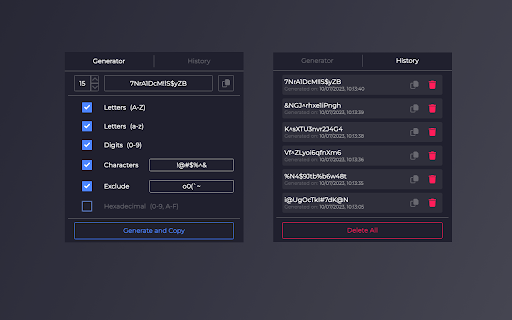


Generate a random secure password in one click The generator adds generated password to the dedicated field and copies it to the clipboard You can specify: — length of password — used chars: lowercase, uppercase, digits, and special characters — excluded chars — hexadecimal only

Random Password Generator
Random Password Generator - Secure, Customizable, and Offline Generate strong, random passwords with complete flexibility and security. Our password generator offers the following features: - Customize your password to include numbers, uppercase letters, lowercase letters, and symbols. - Adjust the length of your passwords to meet your security needs. - Generate multiple passwords at once for bulk use. - Export your generated passwords for easy saving and management. - 100% offline functionality ensures that your passwords are created in a secure environment. Perfect for anyone looking to enhance their online security with ease and convenience.

Namlet - Smart Username Generator
A smart username generator with themes, custom words, numbers, special characters, generation history, and real-time updates. Say goodbye to the struggle of finding the perfect username! Namlet helps you create unique, personalized usernames that are less likely to be taken on any platform, whether for gaming, social media, or more—all with just a few clicks. Features ✔ Select from Futuristic, Meme, Anime, Medieval, and more themes to align with your personality or needs. ✔ Generate usernames with context-aware suffixes/prefixes like ItsMiya, AdamOfficial, ElonWasHere, Bella.tv, and countless more by typing a custom word and enabling Smart Extensions. ✔ Toggle numbers, special characters, or capitalization in real-time, without losing your original username base. ✔ Adjust length to create short fictional words, medium random combos, or long, multi-word usernames. ✔ Track your last 30 copied usernames in the log, view them anytime, and export to CSV for easy reference or sharing. How It Works 1. Pick a theme and start generating. 2. Enter a custom word for personalization (optional). 3. Enable Smart Extensions for advanced prefixes/suffixes (optional). 4. Adjust length, numbers, characters, and capitalization. 5. Copy usernames to save in History or export as a CSV anytime. Note: Themes are disabled for short-length or Smart Extensions as they don’t apply. Why Namlet? - Privacy-first with no data sent or stored externally - Minimal and free with no ads or hidden fees - Simple UI that quickly generates unique usernames About Me I’m an indie creator making tools I personally need. If Namlet makes life easier for you, you can support me via the in-app “Donate” button. Have suggestions or questions? Contact support@pax.red Disclaimer ⚠ Generated usernames are created randomly based on user inputs and algorithmic logic. The developer is not responsible for any unintended combinations. Change Log: Version 1.15.35 (24.12.2024) ✔ History Feature: Added a History icon to track and export the last 30 copied usernames. ✔ Enhanced Tooltips: Hover over length settings (Short/Medium/Long) for quick tips. ✔ UI Updates: Improved design for better usability and consistency. ✔ Expanded Word Database: Added more words for greater variety.

Memorable Password Generator
Memorable Password Generator is a free tool that allows you to create very strong passwords that are easy to remember in one click. The best passwords are long, generated randomly and unique. Unfortunately, passwords that are long, random-looking and hard to guess are also difficult to remember. Memorable Password Generator helps you get the best of both, a strong password and an easier to remember one. The way it works is simple, when you click the browser action button, the password is generated and you can copy it one one click. If the password does not look good, you can generate another one in one click. What really makes Memorable Password Generator special is that, unlike most secure password generators, it doesn't output totally random and hard-to-remember passwords. Instead, the password is generated with recognizable words, but with random letters, capitals and random special characters included. It makes the password harder to guess, but at the same time, easier to remember as it is composed of real words. Memorable Password Generator is fully secure and no password is stored. Passwords are only shown to you when generated and disappear when you close the extension popup. You can also completely customize the patterns for your generated passwords. For example setup a password pattern such as {0-9}{0-9}{0-9}_{word}{WORD}{symbol} or {word?}{symbol}{Word}66 Here's a list of items you can use for your custom password pattern : {WORD} : random uppercase word {word} : random lowercase word {Word} : random capitalized word {word?} : random word with random case (lowercase, uppercase or capitalized) {symbol} : random symbol {a-z} : random lowercase letter {A-Z} : random uppercase letter {a-zA-Z} : random letter with random case (lowercase or uppercase) {0-9} : random number. Any other characters added without brackets { } will be included literally (fixed) in the password.

Password Generator
Simple tool for generating strong and secure passwords Password Generator helps you create strong, more secure passwords to protect sensitive information. Creating more secure passwords has become a problem due to the increasing need to protect sensitive information, so Strong Password Generator will help you generate strong passwords that contain letters, numbers, custom symbols, and up to 256 characters, making your passwords nearly impossible to crack.
