
klnahlpgoepmknjahihihafdpnpiahip
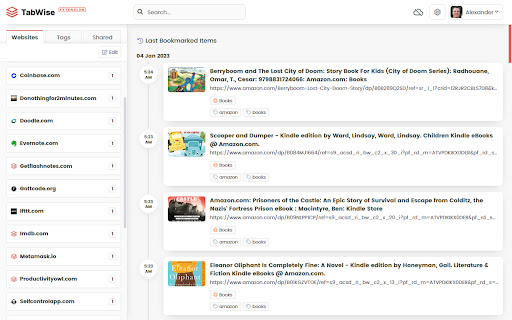
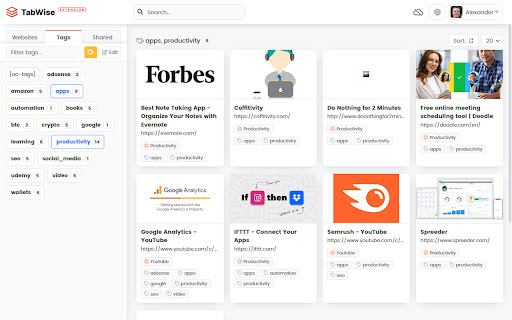
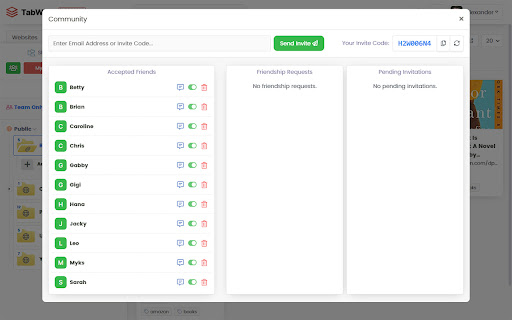
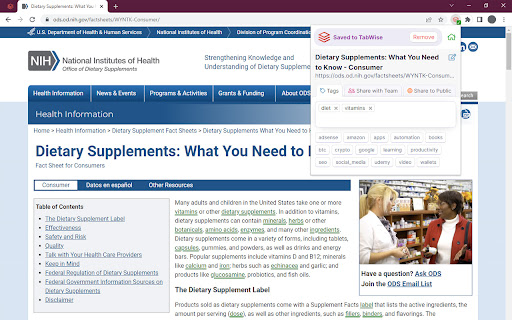
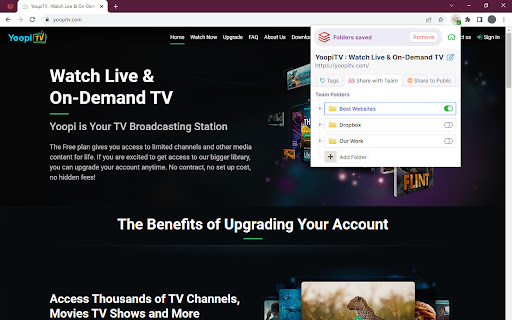
Save, Organize & Share Your Favorite Bookmarks TabWise is a versatile application that helps you effortlessly manage your bookmarks, enabling you to save and access all your web links faster. With a clean and intuitive user interface you can find what you need without getting lost in a sea of links. The Browser extension also comes with a built-in bookmark manager, which lets you save and organize your bookmarks and categorize them with different tags. Install the extension and start using TabWise, it is completely Free and doesn't require an account to get started. And if you enjoy the experience and want to unlock all the features you can upgrade anytime to the Pro Plan. With TabWise Pro Plan, you can easily organize your bookmarks, share them with a restricted community, or make them public for everyone to access. You can create a public profile and increase your visibility by making your bookmarks public, you can showcase your interests and expertise and connect efficiently with your audience. Try TabWise today and discover how it can help you stay on top of your bookmarks!

Bookmarks
Organizing Your online world with Artificial Intelligence, one tag at a time. Discover the true magic of smart sourcing with Bookmarks! Simplify your daily tasks and gain productivity superpowers by delegating some of the work to Bookmarks. * Complete search: Our state-of-the-art search engine is designed to deliver fast, accurate results, allowing you to find exactly what you need, when you need it. * Organization Flexibility and Efficiency with Tags: Organization with tags is our foundation for efficient, personalized bookmark management. Our revolutionary approach allows you to sort your favorite links intuitively, creating a versatile categorization system that adapts to your needs. * Tags with Artificial Intelligence: In Bookmarks, we embrace Artificial Intelligence to take organizing your bookmarks to a whole new level. * Bring your Favorites: Bookmarks offers a seamless transition that preserves structure and organization, allowing you to enjoy all the benefits of our bookmark manager while keeping its valuable resources at your fingertips. * Save with 1-Click: While other methods can be complicated or time-consuming, our extension simplifies the process into a single click, allowing you to save valuable web content instantly and focus on what really matters. Transform your browsing experience with Bookmarks. Organize your links smartly and free yourself from digital clutter. Try it now and discover how Bookmarks can simplify your online life!

Pretty Bookmarks
A pretty Google Chrome bookmark manager created with productivity with mind. - It's a more clean and usable alternative to chrome://bookmarks; Pin the extension and it's a one-click-open bookmark search and manager - Quickly search and navigate through your bookmarks - Avoid bookmarks bar mess and limitations by having access to all bookmarks in the same place - Avoid too many open tabs and don't loose your research while surfing the web - Easily categorize and manage items via folders - It's generally useful no matter the field - Quick search based on provided query that looks for matches against bookmarks' titles and URLs - Main bookmark folders (Bookmarks bar, Mobile bookmarks, Other bookmarks) are split in tabs for easy access - Allows quick creation of level one subfolders in each of the above mentioned global folders to serve as categories (deeper levels are not purposely not allowed to avoid mess) - Subfolders are presented on top - Bookmarks are ordered by date - Presents bookmark's saved date - Presents bookmark referral if available (the link that brought you there is of type do-follow) - Allows moving and deleting bookmarks - Allows deleting subfolders if they are empty - Allows toggling dark/light mode (initial is set by browser's current theme)

LinkCollect - Save & Share Bookmarks
linkcollect is the simplest way to save & share web links, bookmarks or tabs from anywhere to anyone A tool to help you save, collect and share links and resource bundles with your friends faster and easier. We help you create folders of links and share with your friends, Save all your tab groups simply with just a right click 🤩 or commands (ALT + C) or (Alt +A). You can also use ALT + W to open the extension without doing anything ✅ Use our browser extension on any browser to save any link to your collection with just a right click on the page to save ✅ or a command (Alt + C) ✅ we create a shareable link instantly so you can share your bookmarks with your friends super fast ⚡️ ✅ Use our commands and key shortcuts anywhere on your browser to save your time, do things that matters instead 👀 , Try ALT + A to save all open tabs in seconds. Copy the link and share it with anyone, see how many people saw it in the dashboard, edit it to add notes and change anything about it ✅ Use right click select and save all links in the selection in one click ✅Linkcollect will help you do following in very simple and easy way: 🔒For Private Use (in extension) - Save all of your tabs as session so you can reopen them later - Save bookmarks in folders or collections, and share them with anyone - Search across bookmarks, add notes to your bookmarks and search with notes - Access them anywhere by just logging in to you account on pc, multiple logins from same accounts are also supported - Use right click to select and save all links in the selection in one click, share it aith anyone by making it public 🪄In Dashboard - Explore collections created by other users, Save and duplicate collections you found in explore page, to your personal account - Search on linkcollect for learning resources or any thing you might be looking for, profile of users discover the most viewed collections. - Share your linkcollect profile, just like you share any other social, so people can checkout your links and collections (public ones) easily. Coming Soon - add reminders to your bookmarks while you save it, so you don’t forget it later

Zero Bookmark Manager
A sleek and intuitive Chrome extension to manage bookmarks. # Bookmark Manager - Chrome Web Store Description ---- Bookmark Manager is a powerful and intuitive Chrome extension designed to help you organize and manage your bookmarks effortlessly. With a modern interface, it allows you to view, search, sort, and customize bookmarks efficiently. ---- You can bookmark the current page using the universal browser shortcut: - Windows / Linux: Ctrl + D - Mac: Command (⌘) + D - Pro Tip: + Bookmark all open tabs into a single folder: + Windows / Linux: Ctrl + Shift + D + Mac: ⌘ + Shift + D ---- Key Features: Versatile Display Modes Tailor your view to your workflow. Choose from 5 different layouts: - Nested Tree: Classic folder structure. - Grid Card: Visual preview of your bookmarks. - Detailed View: Comprehensive info with web previews. - Flat and Compact Lists: For maximum efficiency. AI-Powered Productivity - Smart Chatbot: Manage bookmarks using natural language commands. - AI Integration: Supports Google Gemini and Chrome's built-in AI. Intelligent Organization - Raindrop-style Sidebar: Smooth navigation with nested folders. - Drag and Drop: Effortlessly rearrange bookmarks and folders. - Smart Cleanup: Automatically detect and remove duplicate links. Advanced Tools - Link Health Check: Identify dead links or suspicious URLs instantly. - Web Preview: Preview websites in a modal without leaving the extension. - QR Code Generator: Share any bookmark to your phone in a second. - Visit Tracking: See which links you use the most. - Tagging System: Organize with custom color-coded tags. Customization and Security - 10+ Professional Themes: Tokyo Night, Dracula, Monokai, GitHub, and more. - Custom Fonts: Support for Nerd Fonts and system styles. - Side Panel Support: Keep your bookmarks always accessible. - Safe Data: Import/Export via JSON, HTML, or CSV. ---- Privacy & Security: - No personal data is collected or transmitted. - All data is processed locally within your browser. - No remote code, analytics, or third-party services. ---- Source Code: https://github.com/ChickenSoup269/Zero-Bookmark-Manager ---- View All Releases version here: https://extension-changelogs.vercel.app/changelog?ext=Zero+Bookmark+Manager
