
kllffaphjphbkjjnmpegofkkcokbfahk
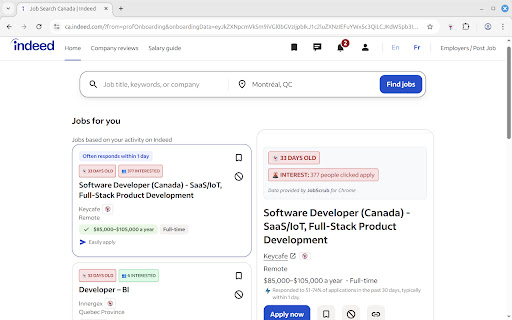

Reveal the true posting date of every listing, view applicant counts, and permanently block toxic companies from your Indeed feed. Are you wasting hours applying to listings that are actually months old? Are you tired of scrolling past the same spammy agencies day after day? JobScrub helps you take back control of your job search on Indeed. It cuts through the algorithmic noise by showing you the data Indeed tries to hide. We expose the true original posting date of every job—allowing you to spot "ghost jobs" instantly—and give you the power to block employers permanently. ✅ Reveal True Posting Dates Indeed often resets the clock on old jobs to make them look "Just Posted." JobScrub digs into the code to find the actual creation date. Stop applying to roles that have been sitting stale for 3 months. ✅ Block Toxic Employers & Agencies Sick of seeing listings from a specific recruiting agency or a company with bad reviews? Click the "Block" button once, and they will vanish from your search feed forever. ✅ See Popularity Metrics Know your competition. We reveal hidden "Applicant Counts" (how many people started the application) so you can decide if a role is too saturated or a hidden gem. ✅ Filter keywords Detect keywords in job descriptions. Don't waste your time figuring out which postings include a salary, or include the possibility of remote work. Just add "salary" and "remote" to your keywords! ✅ Highlight Urgent & Fresh Roles We color-code listings so you can scan the page instantly. Yellow: Aging (Proceed with caution) ✅ Auto-Hide Old Jobs (Premium) Set a threshold (e.g., 30 days) and automatically hide any listing older than that. Keep your feed pristine and focused only on active hiring. No tracking of your search history. No selling your personal data. All blocking and preferences are stored locally on your device. 🌟 FREE VS PREMIUM JobScrub is free to use! The free version includes: Auto-Hide feature for old jobs 🛑 DISCLAIMER JobScrub is not affiliated with, endorsed, or sponsored by Indeed.

Common Resolve
Common Resolve helps you avoid wasting time on fake job listings by flagging potentially fraudulent postings as you browse. In a job market flooded with "ghost jobs" - positions that aren't really available - this extension helps you focus on genuine opportunities. We flag ghost jobs based on various indicators such as vague language, unrealistic job requirements, and patterns commonly associated with ghost job postings to identify potential fraudulent listings. We acknowledge that there is no "silver bullet" solution for detecting ghost jobs, as the identification process can be complex and subjective. However, this initiative aims to provide a proactive approach to flagging potential ghost jobs and contribute to a more transparent and reliable job search experience. Key Features: - Real-time Detection: Automatically analyzes job postings while you browse - Smart Flagging: Uses advanced algorithms to identify common signs of ghost jobs, including: - Perpetually "open" positions - Copied job descriptions - Suspiciously generic requirements - Multiple identical postings - Visual Alerts: Clear indicators show the likelihood of a posting being legitimate - Time-Saving: Filter out probable ghost jobs to focus on real opportunities Why You Need This: Companies sometimes post positions with no real intent to hire. These "ghost jobs" waste your valuable time and energy. Common Resolve helps you: - Avoid applying to likely fake positions - Focus your efforts on legitimate opportunities - Save hours of application time - Reduce search frustration - Make informed decisions about where to apply How It Works: The extension runs quietly in the background as you browse job sites. When it detects potential red flags, it provides a clear visual indicator of the posting's likely authenticity. You maintain full control - use our insights to make informed decisions about which opportunities to pursue. Privacy & Security: - No personal data collection - No tracking - Works entirely within your browser - Regular updates to improve detection accuracy Installation: Simply add to your browser with one click. No account creation or setup required. Start protecting your job search immediately. Current Limitations and Potential Improvements: Due to the dynamic nature of LinkedIn's DOM, the structure and availability of fields may change over time. This can potentially impact the reliability of the data extraction process. Future improvements could involve implementing more robust selectors, regular updates to the DOM parsing logic, and monitoring for structural changes in LinkedIn’s web pages to ensure ongoing accuracy and stability.

Indeed Scraper
Introducing the Indeed Scraper Browser Extension: Your Ultimate Job Data Extraction and Saving Solution Whether you're a job seeker, HR manager, recruiter, or business owner, the Browser Extension is your go-to tool for in-depth job market analysis. With the ability to save and export data not only in CSV format but also in JSON and XLSX (Excel), this extension unlocks a wealth of information from Indeed's vast job listings. Our scraper simplifies the process of searching and extracting detailed job data, requiring no coding expertise. Why Choose the Indeed Scraper? Harness the full potential of Indeed's database to identify job trends, track hiring patterns, and pinpoint job openings that meet your specific needs. Our extension gives you the power to: - Effortlessly access up-to-date, extensive job data. - Analyze job market trends and recruitment practices. - Locate targeted job vacancies and craft more effective job listings. What Data Formats Can You Export? Our extension is adept at extracting crucial information from job postings, allowing you to save and export data in the following formats: - CSV - JSON - XLSX (Excel) This includes details like Position Name, Company, Location, Rating, URL, Id, Posted At, Scraped At, and External Apply Link. With the Pro version and settings activated, you can obtain additional columns such as: Salary, Job Type, Shift & Schedule, Description Text, Description HTML. How to Use the Indeed Scraper? Operating our extension is straightforward and user-friendly. Simply: 1. Navigate to indeed.com and conduct a search with basic parameters like job title, company name, and location. 2. Click the Download button next to the “Find Jobs” button. ( or you can copy the search results page’s URL from your browser's address bar, Paste the URL into our extension's input field). 3. select "EXPORT JOBS" and choose your desired format (CSV, JSON, or XLSX). 4. Wait for the scraping process to complete. 5. Click "Download Jobs" to receive your data in the chosen format, ready for thorough analysis. The Benefits of Our Extension Opting for our extension offers a multitude of advantages: - No need for coding expertise – we manage all the technical aspects. - Instantaneous results – obtain the latest data in a flash. - Customizable searches – refine your queries to fulfill your specific requirements. - Time-saving – bypass the lengthy hours of manual data gathering or scraper development. - Consistent updates – our tool is regularly enhanced to keep pace with Indeed's site modifications. Speed of Delivery Your data is just a few clicks away once you start the scraping process. The duration of extraction depends on the data volume, but our tool is optimized for swift and efficient performance. Prepare to revolutionize your approach to job market data access. The Indeed Scraper is the ideal solution for anyone aiming to optimize their job data collection and analysis process. Give it a try now and witness the impact firsthand! Data Privacy The data you work with remains confined to your local machine and does not traverse our servers at any point. In-App Purchases Our Extension is a freemium product with a nominal subscription fee. With a paid subscription, you can export up to 3000 items at a time and receive premium support. The exact cost is displayed in the extension's interface, ensuring transparency and ease of understanding. Disclaimer This extension is an independently developed product by ExtensionsBox and has no association with INDEED.

OriginallyListedAt for LinkedIn Jobs
Displays the original listing date of a LinkedIn job. This extension displays the original listed date for LinkedIn job postings directly in a popup. Important Note: For some LinkedIn job pages (especially recommended jobs or collections viewed for the first time in a new browser session), you may need to refresh the page once and then click the extension icon again for the date to appear. This is due to how LinkedIn loads these specific pages initially. Just one refresh enough.

Canyon: AI Job Application and Resume Builder
Effortlessly apply to jobs with a single click. Canyon automatically fills out job applications and creates resumes for you. Canyon makes it easy to streamline your job application process, track your progress, and create standout resumes, all in one place. Features • AutoFill Technology: Our extension automatically populates job applications with your information at the click of a button, saving you redundant keystrokes and priceless time. • Job Tracking: Keep tabs on every job application you send out. Monitor its progress and use Canyon's interviewing preparation tools to nail that next interview. • Resume Builder: Building an impressive resume has never been easier. Our AI-driven resume builder guides you through the process, suggesting improvements and highlighting your strongest assets. Increase the odds of your resume getting noticed by generating a unique resume for each job description. • Ghost Job detector: Our ghost job detector calculates the likelihood of you receiving a response from your job application. You can also manually report a ghost job for future jobs you run into by that company or to notify other jobseekers. • Are you a good fit for this job? Canyon lets you know if you're a good fit for this job so you know which job applications to focus on to increase the chances of landing that job. • Message Writer: Our Message Writer generates networking messages to employees at companies you want to work at in seconds. Canyon works with all the popular job boards (like LinkedIn and Indeed) and ATS systems (Like Greenhouse and Lever), making it fast and easy to track and apply to all your job applications!
