
kkoccljoocknljaljhpifcnkmillmilo
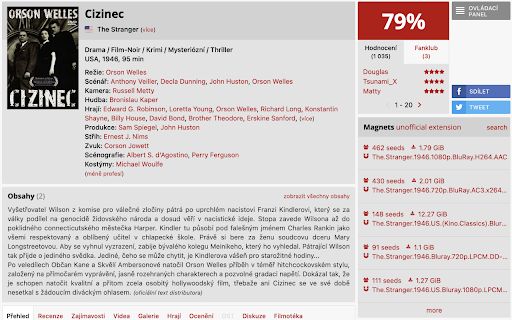

Magnet links for CSFD films Simple Chrome extension for ČSFD (Czech-Slovak Movie Database). This is unofficial, experimental, made for fun and it has nothing to do with CSFD ❤️ itself

BoostPic - Google Reverse Image Search on the fly
Uncover the possibility to perform Google Reverse Image Search quickly and incredibly, with clip & paste. With this extension users can search google images simply with clip & paste. The following is how it works. 1. For win10/11: win+shift+s to clip an image even outside the browser, and for mac: shift+control+command+4; 2. Click at the input box below(select another visual search engine other than Google Images at the bottom if you prefer), and then press ctrl+v or command+v; 3. Wait a moment until it returns an URL. If timeout error happens, please delete the error message and ctrl+v or command+v again.

TorrentDay Batch Download
Adds checkboxes to search results on TorrentDay, allowing for batch download of torrent files Adds checkboxes to search results on TorrentDay, allowing for batch download of torrent files

Torrent Links for Episode Calendar
Almost instant magnet links, uses torrent sites to find links based on your preferences. This will give you magnet links for each episode on Episode Calendar, with options to get the links for different qualities, you can also download all unwatched. The links show on the Calendar, the Unwatched page and the the Show overview. It's tidy and easy to use and takes away the tediousness of searching for each episode individually . It also includes options for HEVC and, if the proxy sites are not working anymore, the list is editable by you, meaning, you won't have to wait for an update. You also have the option for it to mark the episode as watched after it has given you the link. Please ensure your torrent software is open before you click to download all. If you have any suggestions for other sites to add this too, feel free to let me know :) UPDATE: Version 1.0 - This has had to change the way the extension works, all calls for the links have been moved to the background script as chrome no longer allows this in the foreground. Also this version adds queues to the downloads instead of downloading them all at once, also because of the way chrome has changed. Version 1.1 - Removes the need to add your own proxies, it now collects them automatically. Version 1.3 - Changes yet again as Chrome has changed a lot of their rules, such as the dialogue popping up every time you want to open a magnet link. This update adds a queue that you have to manually continue. My apologies but it appears to be the only way to bypass this. Version 1.4 - Now adds the option to use the newly replaced option to allow links to be opened automatically again, allowing you to download in bulk. Version 1.6 - Moved away from ETTV as they were down for a while, now we are using Zooqle, it's faster too as they have the magnet links there on the search result table. Version 1.8 - Now using an API which uses a few torrent sites for the links. There may be still be a few bugs going forward but I will try to keep on top of them. Version 1.8.1 - Had to remove the link to Episode Calendar from clicking the extensions icon. As this is no longer permitted. Version 1.9.0 - The place I was getting the torrents from changed the url, this has now been fixed. Also updated to manifest v3.

GitHub File Diff
View diffs of files and directories on GitHub. To use this extension, go to a file or directory in GitHub and click the **History** button. Then, click on any commit. The extension will override the click to show the diffs of only the relevant files instead of GitHub's default behavior of showing the entire commit's diff. This is especially helpful when a commit is very large and GitHub only shows a partial diff or none at all. To get the regular view, simply refresh the page.
