
kkjfobdnekhdpmgomkpeibhlnmcjgian
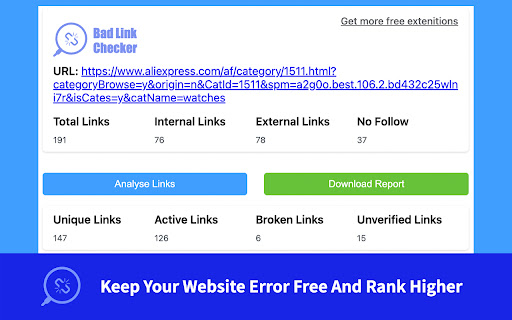

A SEO tool to fast find all broken links on your websites to Rank Higher. website broken link and 404 error checker is a find broken link Chrome extension. With this plugin, you can find all broken links (404 errors) on the web page. Aren't you bored of the eliminate bad links on the page? All you have to do is install the website broken link and 404 error checker quickly. *No bloat, no ads, no unnecessary permissions, just a simple way to find all broken links (404 errors) on the web page. Find more! Save more!* The advanced find all broken link technology handles unlike any other extension. If you encounter an issue, please report it via the customer support flag icon on the capture page, so we can improve the extension for you and everyone else who uses it. What are the applicable sites? Any website can be used to extract all website links in the page. How long will it take to find all broken links? Broken Link Checker" scans your pages or your entire website and provides a link analysis report within minutes, showing you the bad links that exist on your website as well as the external links that have 404 errors (nofollow or dofollow). Allows you to quickly optimize the links in your website Use this tool to keep your website error free and rank higher!

Ahrefs SEO Toolbar
Save hours with a complete toolkit in one SEO extension. Insights for on-page, keyword research, and link analysis on any webpage. Ahrefs toolbar is free and gives you detailed SEO insights without leaving your browser. 🌍 Global SEO research (No VPN needed) Switch regions, Google domains, languages, and get new keyword ideas directly in search results. 📃 On-page SEO data in 1 click Check titles, meta descriptions, headers, and technical SEO factors like canonical tags and indexation directives in one click. 🔗 Link analysis made easy Highlight links on the page, trace redirects, filter outgoing links, spot broken links, and export all the data to CSV. 🛠 Detailed SEO research tools Save URLs from open tabs or a SERP, switch user agents to see pages like Googlebot, read HTTP headers, and get performance data for page speed insights. ✨ Paid Ahrefs users unlock Ahrefs metrics: See domain and page-level metrics like keyword counts, traffic estimates, referring domains, and more - directly on every site or result. 📌 Note: Ahrefs subscription is required for access to Ahrefs metrics. The core tools of this SEO extension remain completely free.

SEO Minion
SEO Minion helps you in your daily SEO tasks such as On-Page SEO analysis, Broken Link Checking, SERP Preview and more The tool helps you with the following tasks - (1) Analyze On-Page SEO - analyze the HTML of any webpage and view useful information that will help you optimize the On-Page SEO as well as alert you to any issues. (2) Highlight All Links - quickly see all the links (internal & external) for any webpage (3) Check Broken Links - check every link on a webpage and get a report of any links with issues (5) SERP Preview - preview your website on a real Google search result and update this in real time (6) Google search location simulator - view non-personalized google search results for one keyword on two different location/language combination. (8) HTML v/s DOM - analyze the differences between the HTML source code and the rendered DOM to check if your JS library is causing any SEO related issue (9) Analyze Structured Data - analyze the structured data on the webpage We add features based on user feedback. If you'd like us to add any new features, please email us at akash@seominion.com. You can view the change-log for every version update at https://seominion.com/news

Check Broken Links
Use check broken links app to run url check on your website. Quick highlight urls with an easy-to-use broken link checker. 🚀 Keep your website healthy with the app Are you tired of dead urls on your website? They not only create a bad user experience, they can also impact your SEO ranking. That’s why it’s good to have broken link checker on your site 🚀 How does check broken links work? Here's how it works: Scan your webpage– the app is running to find any bad link. It also works as 404 checker Scanning – the program will show a report of all urls found across your website Fix the issue – after check broken links you can fix hrefs by updating or removing them With our tool, you can easily scan on your website and ensure all your “a” tags are well 🚀 Features of check broken links ⚙️ Comprehensive scanning: the extension scans your page to see which urls are inactive ⚙️ Multiple urls detection: the app can detect internal and external urls ⚙️ Reports: get reports showing how many inactive urls in the site ⚙️ Friendly interface: click on the icon, and you’re good to go ⚙️ Colors: check broken links app paints the targets so you can address them fast ⚙️ Updates: the tool stays updated with to keep your hrefs working well ⚙️ Find everything: the tool will find hidden “a” tags even in small images 🚀 Why use the check broken links? ⭐️ Improved SEO: when you look after urls, you improve SEO performance ⭐️ User experience: url issues frustrate users, leading to high bounce rates ⭐️ Time: searching for non-working “a” tags can be tedious ⭐️ Trust: if a site contains invalid adresses, it appears outdated and unreliable This powerful extension helps to find dead links website. This tool saves you time and effort. 🚀 Key benefits of the check broken links tool Here are some of the key benefits of using this app: Efficient: the broke link checker scans in a fraction of the time it would take manually Find hidden: it works even in the smallest details Platforms: the app is browser extension so it can work on every os properly If you don’t have a good broken link checker tool - it can low ui experience and search engine rankings. That is why using a linkchecker is crucial 🚀 How to use the check broken links Start the scan: click on the extension, and you are ready to go Color: during the scan all hrefs will be colored so you can test hyperlink Report: after the app is done you will get an full detailed report Fix the issues: now you can quickly fix them Whether you have a blog, an e-commerce platform, or a corporate page, using broken links checker will help you keep your site free of hrefs which is not working, so your visitors can have a seamless experience 🚀 Find issues and fix them across your site The problem is “a” tags on your page. From blog posts to product pages, by using our check webpage for errors app, you can go across your site. The tool looks for external and internal href data. The site link checker functionality ensures that all hyperlinks lead to the right pages, preventing 404 errors 🚀 The importance of regular testing With the check broken links you are scanning for hrefs regularly which is crucial for website maintenance. You can periodically run tests to catch any new dead url’s data that may have appeared in the link anaylzer reports. The check broken links saves you from letting minor issues snowball into bigger problems. In the other hand, simple caring about your site's data can show that your content is actively maintained and earns user's trust. Whether you’re a beginner or an experienced web developer, using a broken link checker helps keep your site running optimally 🚀 Frequently asked questions ❓ Why is it important to run to use web url checker on website? 💡 Scanning is essential for user experience. Avoiding damaging your SEO. Inactive hrefs can lead to high bounce rates and make your website appear outdated ❓ How does the tool work? 💡 The check broken links scans your website, detects internal and external “a” tags, images, and resources, and generates a report showing which urls are broken ❓ What features does the tool have? 💡 The tool offers comprehensive search for broken links, multiple detection, real-time reports, a user-friendly interface, and regular updates ❓ Why is using this important for my website? 💡 It helps to site’s SEO, provide a better experience and save time ❓ How do I use the check broken links tool? 💡 Click on the icon, and it will scan website. Once it's done, a report'll show with all urls. Now you can update or remove them ❓ What types of urls the tool detect? 💡 The tool can see internal, external and images ❓ Why is regular testing important for my website? 💡 Testing using check broken links helps to see new hyperlinks appearing. Prevent emerging issues

Detailed SEO Extension
Get SEO insights at the click of a button to any website you're currently on. Built by full-time SEO's for daily analysis. Get SEO-related insights at the click of a button to any website you're currently on. Pull back their title tag, meta description, meta robots tag and much more. Save hours of time looking through the source code of this page with our SEO analysis extension.
