
kkbpocnnjhgdfpjemfpfofdpdbohfjcg


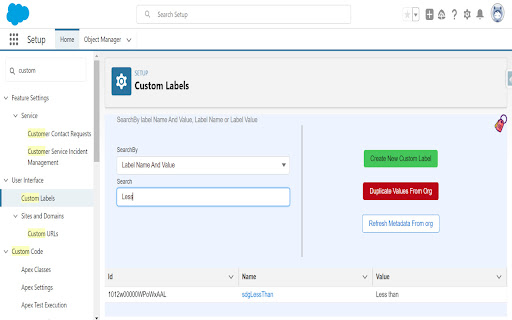


View Duplicate Custom Labels and Create Search for salesforce custom labels in salesforce org, find duplicates and create new custom labels seeing any possible duplicates in value How to use? 1. Click on Add To Chrome button 2. Once installation is completed, Login to SFDC 3. From Setup, Quick find, type Custom Label and click Custom Label 5. Click on Label icon on right top to open extension workspace!!!

Salesforce User Language Switcher
Salesforce User Language Switcher: A Chrome extension which lets you switch your current user's language with just one click. This little Google Chrome extension helps Salesforce users to switch their current user language with a single click. Working with customers who use their Orgs in multiple languages is always tricky and time-consuming, when it comes to translations and testing these. In the current version of Salesforce you need 6+ clicks to change your own user language in your personal settings of Salesforce. And even worse, as the settings page does not open in a separate tab, you might even lose your current context. Annoying... And as we are developers and therefore love to make our lives easier, we've developed this little Google Chrome extension.

Salesforce Code Coverage Navigator
Are you tired of wasting time searching for your test class after running a test to check your code coverage? Introducing "Salesforce Code Coverage Navigator" - the simple solution to simplify your navigation in the Code Coverage table. Our Chrome extension provides a simple and clean way to find your test class quickly and efficiently. With just a few clicks, you can enter your search class or even a partial class name and let our extension do the rest. It will automatically scroll and highlight your desired class and help you navigate your way through the Code Coverage table.

Salesforce Devsforce
Powerful Salesforce development tools utilized for data backup, metadata download and deployment, and automated test, etc. A powerful toolset for Salesforce developers, supporting secure account management, metadata operations, data handling, and automated testing — all optimized for use with SFDX. #2 Metadata Management ・Instant and scheduled retrieval of all metadata types. ・Compare metadata across Production and Sandbox environments. ・Deploy Apex classes, Custom Objects, Flows, and more. #3 Data Management (SObjects & Tooling API) ・Search and export Salesforce object data (CSV format). ・Scheduled data fetching (feature in development). #4 Automated Apex Testing ・On-demand and scheduled execution of Apex test classes. v65.0.0 ~ v65.1.9 (2025/10/21 ~ 2025/12/25) API version updated to 65.0. UI / Performance enhancements and bug fixes. v64.0.0 ~ v64.0.9 (2025/06/16 ~ 2025/10/20) API version updated to 64.0. UI enhancements and bug fixes. v63.0.0 ~ v63.8.48 (2025/02/17 ~ 2025/06/06) ★ Production warning feature added. ★ Event log file downloads enabled. ★ Multi-language support for SObject definitions. ★ Tooling API Object enabled. ★ Support base64 file downloads for all SObjects. ★ Hidden features. Enhanced attachment downloads. API version updated to 63.0. UI enhancements and bug fixes. v62.0.0 ~ v62.8.25 (2024/10/15 ~ 2025/01/22) ★ New logo introduced. ★ SOQL auto-completion in data management. ★ Application settings in data/metadata modules. ★ Display of picklist values, field dependencies, record type assignments. ★ Undo edits in data management. ★ Metadata package cleanup supported. ★ Font size customization and auto-completion in metadata editor. API version updated to 62.0. UI improvements and bug fixes. v61.0.0 ~ v61.4.17 (2024/06/24 ~ 2024/09/25) ★ Full CRUD support for data management. ★ Export/import of extension settings between browsers/computers. Improved stability for large-scale metadata retrieval (e.g., Profiles & Layouts). API version updated to 61.0. v55.0.0 ~ v55.6.12 (2022/07/10 ~ 2022/09/22) ★ Inline data editing in list view. ★ Copy and export partial search results to CSV. ★ API version selection for automatic metadata retrieval. Bug fixes and improvements. API version updated to 55.0. v54.0.0 ~ v54.2.6 (2022/03/05 ~ 2022/07/02) ★ Redesigned data management module. ★ Bulk export of ContentVersion and Attachment records. UI enhancements and bug fixes. API version updated to 54.0. v53.0.1 (2022/01/27) ★ Auto-generate package.xml via metadata UI. ★ UI improvements for streamlined metadata downloads. Bug fixes. v53.0.0 (2021/10/10) ★ New logo and UI redesign. ★ Manifest upgraded to MV3 (Chrome extension). ★ Privacy Policy updated with multi-language support. Bug fixes and API version updated to 53.0. v52.0.0 ~ v52.0.3 (2021/07/31 ~ 2021/10/02) ★ Custom manifest-based mass metadata retrieval without switching users. Improved full metadata extraction. Bug fixes and UI enhancements. API version updated to 52.0. v51.1.3 (2021/05/07) ★ Added support for metadata retrieval using custom package.xml. Bug fixes.

Salesforce Metadata Finder
Chrome extension to search Salesforce Metadata This extension can be used to open the metadata used in the salesforce org without going to the Salesforce setup. Supported Metadata > Apex Class > Apex Trigger > Visualforce Page > Custom Label > Profile > Permission Set > Flow In the new update user can select whether the metadata opens in classic or lightning view. User can also set the default metadata type. These can be configured using settings icon on the home page.
