
kjheadnejomnapknbjdficacmoppeege

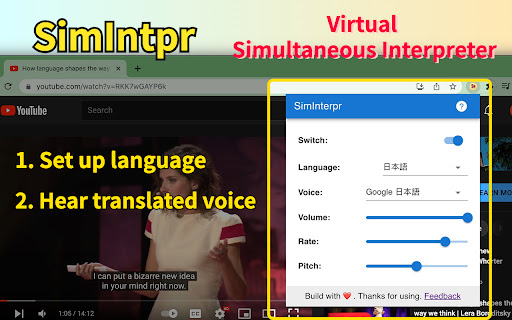
Translate YouTube video subtitles and speak out. Just like a YouTube virtual simultaneous interpreter. SimIntpr is a virtual Simultaneous Interpreter for YouTube videos. It translates YouTube video subtitles and speaks them out. If you want to watch any YouTube video and hear the voice of your own language, SimIntpr is your thumb of choice. It can translate the YouTube subtitles / captions into almost all widely used languages and read them out. Currently, to make the extension work, the YouTube video should have at least 1 official subtitle. You need to choose a YouTube official subtitle as the translation source, then select your preferred voice language, tune, speed, etc. We're working on supporting uploading your local subtitles, or links to external subtitles. Once you set up, SimIntpr speaks out your preferred language and voice, just as a virtual simultaneous interpreter. The translated voice does not conflict with the YouTube original one. So you can keep them both and adjust the volume separately as you wish. SimIntpr remembers your settings locally. Hence the translated voice comes up every time when you open a new YouTube video, needless to set up repeatedly. Features: ✅ Translated YouTube subtitle and speak out ✅ Multiple speech voice related settings Upcoming features: 🏃♂️ Support upload your local YouTube subtitle 🏃♂️ Support embed YouTube videos anywhere on the web Tips: 🔹 Pin the extension and left-click the icon to set up language, voice and other settings. Attention: ⚠️ This extension only works when the YouTube video has AT LEAST one official subtitle / caption Contact: 😜 Also feel free to contact us if you have any questions or suggestions on this extension. 📧 Email: support@simintpr.com

Dubsy
Instantly dub YouTube videos in any language and share them with the world! Introducing Dubsy, your one-click solution to translating and dubbing videos into any language, on the fly! Dubsy seamlessly integrates camb.ai’s cutting-edge AI technology (MARS and BOLI) to translate and dub any YouTube video into your chosen language in 4 clicks. How to use: > Step 1: Sign in / Sign up using your camb.ai account (https://studio.camb.ai) > Step 2: Open YouTube and find the Dubsy menu under the progress bar on the left side. > Step 3: Click on “Dub For Another Language” button. > Step 4: Select the original and your preferred language, click submit and wait for it to process. And Ta da! Your video is now successfully dubbed in your selected language! With Dubsy, you can now enjoy YouTube videos in any language of your choice. Whether you're learning a new language, exploring global content, or simply seeking clarity in your native tongue, Dubsy has you covered. Features Overview: ---> Wide Language Selection: Choose from 100+ languages with voice preservation. ---> Language Switching: Switch between your translated languages and original language with just a click. ---> Easy to use: Dubsy transforms spoken audio into your preferred language with just a click of a button, without you needing to do anything. ---> Shareable: You can share your dubs with friends and vice-versa. Invite them on to unlock many more videos to watch! ---> Accurate Performance transfer: Create a near-perfect replica of the performance in the target languages (with voice preservation, style cloning etc) ---> CAMB.AI's Powerful and Evolving AI: Dubsy utilizes Camb AI's advanced AI technology, known for its accuracy and continuous improvement. This ensures you get the best possible dubbing experience, always getting better. Dive deeper into camb.ai’s translating and dubbing technology: https://www.camb.ai

YouTube Translator & YouTube Video Dubbing
Automatically translate Youtube videos in real time and play them in your language. 🔹Note: Currently, only YouTube videos with subtitles are supported for translation. You can check the control bar below the YouTube video to see if the "CC" button is highlighted. If the button is grayed out, it means there are no subtitle files and translation is not possible. 🔹How to translate YouTube videos? After installing the extension, open a YouTube video with subtitles. The extension icon and “Translate Video” text will appear below the video control bar. Click it, select the language you want to translate to, save the settings, and then click the extension icon on the video control bar again to start the translation. ➤Intelligent synchronous dubbing Convenient operation, precise and synchronized dubbing. Whether you pause, drag the progress bar, or adjust the playback speed, our intelligent dubbing system can adapt in real time to bring you a viewing experience similar to that of native videos. ➤AI subtitles By using AI technology to automatically generate AI subtitles for YouTube videos, a better viewing experience can be achieved through improved subtitles. ➤Multi-language support Support mutual conversion of English, Korean, Japanese, French, Spanish and other common languages. ➤Multiple voice styles Supports male and female voices, with exclusive voice support for different countries. 🔹Privacy Policy By design, your data stays at all times on your Google account, never saved in our database. Your data aren’t shared with anyone, including the add-on owner. We complies with privacy laws (especially GDPR & California Privacy Act) to protect your data. All data you upload are automatically deleted every day.

Vdubo - Video dubbing online | AI translate & dub YouTube video subtitles
Play dubbing when watching YouTube video. Further optimize translation, subtitles, and dubbing for members. Vdubo provides online AI dubbing for video websites, based on the user-specified language. Currently, YouTube is supported. The Vdubo control icon is located at the bottom of the YouTube video being watched. Users can click the control icon at any time to start voice-over. For videos without subtitles or with unsatisfactory subtitles, members can use the speech transcription function to generate subtitles. Vdubo supports multiple languages for voice-over and can synchronize the volume and speed of the voice-over, allowing you to focus on the foreign language video without constantly looking at the subtitles, thus improving the video viewing experience.

YouTube Subtitle Reader (AI)
Dub YouTube videos with real-time translation and natural voices. Experience any content in your native language easily Convert YouTube subtitles into natural-sounding speech with cutting-edge Google & Microsoft AI Text-to-Speech technology! ℹ️ Note: This extension may conflict with other YouTube extensions. If you experience issues, try disabling other extensions. Try it now and enhance your YouTube experience with lifelike AI-generated voiceovers!
