
kjffpdeflcpflmilnjgfhiheonjnalfo

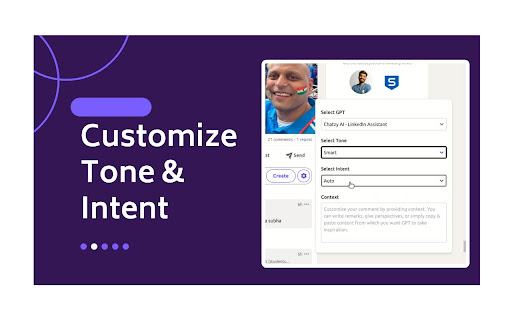
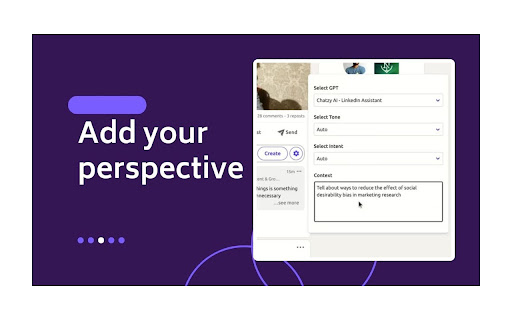

Individuals can use it to increase engagement and develop more meaningful connections. Brands can utilize this tool to offer prompt and efficient responses to customer complaints, adhering to their internal guidelines. Ensuring timely, consistent, and high-quality interactions will strengthen and maintain a positive brand image. 🔑 Key Features: 1️⃣ One click comment generator with optimized default settings 2️⃣ Unlimited comments 3️⃣ Customize Tone and Intent 4️⃣ Customize your comment by providing context. You can write remarks, give perspectives, or simply copy & paste content from which you want GPT to take inspiration. 5️⃣ Generate comment replies, enabling you to further continue the conversation in comments 6️⃣ Create custom GPTs trained on your writing style, mimicking famous influencers, and adhering to your brand guidelines. 🛠️ Setup Process: 1️⃣ Click on 'Add to Chrome', accept permissions and you will be redirected to Chatzy AI login. 2️⃣ After logging in to Chatzy AI, you can head back to LinkedIn and start using the extension. 📘 How to use: 1️⃣ You can use optimized default settings, by just clicking on the Comment button to generate the comment. 2️⃣ To customize settings, click on the Chatzy AI setting icon in your comment box. You can customize the comment by selecting/providing a. GPT b. Tone c. Intent d. Context. 3️⃣ Select GPT: In the free plan “Select GPT” is disabled and set to GPT 4.1 Mini by default. Whereas in the paid plan you also have option to select a custom GPT. 4️⃣ Select Tone from drop down 5️⃣ Select Intent from drop down 6️⃣ Provide Context 💰 Pricing and Plans: Chatzy AI offers various pricing options and subscription plans, allowing you to choose the best fit for your needs and budget. 1️⃣ Starter Plan: Always free, works on GPT 4.1 Mini 2️⃣ Basic Plan: Use Chatzy AI no-code platform to create custom bots trained on your data. 🚀 Benefits: Using Chatzy AI - LinkedIn Assistant can significantly enhance your LinkedIn experience and professional networking strategy. 1️⃣ Efficient Engagement: Quickly generate responses and increase engagement. 2️⃣ Enhanced Quality of Interactions: Produce relevant and thoughtful comments. 3️⃣ Personalization: Customize responses to maintain authenticity. 4️⃣ Consistency in Engagement: Maintain a regular presence with quality interactions. 5️⃣ Ease of Use: User-friendly interface and quick learning curve. 6️⃣ Innovative Edge: Leverage the latest AI technology. 7️⃣ Growth Opportunities: Engage meaningfully for collaboration and business opportunities.

AI Prompt Helper for ChatGPT & Claude - PromptSloth
Improve prompts with one click. 2000+ expert prompt templates. Works with ChatGPT, Claude, and every AI tool. Make your AI prompts better with one click. PromptSloth is a Chrome extension that helps you write better prompts for ChatGPT, Claude, Gemini, and any AI tool you use. ONE-CLICK PROMPT IMPROVEMENT A small helper icon appears in every AI chatbox (ChatGPT, Claude, Gemini, Perplexity, etc.) Click it to improve your prompt before sending. Get better, more detailed AI responses without learning prompt engineering. 2000+ EXPERT PROMPT TEMPLATES Type // anywhere to open the template library. Browse templates for: - Copywriting & Content Creation - Coding & Development - Email & Professional Writing - Research & Analysis - Marketing & SEO - Creative Writing - Business & Strategy - Education & Learning Insert any template with one click - no copy/paste needed. WORKS EVERYWHERE YOU USE AI - ChatGPT - Claude - Google Gemini - Perplexity AI HOW TO USE 1. Install the extension 2. Go to ChatGPT, Claude, or any AI tool 3. Click the PromptSloth icon in the input box to improve your prompt 4. Or type // to browse and insert templates 5. Get better AI responses Get started in seconds. No signup, no setup, just install and improve your AI prompts.

Replya - FREE LinkedIn Comment Generator & AI Assistant
Generate perfect LinkedIn comments instantly with AI. Free comment suggestions, personalized tone, and one-click apply. Generate perfect LinkedIn comments instantly with AI. Free comment suggestions, personalized tone, and one-click apply. 🚀 Free LinkedIn AI Comment Generator - Boost Your Professional Engagement Transform your LinkedIn networking with Replya, the intelligent comment assistant that helps professionals engage authentically and efficiently. Generate perfect, personalized comments in seconds! 🎯 Instant AI-Powered Suggestions * 5 unique comment variations per post * Context-aware responses that understand post content * Personalized to your professional background * One-click apply directly to LinkedIn 🎨 Full Customization Control * 4 Professional Tones: Professional, Enthusiastic, Friendly, Thoughtful * 3 Length Options: Short (5-15 words), Medium (20-35 words), Long (50-60 words) * Optional emojis and engaging questions * Real-time regeneration with updated filters 👤 Smart Personalization * Uses your job title, company, and expertise * References poster by name automatically * Builds on your existing draft comments * Maintains your authentic professional voice ⚡ Seamless LinkedIn Integration * Native UI that matches LinkedIn’s design * Replya logo "R" button appears right in comment box * Smart caching for instant re-access * Works on all LinkedIn posts Perfect For: ✓ Job seekers building their network ✓ Professionals growing their LinkedIn presence ✓ Sales & marketing teams engaging leads ✓ Content creators responding to audience ✓ Executives maintaining thought leadership ✓ Anyone who wants thoughtful comments faster How It Works: 1. Click the Replya logo "R" button in any LinkedIn comment box 2. AI analyzes the post and generates 5 tailored suggestions 3. Customize tone, length, and style preferences 4. Click “Apply” to insert into comment field 5. Edit if needed and post! Why Choose Replya? 🆓 Completely Free - No hidden costs or premium tiers 🚀 Saves Time - Comment 10x faster than writing from scratch 🎯 Increases Engagement - Professional comments get more responses 💼 Career Growth - Build your network and visibility 🤖 AI-Powered - Leverages latest language models ⚡ Lightning Fast - Generate suggestions in 2-3 seconds Start Engaging Smarter Today! Install Replya now and experience the easiest way to boost your LinkedIn presence. Join thousands of professionals who are commenting with confidence and building stronger professional networks.

Comment Assistant In LinkedIn™
This is an AI assistant to generate comment by one click in LinkedIn™, powered by ChatGPT. Save time and increase your engagement. Our Comment Assistant will unlock the power of ChatGPT on LinkedIn Website. Click Ctrl/⌘+M to use Chat GPT on LinkedIn website anywhere. Save your time and increase engagement on the platform. This extension has a revolutionary new UI for using OpenAI's ChatGPT on LinkedIn sites. Here's how it works: 1. Select any online content on LinkedIn by your mouse 2. Click on Cmd+M (Mac) or Ctrl+M (Windows) to open extension popup 3. Choose prompt that you want to do with it (create a reply, comment, make it words limit, or add some fun), separate multi demand by "," 4. Click the switch icon, extension will automatically create you response for you. (PS: Please set your openai API-Key first, so our Assistant can work smoothly) Features: 1. Easily access LinkedIn by clicking on the icon in the toolbar. 2. Get comment from any pages on LinkedIn, such as group, event and post. 3. Run ChatGPT from the context menu. If you have any difficulties, please contact us via WhatsApp ID: +86 180 2303 4541 or email to nathanskovalchik9095@gmail.com LinkedIn is a trademark of LinkedIn Inc., registered in the U.S. and other countries. This is an independent project and has no relationship to LinkedIn or LinkedIn Inc.

ConnectGenie - Linkedin AI Assistant
Linkedin AI assistant, assists in writing captivating posts, personalised comments and connect notes It's Your personal branding AI assistant for LinkedIn, BUT quite different. Different how you may ask? Well, what’s the biggest issue you face when using AI tools to create content? But with ConnectGenie, AI meets persona and your content gets written in YOUR unique writing style! - Intriguing hooks that compel your audience to click on the “See more” button. - Post preview ( To see how your post looks in different device settings before posting). - Thought provoking comments written in your unique conversation style. - Craft persona driven personalised connection request notes which can be either created: - By referring your prospect’s most recent posts or - By analysing your prospect’s unique profile details. - Discover relevant leads right within your LinkedIn feeds by highlighting posts with your niche specific keywords. This not only helps your find leads but also helps you focus your engagement efforts where they belong and enhances your content consumption on the platform. - Write customised job cover letters that highlight your skills and abilities exactly according to Job requirements. - Persona can include both company and individual types: so you can also create content from your company’s Linkedin profile. - Supports multiple leading AI models (including OpenAI GPTS and Claude Sonnet) to generate high-quality LinkedIn posts, comments, and connection request messages. - You can create content in 38 different languages. - A Referral Program lets you earn free connects, more over you can join our affiliate partner program to earn money with us. Note: Connect Genie offers free and premium plans, ensuring a flexible and tailored experience that suits you. Upgrade to unleash the full power of our AI-driven features. See, great opportunities await those who connect strategically. Let ConnectGenie support you in the world of networking and Personal Branding. Install ConnectGenie, today and let the magic begin!
