
kjepehkgbooeigeflhiogplnckadlife
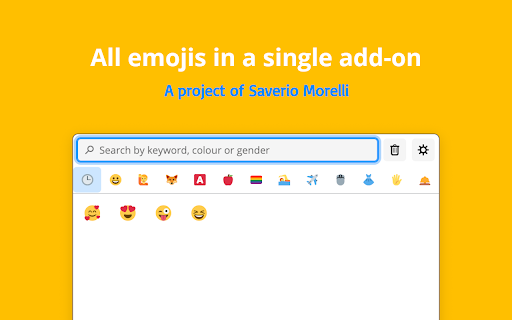


Insert emojis using a web browser, and customise the experience and the add-on in Settings. Use emojis in the browser. You can find by keyword, or by category, and just click on the emoji you want to copy, then you will be able to insert you with "Paste" (or Ctrl+V).

Copy Emoji: Emoji Keyboard, Emoji List & Instant Copy
Fast emoji keyboard, emoji list, and instant emoji search. Quickly browse the emoji list, search, and copy emoji to clipboard. Copy Emoji is the fastest and easiest emoji keyboard for Chrome! Quickly search, browse the emoji list, and instantly copy emoji to make your messages, social media posts, emails, and documents more fun and expressive. 🧩 This extension lets you copy emoji quickly from a handy popup in your browser. Whether you already know which emoji you want or just want to explore, Copy Emoji is here to help. 🚀 Instant Emoji Search: Can’t find the right emoji? Just type a word like "smile," "heart," "food," or "car" into the search bar. Our smart emoji finder shows you matching emojis right away. It’s the easiest way to do an emoji search! 🖱️ One-Click Emoji Copy: Just click any emoji you see in the list or search results, and it will be copied to your clipboard. Then you can easily paste emoji anywhere—on websites, in chats, or in documents. 📚 Full Emoji List: Browse through a full and well-organized emoji list. Emojis are sorted into clear categories like Smileys & People, Animals, Food, Travel, Objects, Symbols, and more. Finding the right emoji has never been easier. 🎨 Light and Dark Themes: Choose the look you like best. Use a clean Light theme or a sleek Dark theme to match your Chrome style. Switch themes any time from the popup. 🧲 Easy-to-Use Popup: Access Copy Emoji directly from your Chrome toolbar. Quickly find and copy emoji without leaving your current page. ⚡ Fast & Lightweight: Enjoy a speedy, lightweight emoji keyboard extension that won't slow down your browser. It’s always ready to use. ⏱️ Save Time: No more searching the web for emojis. Do a quick emoji search, find what you need, and copy emoji instantly. 💬 Make Messages Fun: Add emotion, style, and fun to your texts, posts, and comments with the perfect emoji. 🧰 Always Ready: Your emoji keyboard, emoji list, and search tool are always just a click away in Chrome. 👌 Simple Design: No setup needed. Install and start using it right away. The interface is clean and easy for anyone to use. 🌟 Great for Everyone: Whether you’re a social media manager, writer, student, or just someone who loves emojis — Copy Emoji makes it easy to find and copy emoji anytime. 1️⃣ Click the Copy Emoji icon in your Chrome toolbar. 2️⃣ Search: Type keywords in the emoji search bar to quickly find emoji. 3️⃣ Browse: Browse the emoji list to explore all categories. 4️⃣ Click: Click on any emoji to copy emoji to your clipboard. 5️⃣ Paste: Use Ctrl+V (or Cmd+V on Mac) to paste emoji where you want. 6️⃣ (Optional) Switch themes with the toggle button in the popup. 🙌 No more emoji struggles! Get Copy Emoji today and enjoy the fastest way to do emoji copy and paste in Chrome. The best emoji keyboard, emoji list, and emoji search extension for Chrome.

Emoji Keyboard — typing to emoji
keep trying to find an emoji. Select and copy your favorite emoji like cow, horse, eating, flag, laughing, crying and more emojis If you have difficulty with any emoji prayer in your social media post or comment, we can use this extension. It's very easy to use, you can copy any emoji you like from here with just one click and then you can paste that coffee with your comment or post. To make it easier for users to insert emojis and emoticons into their messages, many devices and operating systems now include an Emoji Keyboard extension. This extension adds a dedicated keyboard to a device's native keyboard, providing users with a wide selection of emojis, emoticons, and symbols that they can easily insert into their text. Now you don't have to go to any other website to find any emoji, you can easily search and copy the emoji you like and add it to your post message or comment. Adding emojis to your message can be important to convey what your message or comment is about, but you no longer have to go to a website to find emojis to accompany your message. You can search any emoji according to your emotion and you can find any kind of animal and all other emojis here.

Emojis Computer – Emoji for PC Keyboard 😍
Emoji keyboard for PC – easily use emojis on your computer in chats, comments & social media. 💡 Emojis Computer – Emoji for PC Keyboard 😍 Easily insert emojis and emoticons with this computer emoji keyboard – perfect for typing computer emoji text and sharing computer emoticons in chats, comments, and social media. No more switching tabs or copy-pasting from emoji websites. Emojis Computer brings emojis right to your fingertips – fast, free, and always ready in your browser. Whether you're writing posts, messaging, commenting, or reacting online – this sleek emoji for PC extension gives you quick access to your favorite emojis. 🔍 Smart Search – find emojis instantly 📋 One-Click Insert – no copy-paste needed ⭐ Favorites & Recents – your top emojis, always ready 🎨 Clean Emoji Picker – elegant and easy to use 🔒 Privacy First – no tracking, no account, no ads Perfect if you're tired of typing "emoji for PC" or "emojis computer" just to find the right symbol. 👉 Try Emojis Computer – Emoji for PC Keyboard 😍 now and bring your messages to life – right from your browser! From your favorite messaging services to web-based platforms for work, content, or social interaction – it integrates naturally into your browser and adapts to your daily workflow. 🔎 Perfect for You If You… 🔹 Use emojis frequently in online communication 🔹 Want a fast, reliable emoji keyboard that lives in your browser 🔹 Prefer staying in the flow without switching devices 🔹 Like to express tone, humor, or emotion with ease We're constantly improving. Want better support for your favorite site? Drop us a note – we’re building this extension for real users like you. Thank you!

Emoji Keyboard
Emoji for Google Chrome Web. Copy-paste Emojis. Compatible Win, Mac, Linux, iOS, Android. Works on website/App. Smileys - Stickers 😄🐘🎮🍎🚀 Use the most up to date Emojis 😀 through this extension 💻 Backward-compatible 🎅 emojis that work in all Windows 7 browsers, older versions of Android 📱 and on Browser for Windows 7 and 8. These emojis will show in black and white ❤ on older systems and will be converted to color 💛 when viewed by a recipient with a system that supports color emojis. Emojis 💎 are supported on iOS, Android, macOS, Windows, and Linux 🌐 Copy and paste emojis to use on Twitter, Facebook, Instagram, WhatsApp, Gmail 💬 or any App/Website where you can input text 📌 Support for Unicode 11.0 and 12.0. Better then EmojiOne because the app size is 90% less, it's 2x faster and shows the emojis like they will really show on your computer. Now support for Unicode 13.0, 13.1, 14.0, 15.0, 15.1, 16.0 and 17.0 🚀 Support the 2022, 2023, 2024, 2025 and 2026 emojis. Must have Windows 11 or MacOs Ventura/Sonoma or a newer in order to see them 🤓 They are available in the Super Emojis Tab 🤣 FEATURES ★ Unicode 11.0 and 12.0: Run Windows 7, 10 or newer to see them 🤓 ★ Unicode 13.0, 13.1, 14.0, 15.0, 15.1, 16.0 and 17.0: Run Windows 11, MacOS Ventura/Sonoma or newer to see them 🤓 ★ Automatic Copy-Paste 📋 ★ Frequently used Emojis section. Right-click and remove 🚽 the ones you don't want there. ★ Backward-compatible 🎾 in all Windows 7 browsers, older versions of Android, and on Browser for Windows 7 and 8 💾 ★ Supported on iOS, Android, macOS, Windows, and Linux 💡 ★ Works 🎯 on any App/Website where you can input text 📢 Including Twitter, Facebook, Instagram, WhatsApp, Gmail, ... 💎 Building Apps and Extensions for Browser and Android 🔥📣 📔 Available on the product page: https://jitt.wwevents.fun/project/emoji-keyboard/#changelog By installing this product you agree to our privacy policy & terms of service: https://jitt.wwevents.fun/privacy-policy/ You may consult the list of permissions and the reason why they are required on the product page: https://jitt.wwevents.fun/project/emoji-keyboard/#permissions “notifications” – Used to send desktop notification. For example when a new message arrive or App is updated. “contextMenus” – Allow to add more settings when right click in the App icon in the browser toolbar and browser context menu. “storage” – Used to save settings on your local computer. “scripting” – Used to be able to insert JS or CSS on the required host/domains. “system.display” – Used to detect the display size and position the Extension window. “unlimitedStorage” – Storage is limited to 5MB of data that may not be enough to store all configs. “host_permissions” – Permission to access to some hosts/domains that we must modify in order to provide the desired functionality detailed in the functionality. It also allows that you can share content (links or text) from other pages directly to inside the App. Also used to allow intercommunication with other WWEvents Apps (i.e. Emojis). “activeTab” – Permission to access the window that the extension is running and is show to the user. “tabs” – Permission required to query all the active tabs in order to put the emoji on the requested tab. “all_urls” – We must access to all hosts/domains in order to inject Emojis on the user target webpage text input. This information is also available inside the App: Options -> About
