
cifkbafiiegeimphnpgcomajaciffdgb

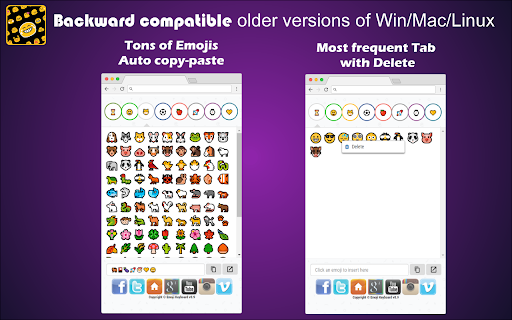

Emoji for Google Chrome Web. Copy-paste Emojis. Compatible Win, Mac, Linux, iOS, Android. Works on website/App. Smileys - Stickers 😄🐘🎮🍎🚀 Use the most up to date Emojis 😀 through this extension 💻 Backward-compatible 🎅 emojis that work in all Windows 7 browsers, older versions of Android 📱 and on Browser for Windows 7 and 8. These emojis will show in black and white ❤ on older systems and will be converted to color 💛 when viewed by a recipient with a system that supports color emojis. Emojis 💎 are supported on iOS, Android, macOS, Windows, and Linux 🌐 Copy and paste emojis to use on Twitter, Facebook, Instagram, WhatsApp, Gmail 💬 or any App/Website where you can input text 📌 Support for Unicode 11.0 and 12.0. Better then EmojiOne because the app size is 90% less, it's 2x faster and shows the emojis like they will really show on your computer. Now support for Unicode 13.0, 13.1, 14.0, 15.0, 15.1, 16.0 and 17.0 🚀 Support the 2022, 2023, 2024, 2025 and 2026 emojis. Must have Windows 11 or MacOs Ventura/Sonoma or a newer in order to see them 🤓 They are available in the Super Emojis Tab 🤣 FEATURES ★ Unicode 11.0 and 12.0: Run Windows 7, 10 or newer to see them 🤓 ★ Unicode 13.0, 13.1, 14.0, 15.0, 15.1, 16.0 and 17.0: Run Windows 11, MacOS Ventura/Sonoma or newer to see them 🤓 ★ Automatic Copy-Paste 📋 ★ Frequently used Emojis section. Right-click and remove 🚽 the ones you don't want there. ★ Backward-compatible 🎾 in all Windows 7 browsers, older versions of Android, and on Browser for Windows 7 and 8 💾 ★ Supported on iOS, Android, macOS, Windows, and Linux 💡 ★ Works 🎯 on any App/Website where you can input text 📢 Including Twitter, Facebook, Instagram, WhatsApp, Gmail, ... 💎 Building Apps and Extensions for Browser and Android 🔥📣 📔 Available on the product page: https://jitt.wwevents.fun/project/emoji-keyboard/#changelog By installing this product you agree to our privacy policy & terms of service: https://jitt.wwevents.fun/privacy-policy/ You may consult the list of permissions and the reason why they are required on the product page: https://jitt.wwevents.fun/project/emoji-keyboard/#permissions “notifications” – Used to send desktop notification. For example when a new message arrive or App is updated. “contextMenus” – Allow to add more settings when right click in the App icon in the browser toolbar and browser context menu. “storage” – Used to save settings on your local computer. “scripting” – Used to be able to insert JS or CSS on the required host/domains. “system.display” – Used to detect the display size and position the Extension window. “unlimitedStorage” – Storage is limited to 5MB of data that may not be enough to store all configs. “host_permissions” – Permission to access to some hosts/domains that we must modify in order to provide the desired functionality detailed in the functionality. It also allows that you can share content (links or text) from other pages directly to inside the App. Also used to allow intercommunication with other WWEvents Apps (i.e. Emojis). “activeTab” – Permission to access the window that the extension is running and is show to the user. “tabs” – Permission required to query all the active tabs in order to put the emoji on the requested tab. “all_urls” – We must access to all hosts/domains in order to inject Emojis on the user target webpage text input. This information is also available inside the App: Options -> About

✨ Emoji Picker 🌻 Copy & Paste
Emoji Picker is a free extension, enables the integration of emojis directly. Multi-language fast search and developer-friendly. We've made sure you search for your favourite emoji in your own language. And for developers, we have added technical data. Enjoy it.

Emoji Keyboard by EmojiTell
Search and copy emojis easily Your Ultimate Emoji Expression Tool 🎉✨ Emoji Keyboard is a free, cutting-edge extension that revolutionizes emoji input on your web browser 💻. Powered by advanced AI technology 🤖, this smart tool brings personalized emoji suggestions to your fingertips ✋💖, enhancing your digital communication across Chrome and other supported browsers . • 🌟Always Fresh: We regularly update our extensive emoji library and AI algorithms, ensuring you always have access to the latest and most relevant emojis, now 3,700+ latest emojis. • 📋Flexible Input: Copy emojis to your clipboard or insert them directly into any input element on web pages. You can now navigate the emoji grid using the arrow keys (up, down, left, right, tab) and copy an emoji with the Enter key. • 🧠AI-Driven Recommendations: Our state-of-the-art AI algorithm analyzes your input in real-time, offering context-aware emoji suggestions that perfectly match your message intent. • 🌐Multilingual Intelligent Emoji Suggestions: Our cutting-edge AI uses advanced natural language processing to understand and process multiple languages, providing context-aware emoji recommendations and intelligent search functionality. Effortlessly find the perfect emoji that matches your message intent, no matter if you're typing in English, Spanish, Chinese, Arabic, or any other language. Our AI ensures you’re covered across all languages! • 🚀Instant Access & Quick Emoji Keyboard: With just a click on the extension icon or by using the Alt+Shift+E shortcut, instantly summon an AI-powered emoji keyboard right in your browser for seamless emoji insertion! Experience the synergy of AI and emojis with Emoji Keyboard. Whether you're searching 🔍, exploring new emoji combinations 🌀, or seeking the perfect expression💥, emojitell adapts to your unique style. 🤖 20240920 - Added keyboard control direction and copy - Improve AI recommendation speed 20240904 - Added AI recommendation module - Optimize layout and add custom controls 20240830 - Added a new independent window mode 🖥️ - Added support for resizing emojis 🔄 - Added display

Emoji Keyboard - Ilovemoji
This is a tool that can quickly access and insert emojis in Chrome browser. It has the following functions: 1. Quick access to emoticons: The Emoji plugin adds an icon to the browser's toolbar, and clicking on the icon opens a emoticon panel. Users can browse and search for emoticons in the panel, and directly click to copy them for use. 2. Multiple sets of emojis: The Emoji plugin provides users with a wide range of emojis to choose from, including smiley faces, animals, food, transportation, symbols, and more. Users can browse and use these emoticons as needed. This Chrome plugin makes it easier and more convenient for users to use emoticons in their browser, adding more fun and diversity to their text expression.

Red Messenger for Youtube
Youtube Lite for Chrome. Magic actions, Ad block. Auto HD videos, Cinema Player mode, Search. Dark mode. Auto replay. Flash. ★★★★★ Everything is done directly on Youtube™ 📣 platform. No need to register in other platforms 🔑 or share your account credentials to third party applications 🔓 Make YouTube wonderful 💎 Keep It clean! YouTube Player Size Playback, Quality, Auto HD, Speed Style, Adblock, Volume, Playlist Channel, H.264. ⚽ Make your watching experience on Youtube a whole lot better and save you a lot of clicks and time 🥇 FEATURES ★ Small window well positioned for texting 🚴 ★ Expand Youtube videos to full window width / height 😱 ★ H264 codec (h264ify to speed up Player / save CPU electricity. H.264 encoding is fast, efficient in GPUs built before 2016 without VP8 VP9 ) 😍 ★ Customize youtube's player Size (Resize Youtube Video) 🚀 ✔ Auto-Start when Google Chrome™ starts 💻 ✔ Configurations in a Options 🔧 section. ✔ Quickly see your profile and news feed 🙂 ✔ Very Low CPU/RAM/Bandwidth consumption 📌 💎 Building Apps and Extensions for Google Chrome and Android 🔥📣 📔 Available on the product page: https://jitt.wwevents.fun/project/red-messenger-for-youtube/#changelog Youtube™ is a trademark of Google Inc., registered in the U.S. and other countries. This is an independent project developed by WWEvents and has no relationship to Google™ or Google Inc. By installing this product you agree to our privacy policy & terms of service: https://jitt.wwevents.fun/privacy-policy/ You may consult the list of permissions and the reason why they are required on the product page: https://jitt.wwevents.fun/project/red-messenger-for-youtube/#permissions “notifications” – Used to send desktop notification. For example when a new message arrive or App is updated. “contextMenus” – Allow to add more settings when right click in the App icon in the browser toolbar and browser context menu. “storage” – Used to save settings on your local computer. “scripting” – Used to be able to insert JS or CSS on the required host/domains. “system.display” – Used to detect the display size and position the Extension window. “unlimitedStorage” – Storage is limited to 5MB of data that may not be enough to store all configs. “host_permissions” – Permission to access to some hosts/domains that we must modify in order to provide the desired functionality detailed in the functionality. It also allows that you can share content (links or text) from other pages directly to inside the App and send it as a Chat to a friend for example. Also used to allow intercommunication with other WWEvents Apps (i.e. Emojis). “activeTab” – Permission to access the window that the extension is running and is show to the user. “all_urls” – Permission required for users be able to take screenshots of the current window – captureVisibleTab. This information is also available inside the App: Options -> About
