
kjeghcllfecehndceplomkocgfbklffd
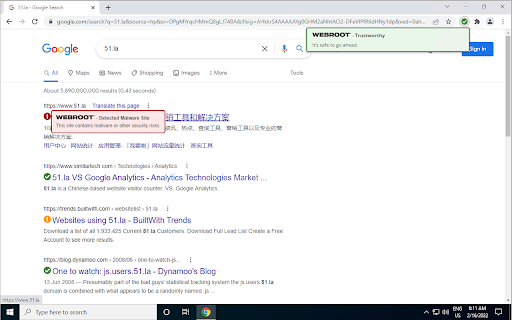
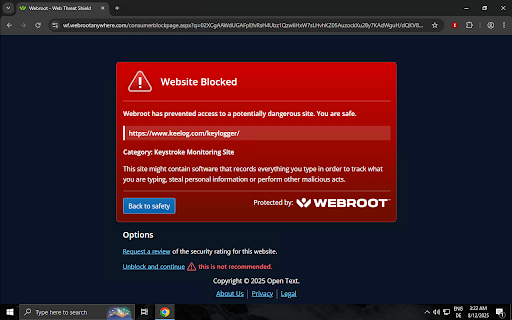
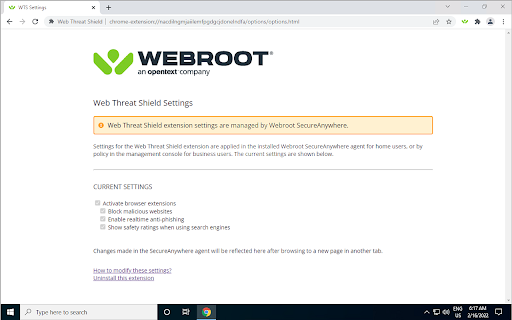

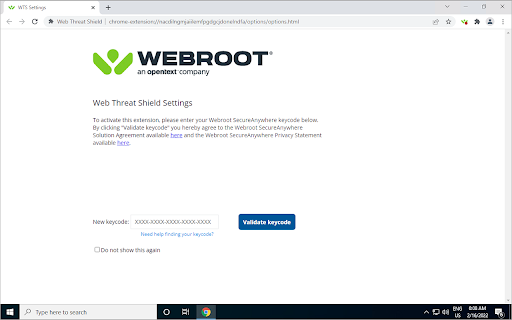
Keeps you safe when browsing the web by identifying and blocking dangerous websites. The Internet can be a scary place. Wouldn’t it be great if you could tell which sites were dangerous before it was too late? Now you can with the Webroot® Web Threat Shield. The Webroot Web Threat Shield offers top-of-the-line defense against cybercrime while browsing the internet. It warns about unsafe websites before you click, and automatically blocks bad ones trying to install viruses and malware on your computer. You’ll have peace-of-mind knowing personal information like passwords and credit card details are safe. The Webroot Web Threat Shield also provides up-to-the-minute data about website reputations and real-time protection against phishing sites. The Webroot Web Threat Shield is available as a feature of our award-winning internet security that protects PCs, Mac computers, and mobile devices. Copy and paste the link below into the address bar above to learn which type of security is right for you. https://www.webroot.com/us/en/home/products/helpmechoose If you are already using a Webroot Product, locate the keycode used to activate your subscription and click “GET” at the top of your screen. If you can’t find your keycode, copy and paste the link below in the address bar above and we’ll help you find it. https://answers.webroot.com/Webroot/ukp.aspx?pid=12&app=vw&vw=1&login=1&solutionid=127 A keycode can be acquired at www.webroot.com. By installing the Webroot Web Threat Shield Extension, you agree to the Webroot SecureAnywhere Solution Agreement available at https://detail.webrootanywhere.com/p4inbound.asp?CMD=P40EULA.

Urban Browser Guard
Urban Browser Guard safeguards your online privacy and blocks harmful content, including malicious websites and intrusive ads Urban Browser Guard Chrome extension adds a security layer that blocks access to malicious websites while filtering out annoying ads and other unwanted content. Urban Browser Guard protects your digital fingerprints from leaking into the wrong hands and prevents identity theft, malware ads, and phishing attempts, whether you’re in a public place or at home. ⛏️ Mining Site Alerts: Receive alerts about cryptocurrency mining websites that could compromise your device's performance and security. 🧹 Clear Cache and History: Clear your browser cache and history, ensuring your data stays private. 🚫 Block Analytics Requests: Easily block analytics requests that track your online behavior. 🛡️ Advance browser protection: Blocking access to malicious sites and ads, anti phishing, and improving secure browsing and private internet security. 🆕🤖 Chat AI Anonymizer - Personal data protection (Optional Feature): When enabled and approved, Urban Browser Guard warns you before sending AI chat messages that may contain personal information (such as names, phone numbers, ID numbers, passport details, SSN, TIN, or MAC addresses). Detection backend based is analyzed in a de-identified and anonymized manner and is available only to users who opt in. When using the optional Advance browser protection features, you enjoy anti-phishing, anti-malware, blocking access to malicious sites and blocking malicious ads for your browsing. To use these safe browsing and AI chat protection features, subject to your acceptance of the prominent disclosures provided for each, we will process browsing information. We further encourage you to review our privacy policy before installing the Urban browser guard extension, available here: Privacy Policy https://www.urban-vpn.com/about-us/privacy-policy-urban-browser-guard/ This extension is an all-in-one browser protection solution. You don't need to download additional software → click "Add to Chrome" to install the extension, and you're set to browse freely. Urban Browser Guard is a comprehensive Chrome browser extension for securing your connection. It will not slow your browser’s performance and will not affect bandwidth. ⚡Browser protection updates and fixes. ⚙️ UI/UX and settings updates.

SpyHunter® Web Security
SpyHunter® Web Security identifies and blocks malicious web content and other potential security threats. SpyHunter Web Security integrates with your browser and is designed to improve your security and help keep you safe while you browse the web. SpyHunter Web Security protects you from web-based threats including malware, ransomware, phishing sites, adware and/or potentially unwanted software. - Website Blocking: SpyHunter Web Security will scan links that you click in emails or documents and URLs that you enter into your browser. It will also analyze search results and links on web pages. If you attempt to visit a website that has been categorized as potentially unsafe, SpyHunter Web Security will block access to the website and display a prompt that allows you to disregard the warning at your own discretion. - Search Engine Integration: SpyHunter Web Security can be configured to integrate with popular search engines to categorize and visually identify links in your search results as “safe”, “potentially unsafe” or “uncategorized”. Search engine integrations can be individually configured or disabled according to users’ preferences via SpyHunter Web Security’s settings. - Exclusions: Users also have the choice to individually override SpyHunter Web Security to disable its blocking of specific websites. To do so, users can manually add websites to the “Exclusions” section in SpyHunter Web Security settings. Websites added to “Exclusions” will be identified as “User-Excluded” in search results (if “Search Engine Integration” is enabled). SpyHunter Web Security is regularly updated to help you surf the web with added safety.

Malware Protection
Malware Protection shields you from dangerous websites automatically Malware Protection shields you from dangerous websites automatically — no configuration needed. Every site you visit is scanned in real time against McAfee SiteAdvisor's threat database. If a domain is flagged as malicious or a phishing site, the page is blocked instantly and replaced with a clear warning — before any harmful content can load. You can still choose to proceed to the site if you believe it was flagged in error. Features: 🛡️ Real-Time Protection — Every website is scanned the moment you navigate to it. Dangerous domains are blocked before the page loads. 🔍 Search Advisor — Safety icons appear directly on Google and Bing search results, so you can see which links are safe before you click them. ⚡ Smart Caching — Scan results are remembered for the duration of your session, so previously checked sites load instantly without repeated lookups. ↩️ False Positive Override — If a safe site gets wrongly blocked, a single click lets you proceed without disabling the extension. Privacy: Domain lookups are sent to McAfee SiteAdvisor for scanning. No personal data or browsing history is collected or stored by this extension. Free. Open source with public license (GPLv3)

LinkShield
LinkShield helps you identify unsafe websites and links to keep you safer online. ---- Short Description (Summary): Browsing in 2026 requires more than a filter. LinkShield is Audit-Validated (100% detection rate) against modern phishing, BitB, and WebTransport threats. Experience the new gold standard in real-time AI security. ---- Full Description: Do you want to browse the internet with absolute peace of mind? Meet LinkShield, your personal digital bodyguard designed for maximum online security and safety. Cyber threats are evolving. Fraudsters now hide malicious links inside images, QR codes, or use "look-alike" characters (homoglyphs) to impersonate your bank or favorite services. LinkShield is the only extension that unmasks these hidden dangers using technology that goes far beyond standard security. Why choose LinkShield Security? 🛡️ Proactive Background Analysis (Premium): We scan websites and scripts in the background, blocking dangerous domains before the page even finishes loading. 📱 QR Code Protection: See a QR code on your screen? LinkShield instantly verifies the destination's safety before you are redirected. 🔡 Advanced Homoglyph Detection: We detect characters from foreign alphabets (like the Turkish 'ı') used to spoof famous brands like PayPal, Microsoft, or your local bank. ⚡ Seamless Performance: Thanks to our optimized scanner, you won't experience any browser lag. High-end security without compromising speed. Safe Internet for Everyone Whether you are working, banking, or shopping, LinkShield provides the essential security you need. Stop phishing ads in search results and navigate with confidence. Install LinkShield today and experience the new gold standard in online safety.
