
kheeipganhdcpkecibbpgggianpodhkc

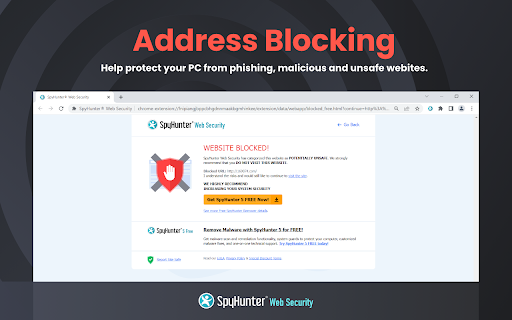
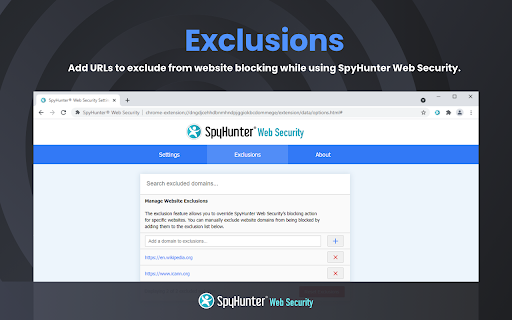
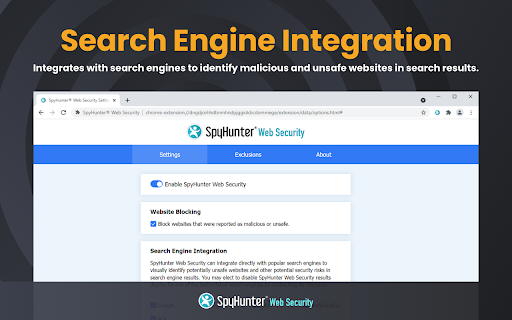
SpyHunter® Web Security identifies and blocks malicious web content and other potential security threats. SpyHunter Web Security integrates with your browser and is designed to improve your security and help keep you safe while you browse the web. SpyHunter Web Security protects you from web-based threats including malware, ransomware, phishing sites, adware and/or potentially unwanted software. - Website Blocking: SpyHunter Web Security will scan links that you click in emails or documents and URLs that you enter into your browser. It will also analyze search results and links on web pages. If you attempt to visit a website that has been categorized as potentially unsafe, SpyHunter Web Security will block access to the website and display a prompt that allows you to disregard the warning at your own discretion. - Search Engine Integration: SpyHunter Web Security can be configured to integrate with popular search engines to categorize and visually identify links in your search results as “safe”, “potentially unsafe” or “uncategorized”. Search engine integrations can be individually configured or disabled according to users’ preferences via SpyHunter Web Security’s settings. - Exclusions: Users also have the choice to individually override SpyHunter Web Security to disable its blocking of specific websites. To do so, users can manually add websites to the “Exclusions” section in SpyHunter Web Security settings. Websites added to “Exclusions” will be identified as “User-Excluded” in search results (if “Search Engine Integration” is enabled). SpyHunter Web Security is regularly updated to help you surf the web with added safety.

Anti phising safer browsing for chrome
Browserguard protects you against the dangers of the internet Stay safe online with Browserguard, the essential security extension designed to protect you from phishing attacks and malware threats. Key Features: Anti-Phishing Protection: Safeguard your personal information with our advanced anti-phishing technology. Browserguard identifies and marks suspicious links, ensuring you never unknowingly click on harmful URLs. Stay one step ahead of cybercriminals and browse with confidence. Anti-Malware Defense: Defend your device against malicious software with Browserguard’s robust anti-malware features. Detect and block malware threats before they can harm your system, providing you with a secure browsing experience. Real-Time Alerts: Receive instant notifications whenever Browserguard detects a potential phishing attempt or malware threat. Our real-time alerts keep you informed and protected at all times. Seamless Integration: Easily integrate Browserguard with your Google Chrome browser. Enjoy comprehensive security without compromising on browsing speed or performance. User-Friendly Interface: Navigate with ease using Browserguard’s intuitive interface. Protect your online activities with just a few clicks, making internet security accessible to everyone. Why Choose Browserguard? Comprehensive Security: Browserguard combines powerful anti-phishing and anti-malware features to provide all-around protection. Our cutting-edge technology ensures you are always shielded from online threats. Peace of Mind: With Browserguard, you can surf the web knowing your personal information and devices are secure. Avoid phishing scams and malware infections effortlessly. Constant Updates: Our dedicated team continuously updates Browserguard to tackle the latest threats. Benefit from ongoing improvements and stay protected against evolving cyber dangers. Enhance your online security today. Add Browserguard to your Google Chrome browser and experience unparalleled protection against phishing and malware attacks. Download Browserguard now and browse the web with complete peace of mind! Important: You will only notice our extension if you want to visit an unsafe website or if links to such a website are displayed. If you do not notice our extension, this is a good sign as you obviously have a safe surfing behavior.

SafeToOpen Browser Security and Privacy
SafeToOpen browser security and privacy extension. Stop phishing attacks before they reach you. SafeToOpen is a real-time browser security and privacy extension that protects you from phishing websites, online scams, malicious downloads, and hidden trackers — automatically, as you browse. No security expertise required. Install it once and stay protected on every site you visit. Most antivirus software reacts after a threat is already on your device. SafeToOpen works earlier: it analyzes the page you're actually looking at, in real time, and warns you the moment something looks like a phishing or scam site — even if that site is brand new and not yet on any blocklist. ━━━━━━━━━━━━━━━━━━━━━━━━━━━━━━━━━━━━━━ WHAT SAFETOOPEN PROTECTS YOU FROM ━━━━━━━━━━━━━━━━━━━━━━━━━━━━━━━━━━━━━━ ✓ Phishing & fake login pages Detects sites built to steal your passwords, banking details, and personal information — including newly created phishing pages that traditional blocklists miss. ✓ Online scams & fraudulent websites Flags deceptive and impersonation sites before you hand over money or data. ✓ Malicious downloads Warns you before you download dangerous files (like disguised .exe installers) that could carry malware or ransomware. ✓ Hidden trackers Blocks third-party trackers that follow you across the web, so you browse faster and more privately. ━━━━━━━━━━━━━━━━━━━━━━━━━━━━━━━━━━━━━━ HOW IT WORKS — TWO LAYERS OF PROTECTION ━━━━━━━━━━━━━━━━━━━━━━━━━━━━━━━━━━━━━━ SafeToOpen doesn't just check a website against a list of known bad URLs. It inspects every page on two levels at once — which is how it catches the newest scams that blocklists haven't seen yet. ❶ Visual element analysis SafeToOpen looks at a page the way you do. It examines the visual elements — logos, branding, layout, and login forms — to recognize when a site is impersonating a bank, brand, or service you trust. If a page is dressed up to look like something it isn't, you're warned BEFORE you enter your password, card number, or any sensitive information. ❷ Deep structural analysis Like an X-ray, SafeToOpen sees beneath the surface. It inspects the underlying layers and structure of the website that your eyes can't. ➤ Together: one fast, accurate verdict By combining what a page LOOKS like with what it's actually MADE of, SafeToOpen identifies the latest phishing and scam websites in real time — including brand-new pages launched minutes ago that no traditional blocklist has caught up to. ✓ Catches brand-new threats — Phishing kits launch and vanish within hours. SafeToOpen analyzes the page itself, so it flags zero-day phishing sites that lists haven't caught up to yet. ✓ Lightweight & fast — Runs quietly in the background and won't slow down your browsing. ✓ Privacy by design — Your browsing is your business. SafeToOpen protects you without harvesting your personal data. ✓ Works everywhere you browse — Protection applies across the sites and pages you visit, automatically. ━━━━━━━━━━━━━━━━━━━━━━━━━━━━━━━━━━━━━━ GETTING STARTED IS EFFORTLESS ━━━━━━━━━━━━━━━━━━━━━━━━━━━━━━━━━━━━━━ ➊ Install SafeToOpen and pin it to your toolbar. ➋ Browse normally. SafeToOpen checks each page in real time. ➌ If a site looks like phishing, a scam, or a malicious download, you get a clear, immediate warning — with a simple way to stay safe. That's it. There's nothing to configure. Protection starts the moment you install. ━━━━━━━━━━━━━━━━━━━━━━━━━━━━━━━━━━━━━━ FREE TO START — UPGRADE FOR COMPLETE PROTECTION ━━━━━━━━━━━━━━━━━━━━━━━━━━━━━━━━━━━━━━ Install SafeToOpen free and get real-time phishing detection right away. The free plan blocks known phishing, scam, and malware sites, warns you before you open known unsafe links, and blocks third-party trackers. Upgrade to SafeToOpen Personal Plus — with a 14-day free trial — to unlock our most advanced protection: ✦ Zero-day phishing detection (VisionAI) — catches brand-new phishing and scam pages the moment they appear, before any blocklist. ✦ Deeper Analysis (X-Ray) — full structural inspection of suspicious pages for a faster, more accurate verdict. ✦ Paste Guard — stops passwords, card numbers, and personal data from being pasted into untrustworthy sites. ✦ Email-attachment scanning — checks risky attachments in your webmail. Protecting the whole household? SafeToOpen Family Plus — covers up to 5 people, with full Personal Plus protection for everyone. ━━━━━━━━━━━━━━━━━━━━━━━━━━━━━━━━━━━━━━ TRUSTED, PRIVATE & COMPLIANT ━━━━━━━━━━━━━━━━━━━━━━━━━━━━━━━━━━━━━━ Security software should be held to the highest standard — so SafeToOpen is. ✓ GDPR compliant — built to respect your privacy and your rights over your data. ✓ ISO/IEC 27001:2022 certified — our information security is independently certified to the leading international standard. ✓ Privacy by design — SafeToOpen protects you without harvesting or selling your personal data. ━━━━━━━━━━━━━━━━━━━━━━━━━━━━━━━━━━━━━━ FOR TEAMS & ORGANIZATIONS ━━━━━━━━━━━━━━━━━━━━━━━━━━━━━━━━━━━━━━ SafeToOpen also protects businesses, schools, and enterprises. It supports centrally managed deployment and policy configuration, so administrators can roll out consistent phishing and download protection across every device. ➤ Learn more and talk to our team: https://safetoopen.com/en/for/business/ ━━━━━━━━━━━━━━━━━━━━━━━━━━━━━━━━━━━━━━ ⚠ PROTECT YOURSELF FROM THE #1 CAUSE OF ONLINE BREACHES ━━━━━━━━━━━━━━━━━━━━━━━━━━━━━━━━━━━━━━ The vast majority of cyberattacks start with phishing. Antivirus alone isn't enough — phishing happens in your browser, in real time, on pages your antivirus never sees. SafeToOpen is built for exactly that moment.

Safe Browsing Guard
Protects you from suspicious domains and potentially harmful downloads. A Chrome extension that provides an additional layer of security by protecting users from suspicious domains and potentially harmful downloads. This extension helps users make informed decisions about the websites they visit and the files they download. Safe Browsing Guard is designed to complement existing security systems by focusing on sites that are normally considered safe but may be used by attackers for phishing, command and control, data exfiltration, and malware distribution. * 🛡️ Monitors suspicious domains and file downloads * ⚡ Real-time website safety checks * 🔔 Configurable alert frequency * 🎯 Custom domain and extension filtering * 🔒 Privacy-focused with local processing * 📋 Detailed download warnings * ⚙️ Customizable settings * ✅ Whitelist trusted domains * 💾 Import/Export options for easy backup and transfer 1. Visit the Chrome Web Store page 2. Click "Add to Chrome" 3. Confirm the installation 4. Pin the extension to your toolbar for easy access and visibility of warning icons. 1. The extension icon ✅ will appear in your Chrome toolbar. Make sure to pin it for better visibility of warning icons. 2. ✅ A green tick icon indicates normal browsing, meaning the domain does not belong to our list of suspicious domains. 3. 🛡️ An orange shield icon indicates a suspicious domain. 4. When visiting a suspicious domain, you'll receive an alert with an option to whitelist the domain if you trust it. 5. ✅ Click the extension icon for more information on educational resources about safe browsing and to access extension options. 6. 💾 Use the Import/Export options in the settings to backup your configuration or transfer it to another device. 7. ☕ Use the "Buy Me a Coffee" link on the options page to support future development. This Chrome extension is based on data from the following sources: 1. Living Off Trusted Sites (LOTS) Project: The LOTS Project is a research project that aims to understand the threat landscape of the web. The project maintains a list of suspicious domains that are often used by attackers to host malicious content. https://lots-project.com/ 2. FileSec: FileSec is a project that aims to provide information about file extensions and their associated risks. The project maintains a list of file extensions that are commonly used by attackers to distribute malware. https://filesec.io/ License Apache License 2.0. See the LICENSE file for details. (You'll need to specify the license in the store listing separately, not within this description.) FAQs for Safe Browsing Guard 1. Why does Safe Browsing Guard flag legitimate websites like file-sharing or cloud storage services? >> While these platforms are legitimate, they can be misused by attackers to host or distribute malicious files. Safe Browsing Guard adds a layer of protection by scrutinizing downloads and activities, even on trusted sites, to help keep you safe. 2. If these sites are commonly used and trusted, why isn't my antivirus or firewall blocking them? >> Antivirus and firewalls primarily focus on known malicious files and websites. They often trust popular platforms, which is precisely what makes these platforms attractive targets for attackers. Safe Browsing Guard complements your existing security by looking for suspicious behaviors and patterns, regardless of the website's general reputation. 3. The extension frequently alerts me. It's disruptive. Can I customize the alerts? >> Absolutely! You can configure Safe Browsing Guard's alert frequency in the options. Choose to be alerted always, once per day per domain, once per week per domain, or never. Even with alerts off, the extension icon will change to indicate potential threats, allowing you to stay informed without constant notifications. 4. I'm a security professional and understand online risks. Do I need this extension? >> For experienced users, the alerts might seem redundant. However, Safe Browsing Guard can still offer a valuable "second opinion," especially for detecting potentially compromised accounts or malicious activity on trusted platforms. The customizable alert settings and icon-based warnings allow you to tailor the extension to your expertise. (Removed "file extensions" – seemed out of place.) 5. Safe Browsing Guard flagged a download from a site I trust. What should I do? >> Proceed with caution! While the site itself might be legitimate, the downloaded file could still be malicious. Use a reputable online virus scanner (like VirusTotal from extension options) to check the file before opening it. 6. Can I completely disable Safe Browsing Guard for specific websites? >> Yes, you can add websites to your "Trusted Domains" list in the extension's options. However, we strongly discourage this unless you absolutely trust the site and all its content. It's generally safer to reduce the alert frequency to "once a day" or "once a week" instead of completely disabling protection. 7. Safe Browsing Guard flagged a download from a site I trust. What should I do? >> Proceed with caution! While the site might be legitimate, the download could be malicious. Scan it with a reputable online virus scanner like VirusTotal (accessible from the extension's options or at virustotal.com) before opening. (Clarified VirusTotal access.) 8. How does Safe Browsing Guard identify suspicious websites and downloads? >> It uses an internal database of known suspicious domains and file extensions, combined with URL analysis and other heuristics. This data is regularly updated to stay current with evolving threats. 9. How often is the suspicious domain/extension data updated? >> We strive to update our data regularly. Check for extension updates or visit our GitHub repository (https://github.com/lmotwani/safe-browsing-guard-chrome) for the latest information. (Simplified wording, included direct GitHub link.) 10. Does Safe Browsing Guard collect my browsing data or personal information? >> Absolutely not. Safe Browsing Guard is designed with privacy in mind. It does not collect or transmit your browsing history, personal data, or any other information. All analysis is performed locally on your computer. 11. I have a question not covered here. Where can I get help? >> Visit the extension's GitHub repo page (https://github.com/lmotwani/safe-browsing-guard-chrome) or contact us directly through the email address provided on the support page. 12. I found a bug or have a suggestion for improvement. Where should I report it? >> We appreciate your feedback! Please report bugs or suggest improvements on our GitHub page (https://github.com/lmotwani/safe-browsing-guard-chrome). Your contributions help make Safe Browsing Guard even better. 13. Is Safe Browsing Guard open source? >> Yes! The source code is available on GitHub (https://github.com/lmotwani/safe-browsing-guard-chrome), promoting transparency and community contributions. 14. Why does the pinned extension icon sometimes change? >> The extension icon changes to visually alert you about potentially suspicious websites or downloads, even if alerts are turned off. A green checkmark means normal browsing, while an orange shield indicates a potential issue. 15. Safe Browsing Guard flagged a link on social media. Is it a phishing attempt? >> Possibly. Be cautious with links on social media, even from trusted contacts. Safe Browsing Guard can help identify suspicious links, but always double-check before clicking. If unsure, contact the sender directly through another channel to verify. 16. I use other chrome extensions. Will Safe Browsing Guard interfere with it? >> Safe Browsing Guard should not interfere with other extensions. This extension does not collect or transmit any user data. All processing is done locally on your device. For the best protection, please pin this extension to your toolbar for easy access and visibility of warning icons. This ensures that you can quickly see the status of the current website and access the extension's features.

FDev Security
You are protected absolutely with our awesome features: Realtime protection, block seen and typing indicator, blur messenger! # INTRODUCTION You are often afraid about "malicious" websites on the internet. It seems that you cannot know when your sensitive data was stolen by attackers. And when your information, data is hacked by someone (such as banks account, Facebook, ...), you just realized that your data is very importance and you begin to care about the security when you browsing in the Internet. Let's CoderDocs Security protect you with real-time protection feature. And we also has another awesome features like: Facebook (+Zalo) privacy, Privacy Web Experience, Blur Messenger, Malware URL scanning, .... # FEATURE 1: REAL-TIME PROTECTION When you install CoderDocs Security extension successfully, this feature will enable real-time immediately. This feature is the most important, so you cannot disable it. When you visit a malware site, the warning popup will be displayed to warning you about this malicious site. # FEATURE 2: FACEBOOK (+ZALO) PRIVACY You can easily enable / disable this feature by check or uncheck the checkbox of every small functions. This feature includes: - Block "Seen" indicator: When you receive a Facebook message, you click to view this message, the sender will see the status "seen" in their message space. But if you enable this function, the sender can not see the status "seen" any more. They never know whether you saw the message or not. - Block "Typing" indicator: Similar with block "seen", the sender can not see the "typing" indicator when you compose the message in Facebook message space (the three dots indicator "..."). - Block "Seen" status in Story: When you click to view the Story of someone, they will know that you have seen their Story. But with this function, nobody can know that you saw their Story. You can click and see your ex-girlfriend any time. - Block "Typing" indicator in Comments space: When you are typing the comment in any post. People can see the indicator "Someone are typing ...". But if you enable this function, this indicator will be disappear forever. - NOW, it support block seen and typing indicators in Zalo web version. Note: Block "Seen" status in Story and block "Typing" indicator in Comments are disable now because some technical problems. # FEATURE 3: PRIVACY WEB EXPERIENCE You can also easily enable / disable this feature by check or uncheck the checkbox of every small functions. This feature includes: - Block important sites when you absent: When you go out, you forgot to lock your computer, someone can open you browser, they can open some important site such as Facebook, Gmail and see your sensitive information. If you don't want that thing happen. Let enable this function. It allow you to block some importance sites that you don't want anyone access to if you have to lend your computer or you go out. - Block tracking Ads Scripts: This function allow you to block the tracking scripts like Facebook, Google. For example, you go to an e-commerce website, when you comeback to Facebook, the previous items in e-commerce website will be display. You can enable this function to block them. - Browser for kids: This function allow you to block almost porn sites in the world. If your kids uses your computer, let enable this function. # FEATURE 4: URL MALWARE SCANNING This is a feature that allow you to operate directly on the user interface. Let go to menu path: TOOLS / SECURITY / MALWARE SCAN and explore this feature. This feature allow you to analyze any URL and inform for you if the URL will be redirected to the website that contains any malware/virus. # FEATURE 5: BLUR MESSENGER This feature allow you to hidden all information when you chat with someone in the Messenger (messenger.com). Just don't care anyone who often peek at your messages. It only work with Messenger - Open Messenger (messenger.com) - Click Settings Icon in the left side bar. - Enjoy the new Messenger feature. More information about CoderDocs Extension: https://lenhatthanh.com/en/coderdocs-security/
