
kjcpipbleckofommimigmbehkmpjdahg
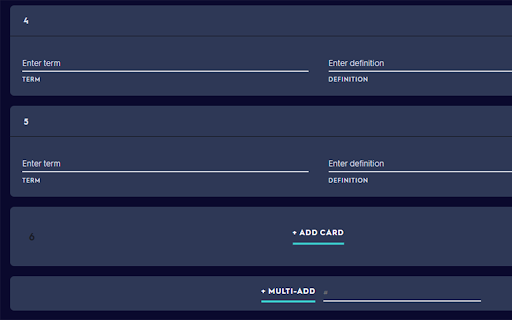
Select how many cards you want to add at once with a click of a button on Quizlet. This extension seamlessly adds another button on Quizlet that allows you to enter how many cards you wanted added, then *poof* all your cards appear. No more needing to manually click add card over and over again. This allows copying and pasting to be a lot quicker.

ProvenBase
ProvenBase chrome extension ProvenBase is an AI-powered deep search sourcing tool that helps recruiters and hiring teams find, engage, and hire hard-to-find talent directly from the web. Using advanced AI and deep search, ProvenBase surfaces qualified, often-overlooked candidates and turns sourcing into a faster, more strategic, data-driven workflow.

Save Me A Click
Summarize any link with a right-click A ChatGPT-powered chrome extension that lets you get to the point of a clickbait article without even clicking its link. It can be used both to answer clickbait titles or summarize informative articles. Makes the browsing experience less annoying. Open source, check it out on github: https://github.com/marksverdhei/save-me-a-click-chrome-extension For a first time setup, you will need an OpenAI api key. Here are the steps to obtain one if you don't have one already: 1. Create an account at https://openai.com/ 2. Register your account as a paid account https://platform.openai.com/account/billing/overview (free trial does not work) 3. Create a new API key at https://platform.openai.com/account/api-keys (copy it and save it somewhere) This currently only works for paid accounts (ass opposed to free-trial accounts) Now that you have obtained the api key, simply click the icon of the extension in the top right corner of your browser, and paste in the key, then click save. For your own usage, save me a click should be very cheap in terms of api costs, but we recommend setting a hard limit of your usage costs here: https://platform.openai.com/account/billing/limits (e.g. of $1)

Quizlet QuickList
🔹 Right-click any word on a webpage → instantly add it to your list 🔹 Manage your vocabulary directly from the popup 🔹 Copy your entire word list to clipboard in one click — ready to paste into Quizlet or any flashcard app 🔹 Works on any website — articles, blogs, news, research papers Whether you're a student, a language enthusiast, or just browsing the web in a foreign language — this extension is your shortcut to faster, smarter learning. What's New in v2.0: - TSV and CSV export — download files for Anki, Google Sheets, or Excel - Live badge counter — word count shown on the extension icon - Smart input — auto-capitalization and duplicate prevention Simple. Fast. Distraction-free. Just the words that matter. Everything is stored locally on your device. No account. No server. No tracking.

TimeCrunch Tennis
AI-powered extension that removes non-playing time from tennis matches on Tennis TV and Tennis Channel Plus. The TimeCrunch browser extension is essential for anyone with an ATP Tennis TV or Tennis Channel Plus account. TimeCrunch uses AI to find and then skip over downtime during a tennis match. TimeCrunch is very light weight and will not increase your data usage. We also do not collect any of your browser data.
