
kimpaankoiokddpaghgclckecbeogifh

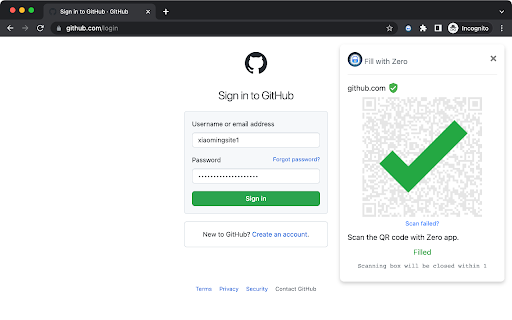
Fill passwords safely in browsers with the most secure password manager extension Zero(formerly ID Guard Offline). Autofill your password in browser by scanning QR code with Zero(formerly ID Guard Offline) app on your phone. 1. A QR code will show up when you open a web page with a login form. 2. Open Zero app(not this extension) on your phone and scan the QR code. 3. Choose the account. 4. Your login form on the web page will be filled automatically. When filling password from your phone to the web page, your password is encrypted with a one time encryption key known only by this extension and the app on your phone. It can never be decrypted during the transmission on Internet. Unlike most password manager extensions, this extension does not save any passwords. Your passwords are stored on your smartphone with security chip and sandbox protection. No password can be sent to the browser automatically unless you scan the QR code with the app on your smartphone. That means, no malicious desktop program or website can steal your passwords without your awareness.

OfflinePass
OfflinePass is a deterministic password manager that turns one Master Key into a unique, secure password for every site — entirely in your browser. No server. No vault. No sync. Lose your device and you can recover every password on a fresh install just by remembering one phrase. ────────────────────────────────────────── THE WHOLE ALGORITHM, ON ONE SCREEN ────────────────────────────────────────── msg = "github.com" + "|" + "you@example.com" + "|2026|0" mac = hmac-sha256(masterKey, msg) password = base58(mac).slice(0, 16) // → 0$87booSaeaKYnhgEq That's it. Three inputs (host, identity, year), one HMAC-SHA256, base58 encoded and truncated to 16 characters. Same Master Key + same site + same identity always produces the same password — on any device, on any version, forever. • No server, ever Every password is computed locally. Open the network tab and watch — there are zero requests after the popup loads. • Nothing to back up No vault, no sync, no database. The only secret is your Master Key, and only you remember it. • Deterministic Forget syncing across devices. Type the same Master Key on a fresh install and you instantly recover every password. • Audit the math, not us HMAC-SHA256 + Base58. ~94 bits of entropy in the truncated output. The whole thing is a few lines of TypeScript you can read in one sitting. Source on GitHub: github.com/sireto/offlinepass • Zero tracking No analytics, no fingerprinting, no telemetry, no cookies you didn't ask for. Apache 2.0 license, free for any use. 1. Click the OfflinePass icon (or press Ctrl/Cmd+Shift+F). 2. Type your Master Key. 3. The current site is filled in automatically; type your username. 4. The 16-character password appears in the result card. Click copy. That's the whole flow. Same site, same identity, same Master Key → the same password every time. ────────────────────────────────────────── OPTIONAL: SAVE YOUR MASTER KEY WITH A PIN ────────────────────────────────────────── If you don't want to retype your Master Key on every visit, you can encrypt it locally with a PIN: • Key derivation: PBKDF2-HMAC-SHA256, 250,000 iterations, 16-byte random per-MSK salt. • Cipher: AES-GCM with a 12-byte random IV. The auth tag is what tells us a wrong PIN was entered — there is no separate hash to crib against. • Storage: localStorage on this device only. Nothing is synced or sent over the network. Enter the wrong PIN and the GCM auth tag fails — the ciphertext is useless without it. PINs are short, so a long PIN (or no PIN at all) is stronger; we explain the trade-off in SECURITY.md. This extension requests one permission: • activeTab — used only to read the URL of the tab where you opened the popup, so OfflinePass can pre-fill the host field. The URL never leaves your browser. OfflinePass collects nothing. There is no analytics endpoint, no fingerprinting, and no remote configuration. The extension makes zero network requests after install. The full source is published under Apache 2.0 — verify it yourself.

codebox-AI Download Article
Website:https://www.code-box.fun Note: Due to review reasons, the new version may be delayed in listing. Please wait patiently. If you have any questions, please submit an issue on GitHub. We will not respond in the comment section. GitHub address: [https://github.com/027xiguapi/code-box](https://github.com/027xiguapi/code-box) Customization - Insert custom styles (CSS code) - Customize the download of HTML - Customize the download of Markdown - Customize the download of PDF CSDN - Open any CSDN blog to start copying code. - In the unlogged state on CSDN, code selection is supported. - In the unlogged state on CSDN, one-click copy is available via the button at the top right corner of the code block. - In the unlogged state on CSDN, no forced login pop-up will appear. - In the state of not following the blogger, no prompt will appear to follow the blogger to read the full article, and the article will be fully displayed. - Code blocks will be automatically expanded. - On mobile devices, the prompt to jump to the app will be blocked. Zhihu - One-click code copying. - In the unlogged state on Zhihu, no prompt will appear to expand and read the full article, and the article will be fully displayed. - In the unlogged state on Zhihu, no forced login pop-up will appear. Baidu - Disable the AI chat box. Jianshu - One-click code copying. - No prompt will appear to expand and read the full article, and the article will be fully displayed. - No forced login pop-up will appear. Script Home - Open any Script Home blog to start copying code. - In the unlogged state on Script Home, code selection is supported. - Ads will be blocked. - On mobile devices, in the unlogged state on Script Home, one-click copy is available via the button at the top right corner of the code block. 51CTO Blog - In the unlogged state on 51CTO Blog, code selection is supported. - In the unlogged state on 51CTO Blog, one-click copy is available via the button at the top right corner of the code block. - In the unlogged state on 51CTO Blog, no forced login pop-up will appear. - On mobile devices, in the unlogged state on 51CTO Blog, one-click copy is available via the button at the top right corner of the code block. PHP Chinese Network - In the unlogged state on PHP Chinese Network, code selection is supported. - In the unlogged state on PHP Chinese Network, one-click copy is available via the button at the top right corner of the code block. - In the unlogged state on PHP Chinese Network, no forced login pop-up will appear. - On mobile devices, in the unlogged state on PHP Chinese Network, one-click copy is available via the button at the top right corner of the code block.

CrapApi Http Test
CrapApi is a plug for testing RESTful web services, like postman. ApiDebug is a browser plug-in for testing RESTful web services.A tool like postman and resteasy. It might be used for testing other HTTP communications too. Support interface debugging (POST, GET), support JSON, XML and other parameters. If you want to save data to you own database, use the API administration tool -CrapApi(a tool to admin interface and save ApiDebug data. CrapApi is open sourced, you also can use the online service, is free to all. The website url is http://api.crap.cn)

FeHelper - JSON格式化、编解码、二维码、开发者工具箱
FeHelper is a powerful developer tool designed for front-end developers. It integrates various practical tools to help developers improve work efficiency. However, FeHelper strictly adheres to the principle of single function activation. By default, FeHelper only provides the JSON auto-formatting function, and all other functions are disabled by default. If users need them, they can go to the plugin configuration page to install and enable them. The following are the main functions of FeHelper: ## JSON Tools: - JSON beautifier: Automatically detects and formats JSON data, supports manual formatting, decoding of messy codes, sorting, BigInt processing, editing, downloading, and skin customization, greatly facilitating developers' processing of JSON data. - JSON comparison tool: Supports automatic key-value comparison of two JSON contents, highlights differences, and helps developers quickly identify data changes. ## QR Code Tool: - QR code generator: Supports custom color and icon QR code generation, suitable for a variety of application scenarios. - QR code decoder: Supports multiple modes of QR code decoding, including decoding after pasting a screenshot, which is convenient and fast. ## Encoding tool: - String encoding and decoding: Supports multi-format information encoding and decoding, such as Unicode, UTF-8, URL, Base64, MD5, etc., to meet different encoding requirements. Code beautification tool: Supports code beautification for multiple languages, including Javascript, CSS, HTML, XML, and SQL, helping developers maintain clean and tidy code. Code compression tool: Provides simple code compression functionality, supports HTML, Javascript, and CSS code compression, and optimizes web page loading speed. ## Developer Tools: - AI assistant: A super intelligent dialogue tool powered by AI, supporting code writing, code modification, scheme design, and other tasks to improve development efficiency. - Simple Postman: An interface debugging tool that supports GET/POST/HEAD request methods, automatically formats JSON content, and simplifies the API testing process. - Websocket tool: supports packet capture testing for Websocket interfaces, including connection testing for ws services, message sending testing, result analysis, and more. ## Other tools: - Time (stamp) conversion: mutual conversion between localized time and time stamp, supporting second/millisecond, world time zone switching, clock display in various time zones, etc. - Random password generation: Generate passwords by randomly combining various characters, supporting specified length and character type to ensure password security. - My sticky notes: A sticky notes tool that supports creating directories to categorize and manage notes. Notes can be exported/imported with one click for convenient information management. - Markdown conversion: Markdown editing/preview tool, supports direct conversion of HTML fragments to Markdown, and supports downloading content in PDF format. - Webpage screenshot tool: It can take screenshots of any webpage, supporting both visible area screenshots and full-page scrolling screenshots. The final result can be previewed before being saved. - Page color picker tool: You can directly collect color values for any element on the webpage. Move the cursor to the location where you want to pick the color, and click OK.
