
ieoejemkppmjcdfbnfphhpbfmallhfnc
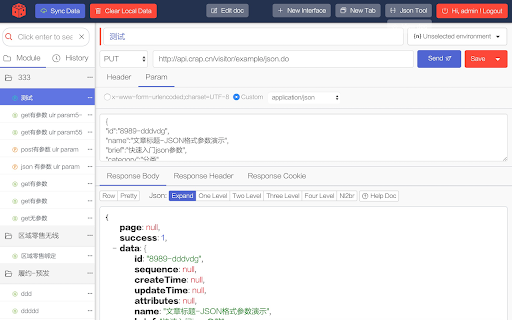
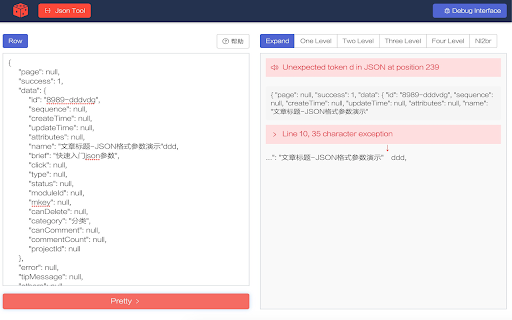

CrapApi is a plug for testing RESTful web services, like postman. ApiDebug is a browser plug-in for testing RESTful web services.A tool like postman and resteasy. It might be used for testing other HTTP communications too. Support interface debugging (POST, GET), support JSON, XML and other parameters. If you want to save data to you own database, use the API administration tool -CrapApi(a tool to admin interface and save ApiDebug data. CrapApi is open sourced, you also can use the online service, is free to all. The website url is http://api.crap.cn)

划词翻译
一站式划词 / 截图 / 网页全文 / 音视频 AI 翻译扩展,支持谷歌、DeepL、ChatGPT、百度、有道等 22 个国内外主流翻译服务,且均可用于全文翻译。能在 PDF 里使用。 划词翻译最初发布于 2013 年,距今已有 11 年历史,且仍在持续更新当中。 - 内置高准确度的谷歌翻译,能确保翻译结果跟 translate.google.com 是一致的。 - 鼠标划词功能,支持丰富的设置项,比如黑 / 白名单、关闭鼠标划词后通过快捷键来触发翻译等。 - 鼠标悬浮取词。 - 语音朗读。 - 内置独立翻译窗口,用于翻译浏览器外的文本。可以勾选持续监听剪切板,在任意程序复制文本即可自动弹出并翻译。 - 网页全文翻译,可以切换原文 / 译文 / 双语对照、自动开启等。 - 截图 / 图片翻译。 - 内置 PDF 阅读器,用于在 PDF 文件上实现鼠标划词、鼠标悬浮取词、截图翻译等功能。对 PDF 进行全文翻译的功能正在加紧开发中。 - 麦克风翻译。 - 音视频翻译(内测中),翻译网页中的音频 / 视频。 - 支持历史记录和收藏夹。收藏夹内容可以导出成多种文件,例如 json 和 csv。 完整功能介绍请查看 https://hcfy.ai/docs/guides/summary/ 英文单词会提供音标、详细释义、美音 / 英音朗读和词根,词根可以被点击,点击后即可查看词根的翻译结果。如果你需要,划词翻译也可以在划词后自动朗读被划选的单词。 默认使用弹窗在文本附近显示翻译结果,也可以固定在一处显示。 支持在任意程序里复制文本后,按下 Ctrl + Shfit + 1(macOS 将 Ctrl 改为 Command)查看翻译结果,无需切换回浏览器。这个快捷键是可以修改的。 支持历史记录和收藏夹,这两个功能也可以关闭。 如果你遇到了问题或者想要新的功能,可以在评论区留言,我基本上都会答复。官网(https://hcfy.ai)里也有其它反馈渠道。

Eolink APIKit Plugin
Eolink APIKit Plugin is a powerful API management platform and easy to use.

Octotree - GitHub code tree
Browser extension that enhances GitHub code review and exploration. Features * Fast IDE-like code tree * Quick search in tree format * Bookmark repos, issues, PRs, files * Support GitHub themes * Support private repositories * High performance, working with repositories of any size NO BS POLICY: Octotree doesn't track you or share/care about your data at all. GitHub tokens are only needed when you want to access private repositories or exceed GitHub API rate limit. Octotree stores tokens in your browser storage and only uses them to authenticate with GitHub.

Axure RP Extension for Chrome
An extension that allows viewing of locally published Axure RP prototypes (HTML files) from Google Chrome. Add this extension to view locally published prototypes (HTML files) created from Axure RP in Google Chrome. This extension requires a high access level to allow the viewing of the file:// protocol. This extension only requires these permissions to allow viewing of prototypes in Chrome - Axure does not track or access any of your information. IMPORTANT: After installing the extension you must check the setting "Allow access to file URLs". You can access this by going to: Tools > Extensions > Axure RP Extension for Chrome from the Chrome > Preferences menu. This extension allows you to view Axure RP prototypes in Google Chrome. It is not used to open Axure RP project files (.rp, .rpteam) for editing in Google Chrome. You do not have to install this extension if you want to view prototypes hosted on the web. For example, you don't need this to view prototypes from Axure Cloud (app.axure.cloud) or Axure Cloud for Business (axure.com/enterprise). If you have any issues or questions, please email support@axure.com To download the latest version of Axure RP or a free 30-day trial, visit axure.com/download.
