
kihpomglkbgbhdhogikhpbgakniddmfj
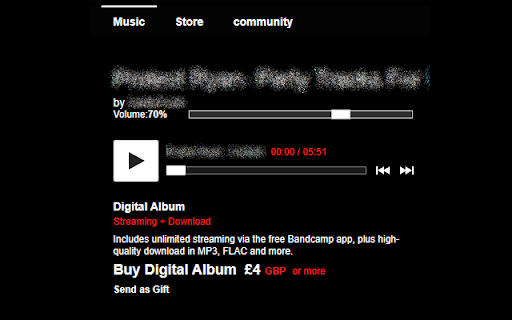
Allows for adjusting music volume on bandcamp.com The album preview on bandcamp does not have volume controls. This adds a volume slider between the track information and the preview play button.

Bandcamp Volume
The BIG Version 2.0 update! Features include: - Syncing of your volume between pages on a single computer (turn this off in Options) - A new logo - New slider layout with Mute functionality - Slider now works on some homescreen players Thank you to github.com/roguedarkjedi and https://github.com/josh-bridge for their contributions! Bandcamp, by default, does not have a volume control on it's player. This extension adds a volume slider to Bandcamp Album pages. You can check out the source code for this extension on github via the website link. This extension is still considered beta and may have issues, if you find one, you can submit a bug report via the Support & FAQ link.

Controls for Instagram Videos
This tiny and efficient extension adds standard video playback controls to Instagram™ videos. Normally, all you can do with an Instagram™ video is play or pause it, but this extension will expose the native HTML 5 video player which has a seek bar (aka video scrubber), a volume control, a play/pause button, Picture-In-Picture (floating video) button, fullscreen video button, and on *some* videos it will also display a download button! The extension automatically runs and works on all web pages that embed Instagram™ videos! How to use it: 1) Load any web page that contains an Instagram video 2) Click the video to make it play 3) That's it - the extension will automatically detect the video and will reveal the control buttons. Options: -Control volume and playback speed via hotkey. -Remember your volume and playback speed for future videos. See the extension config page via right-clicking the extension icon in your browser bar, then select "Options". Or, just navigate to chrome://extensions/ Notes: - After you install the extension, make sure to reload the page for any browser tabs that were opened before installing the extension. The extension will not run in those tabs until you do so. - The download video button doesn't work on many videos anymore due to recent instagram changes, but it does still work on *some*. - On pages where instagram auto plays videos as you scroll, such as on your home page feed, make sure to play/pause the video by clicking in the center of the video, instead of using the button at the lower left. Otherwise, when scrolling, the video may not stay paused. Wondering why the extension is broken so much lately? Read https://rehfeld.us/browser-extensions/controls-for-instagram/instagram-changes Issues currently being worked on: -Remember volume and playback speed not working in some cases. -The volume mute/buttons on the video vs the Instagram GUI aren't always in sync. -On stories, you must use the instagram play/pause button because the button on the video doesn't work. Legal: Instagram™ is a registered trademark. This extension was developed independently of Instagram, by someone who is not related or affiliated with Instagram, without any help or endorsement from them. --------- Changelog --------- Feb 5th, 2023 V1.33 - Fix for not being able to click controls on some videos on home feed. Also make background shade which covers most of the video on reels pages less visually disruptive. Feb 2nd, 2023 V1.32 - Another potential fix for some users not seeing controls on some videos. Also, add support for reels. Nov 24th, 2022 V1.30 - More reliably adjust video height on story videos. Also, potential fix for some users not seeing controls on some videos. Nov 18th, 2022 V1.29 - Fix video controls not being easily clickable for certain videos. Also, new features: configurable hotkeys for volume and video speed (right the extension icon > options). Jun 22nd, 2022 V1.28 - Upgrade to manifest v3. This is a technical change, and should not affect any functionality. Jun 17th, 2022 V1.27 - Make videos stay paused when scrolling on home page if you pause the video by clicking in the center of the video (pausing via the tiny pause button in the lower left will not work). Also, fix bug preventing users with a non-english browser language from using core features. Jun 2nd, 2022 V1.25 - Adapt to recent instagram updates, fixing sudden lack of video controls. Also, resize the video upwards a bit on stories so the video controls arent covered by instagram comment/like buttons. Aug 17th, 2020 V1.23 - Potential Bugfix for disappearing videos/images on some pages. Aug 5th, 2020 V1.21 - Bugfix for disappearing videos on some pages. Jul 18th, 2020 V1.19 - On some Story videos, resize the video a bit so the "Send Message" text box doesn't overlay the video controls. 2nd attempt. May 11th, 2020 V1.18 - Undo previous change to Story videos, which affected some non-story videos and broke them. May 9th, 2020 V1.17 - On some stories, move the video a bit so the "Send Message" text box doesn't overlay the video controls. Oct 30, 2019 V1.14 - Add ability to set video playback speed. Also, enable the "remember volume" feature by default. Sept 29, 2019 V1.13 - Add ability to automatically remember the volume of videos. Jun 8, 2019 V1.11 - Update to react to Instagram changes, fixing support for stories page. V1.3 - Renamed Extension. V1.1 - Improve compatibility to work on more sites, including instagram.com website and other, non instagram.com sites.

Web Scrobbler
Scrobble music all around the web! The extension is developed by a great number of contributors. IF THE EXTENSION STOPS WORKING, REPORT ON GITHUB ONLY: https://github.com/web-scrobbler/web-scrobbler/issues. You should click on a notification that is shown when the extension is loaded first time. Then, you should grant access to your accounts. The scrobbler status is shown on the right side of the address bar. Optionally you can enable desktop notifications of now playing songs. You can manually correct the song title by clicking on the scrobbler icon, if the song doesn't get recognized. Just click on the question mark icon and fill correct song info. See the options page for more information.

Bandcamp Tempo Adjust
A browser extension to detect and adjust track tempo on Bandcamp Detect and Adjust the tempo of tracks on Bandcamp 👉 Pick from ±6, ±10, ±16, or WIDE mode. 👉 Click on the percentage to reset the tempo 👉 Detect the BPM of tracks on album pages 👉 Adjust tempo on wishlist / collection page 👉 You're now a DJ! Bandcamp Tempo Adjust also includes a purchase export feature. Go to your purchases page to see how much you've spent on Bandcamp this year or export a CSV of all of your purchases.
