
kihikabndlcbnpbgjapkhlonoddholga

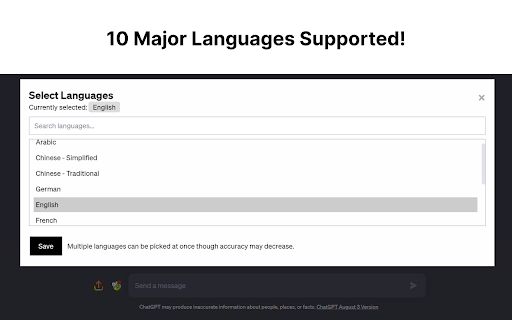
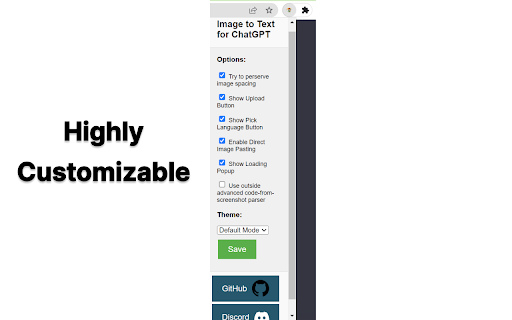
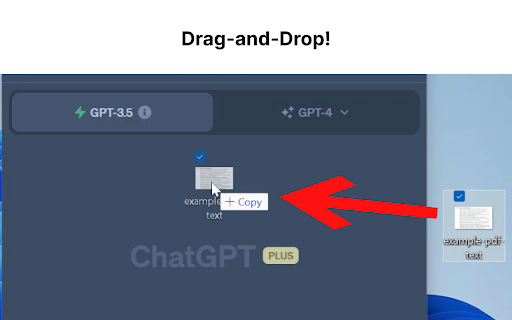

This extension was born out of a need for a fast, quick and intuitive way to get text from images into the textbox for ChatGPT. This extension accomplishes this with a great degree of accuracy and average speeds of ~5 seconds or less. Now, you don't have to switch between multiple tools just for Optical Character Recognition (OCR). With this extension, you can easily upload an image file or drag and drop it for conversion into text, which will automatically populate your ChatGPT textbox. Additionally, if you have a screenshot in your clipboard, you can directly paste (Ctrl+V) it into the textbox. Quick, hassle-free, and highly efficient - this extension is built with a focus on speed, user-friendliness, and most importantly, privacy. For the Tech Savvy: Powered by Tesseract.js, this extension runs OCR directly in your browser, keeping your data secure as none of your information leaves your device. All the OCR work is performed locally, ensuring maximum privacy. But we understand that sometimes, you may need an extra level of precision or need to retain the original format of the image, especially when dealing with content like Python code. For such instances, we provide an option to enable an embedded third-party solution created by Pieces.app. Check out their service at: https://www.codefromscreenshot.com/ All source code for complete transparency can be found on GitHub at: https://github.com/Tshetrim/Image-To-Text-OCR-extension-for-ChatGPT Join the Discord to share feedback, errors, or just chat: https://discord.gg/8hnkBhwTJ5 Disclaimer: Please note, if you opt to use the third-party embedded option, your privacy and data handling will be subject to their policy as this extension is not affiliated with them. Invest in your productivity today with our Chrome GPT extension, and experience the future of text transcription!

JPG IMAGE TO TEXT
It is an online tool, using the OCR we make it possible to extract jpg to text. It is an online tool that converts jpg image text into editable text format. Developed with OCR (Optical Character Recognition), a technology that obtains information from pictures and transforms it into soft copy. It convert active tab into a jpg and then using OCR to read all text on it.

Note It - Notes & OCR
A feature-packed note-taking extension with OCR support. With our note-taking app, you can take notes, convert images to text, download notes to PDF. You’ll be able to stay organized with a beautiful minimalist design. - ✍ Take notes in rich formatting. - 👀 Open the extension as a pop-up or re-sizable window. - 👀 Three different themes light, dark and dim - 📸 Take a screenshot of the active tab and: - ✂️ Copy the cropped image - 📜 Convert to text (OCR support) - ✔ Download the cropped image - 💾 Save notes on your local machine - 🗃 Notes folder - ⭐ Make notes as favorite - 📁 Download note in PDF format - 🗄 Convert your images to text (this feature works only when the extension is in window mode) This extension is open-source and does not store any user data on any server. All your data is on your local computer. Please get in touch with us if you find any bugs or have any features or recommendations. The GitHub link is available on the home page. Note It is a non-profit extension. We built and now maintain it during our free time, and we try our best to improve it and keep it up to date.

Upload file for ChatGPT
Unlock superpower for ChatGPT without ChatGPT Plus A Chrome extension that allows you to upload file directly into ChatGPT! 🔗 50 file format supported 👆 Drag and drop supported 🚀 Upload more than one file at a time 📁 Multiple file upload supported 📥 Download code file directly from chatGPT 👨💻 Preview code to Codepen/CodeSandbox ❓Ask question to chatgpt on any page just with Ctrl + Shift + Q shortcut 🤝 If you would like to support my work, you can donate to buymeacoffee.com/reygner022A 🐦 I share free project on my Twitter : twitter.com/guillaume_rygn

Magic OCR - Extract Text from Images, PDFs & Screenshots (100+ Languages)
🚀 Unleash the Power of Magic OCR – AI-Powered Text Recognition for Google Chrome Transform images, PDFs, documents, videos, and screenshots into editable and searchable text using our powerful Chrome OCR extension. Magic OCR supports 100+ languages. Whether you're a developer, student, or professional, say goodbye to manual data entry and unlock the speed of digital conversion right inside your browser. ✅ Extract text from images, scanned PDFs, websites, YouTube videos & screenshots ✅ Supports 100+ languages including English, Portuguese (português), Spanish (Español), Arabic (العربية), Chinese (中文), Japanese (日本語), Korean (한국어), Russian (русский), Thai (ไทย), Gujarati (ગુજરાતી), Hindi (हिन्दी), Tamil (தமிழ்), Telugu (తెలుగు), Bengali (বাংলা), and more. ✅ Lightning-fast AI OCR with smart detection ✅ Copy, download, or export extracted text instantly ✅ No account required – includes 200 free credits to get started ✅ Secure & privacy-respecting (no hidden tracking) 🎯 Built for everyone – from coders watching tutorials to researchers handling scanned files, Magic OCR saves time, boosts productivity, and simplifies text extraction. 💡 Works wherever you browse – simply click, capture, and convert visual content into editable text. Perfect for subtitles, PDFs, receipts, forms, and more. 🔓 Get started with Magic OCR today – your AI text recognition toolkit, built for the modern web.
