
kidaobgibidickkdbapmeekkaejkacma
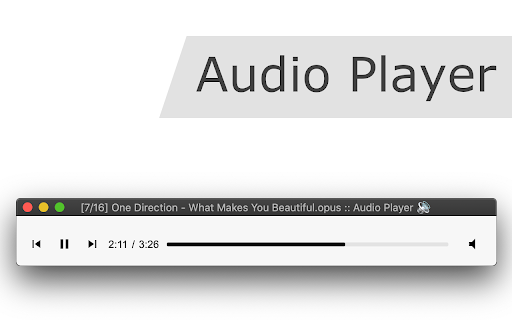
Features: Volume Boost: It can boost the audio level up to twice its original value, similar to VLC Player. Format Support: It plays a wide range of audio formats and can handle audio streams from video containers. Media Key Support: Supports media keys for Play, Pause, Resume, Next, and Previous tracks. Sequential Playback: Plays multiple audio files sequentially, emulating the behavior of a desktop media player. Offline Usage: Works offline, meaning it doesn't require an internet connection once installed. JavaScript-based: The extension is written purely in JavaScript, making it a cross-platform solution. Shuffle and Repeat: It offers options to shuffle the playlist and repeat a single track or all tracks. Keyboard Shortcuts: Supports keyboard shortcuts for various functions. Playlist Support: Allows users to create and manage playlists within the player. Native Integration: Integrates natively with ChromeOS and Chrome OS Flex, enabling media file handling through the right-click context menu. Use Cases: OS Limitations: It's useful for users on operating systems that do not allow the installation of native media players or on Chromium OS. Audio Stream Playback: It is handy when you only want to listen to the audio from a media file, like a concert recording. How to Use: To use the extension, download an audio file that your browser can't play due to unsupported codecs and drop it into the audio player. You can obtain sample AVI or FLV files for testing using a specific website (https://webbrowsertools.com/test-download-with/). Technical Notes: The extension uses the decoder section of the FFmpeg library, enabling it to decode various audio codecs. It uses Emscripten to compile FFmpeg into WebAssembly (WASM), making it compatible with web browsers. This extension is a handy solution for users looking to play a wide range of audio formats directly within their web browser, even when their operating system restricts the installation of native media players. It provides extensive format support, advanced features, and native integration for an enhanced user experience.

Free Music on Google Drive™
Play your music quickly from Google Drive or local computer. Play your music for free quickly from Google Drive™. Listen to music for free without any annoying ads interrupting your songs. Free Music on Google Drive™ is a free online software which allows you to listen to music online from your Google Drive. The music files are stored on your Google Drive You don't need to download music to your computer before you can listen to music. You can use the online music player to import music directly from your Google Drive and listen to music right away. It's simple, we support many formats (aac, mp3, m4a, wav, ogg, weba, wma). No installation required is required, there is no cost. Save your time from downloading music to your computer as our software will help you listen to your favorite songs from Google Drive. Steps to Use Free Music on Google Drive™ 1) Install Free Music on Google Drive™ 2) Upload your favorite songs to your Google Drive™ (One time Upload) 3) Begin playing your songs from Google Drive™ . Have access to your songs no matter where you are if you are online This is better then Spotify because you can make your own custom playlists and there are no ads to disrupt the listening experience. The only limit is your imagination! Disclaimer: Please note this extension is NOT made by Google and is made by an independent development team. All copyrights belong to their respective owners. Google doesn’t endorse or sponsor this Chrome extension. Free Music on Google Drive™ is not owned by, is not licensed by and is not a subsidiary of Google Inc.

Open in VLC™ media player
Send audio and video streams directly to the well-known VLC™ media player Open in VLC™ media player extension, sends video and audio links to the well-known VLC media player. This way you can directly watch online streams in the VLC media player with just one click. To send these links to the VLC media player, right-click over the video or audio link and use the context menu item or use the browser action button. If the extension only grabs a single link, the link is opened in the player. If multiple links are detected, you will get a prompt box to select media links to be sent to the player. Note: For this extension to work, you will need to install a minimal native-client application. Instruction on how to install the native client will be displayed once the extension is used. You can also watch installation instruction on the FAQs page How to use this extension: 1. The extension appends a context menu item to the browser context menu when the media element is the target. 2. The toolbar icon becomes active (colorful) when a page is supported As of version 0.2.0, there is a tool to join media files in a single media file. You can find this tool on the right-click context menu over the page action button. The output format of this tool is WAV. You can use VLC to convert this WAV file to any other audio format. --- Legal VLC is a trademark of the VideoLAN organization. This extension is an independent project and has no relationship to the VLC team or VideoLAN organization.

Video Player for Local Files
A web video player for local files. An easy-to-use and very lightweight video player for local video/audio files, powered by Web technology. It works completely offline. In addition to using the mouse, it supports many useful keyboard shortcuts, as well as a few simple settings. Updates: 1.0.0 (May 1, 2023): Support playlist UI and loop playback mode. FAQ: 1.How to open the player? Click the extension icon. 2.How to open files? • Click the "Folder" icon in the panel • Keyboard shortcut: Ctrl/Cmd + O • Drag and drop files to the player 3.Subtitles Independent or embedded subtitles are not supported. Maybe I will support independent subtitle files in the future. Of course, if the subtitles are already in the video stream, they can be displayed. 5.Video format and codec Because the underlying core functions are completely implemented by the browser, only some video formats and codec are supported. In addition, it doesn't support multiple audio tracks switching.

BetterPlayer - A Modern Video Player
A complete replacement for the default HTML5 video and audio player. ⭐ BetterPlayer was designed as a modern replacement for the default player built into Chrome. ⌨️ With BetterPlayer, you can use various keyboard shortcuts to quickly control the video playback.
