
ihpiinojhnfhpdmmacgmpoonphhimkaj
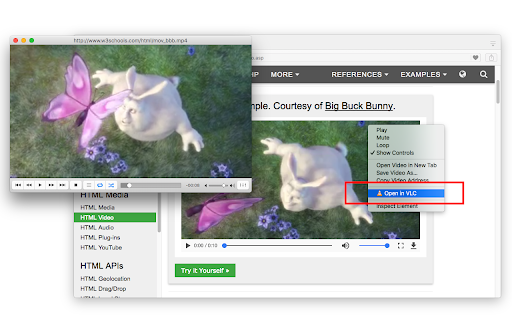

Send audio and video streams directly to the well-known VLC™ media player Open in VLC™ media player extension, sends video and audio links to the well-known VLC media player. This way you can directly watch online streams in the VLC media player with just one click. To send these links to the VLC media player, right-click over the video or audio link and use the context menu item or use the browser action button. If the extension only grabs a single link, the link is opened in the player. If multiple links are detected, you will get a prompt box to select media links to be sent to the player. Note: For this extension to work, you will need to install a minimal native-client application. Instruction on how to install the native client will be displayed once the extension is used. You can also watch installation instruction on the FAQs page How to use this extension: 1. The extension appends a context menu item to the browser context menu when the media element is the target. 2. The toolbar icon becomes active (colorful) when a page is supported As of version 0.2.0, there is a tool to join media files in a single media file. You can find this tool on the right-click context menu over the page action button. The output format of this tool is WAV. You can use VLC to convert this WAV file to any other audio format. --- Legal VLC is a trademark of the VideoLAN organization. This extension is an independent project and has no relationship to the VLC team or VideoLAN organization.

Video Player
Video Player is a Chrome extension that offers a comprehensive video player when you open a video in a browser. - Offer a better user experience than the default player. - Offer multiple shortcuts for controlling the video player. - The video player has a video preview when hovering over the timeline. This extension is useful to watch movies on your computer without the need to download a video player on your computer. This extension can play every supported video format supported by the browser. This extension will load the video player only when the link in the browser is a video. To play a local file, you simply have to copy the path in the URL bar or drag and drop it in the browser.

Video Player
Video and audio player with speed control, playlist, shuffle, and volume-boosting This is a simple, yet powerful media player that supports audio boosting to 300% and playback rate speed up to 8 times. It has a minimal interface and only appends controls that are not provided by default by the VIDEO element. This extension offers to play media files from a local disk or a remote resource. It uses the standard caching method to play remote sources with minimal interruption. Features: 1. This player can increase volume up to 300% similar to the VLC media player 2. This player can increase the video playback rate up to 8 times 3. It supports repeating one song or an entire album 4. Can extract media sources from a destination directory and all its children's directories. 5. You can take screenshots of the video with a button or with a keyboard command. 6. Can play video formats that your browser does not support (using FFmpeg transcoding) (FLV, AVI, WMV, ...) Usage Sample 1: 1. Open "https://www.w3schools.com/html/html5_video.asp" in a browser tab 2. Right-click on the player 3. Use "Play with Video Player" Usage Sample 2: 1. Open "https://www.w3schools.com/html/html5_video.asp" in a browser tab 3. Right-click and save the video to the disk 4. Open the player and drop the video to the player's interface

Open in VLC™
Easily open desired links in the VLC (VideoLAN) media player! Open in VLC™ is an extension that enables you to open desired link(s) in VLC (VideoLAN) application. VLC is a free and open-source media player that can play almost any types of media (audio or video). To operate with this addon you need a native-client patch to connect your browser with native VLC application in your OS. When you first install the addon, please head to the options page and adjust the path for VLC player. Depending on your operating system, the path to VLC could be different. For example, in windows 10 the path is: "C:\Program Files (x86)\VideoLAN\VLC\vlc.exe". Please re-check this path in your OS and make sure it is correct. Once you set the correct path to VLC in the options page, please install the native-client patch. This patch is used to make the communication between the addon and VLC (native app). Please download and install this patch from (https://github.com/alexmarcoo/open-in-native-client/releases). Follow the instruction in the GitHub page to download and install the related patch to your system. After installing, the "Open in VLC™" addon in your browser can communicate with VLC media player on your machine (Window, Linux or Mac). Note 1: please note that Open in VLC™ addon, does NOT belong or relate to VLC or VideoLAN at all. It is basically an unofficial addon that is developed and maintained independently by its author. Note 2: if you want to report bugs or have a feature request, please fill the bug report form in the addon's homepage (https://mybrowseraddon.com/open-in-vlc.html).

MX Player Booster
MX Player Booster is an extension that will allow you to increase the sound of your system. It can raise volume level up to 600%. 1. Click on our extension logo in your extension bar 2. Open up a Youtube, Spotify, Apple Music, or any tab that produces sound 3. Slide the bar to your comfortable volume - All the way up to 600%
