
kicekkepbmfbaiagdcflfghmnnachmdg
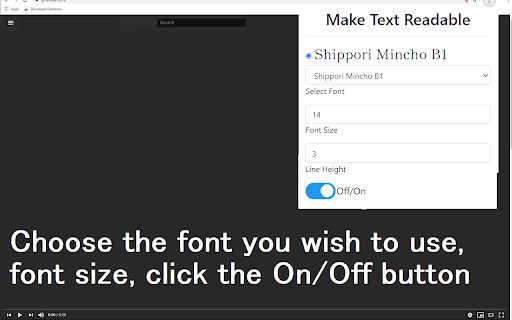
Free! Adjust font, height, and font size to make web pages easier to read. Change the font size/type of font used and height inbetween lines to make the text more readable. Ever struggled with reading text on a website because of a poor font choice used by the website designer? You can change the font which is used on any webpage now when you use our software extension. Install our software extension Go to the webpage which you want to change the font for Choose the font to use and font size, by clicking on the extension icon Click OFF , and then click ON button to finalize the font change The web page should now be using the font you wish. This software is 100% free. Disclaimer: Please note this extension is NOT made by Google and is made by an independent development team. All copyrights belong to their respective owners. Google doesn’t endorse or sponsor this Chrome extension. Make Text Readable for Google Chrome™ is not owned by, is not licensed by and is not a subsidiary of Google Inc.

Reader View
Removes clutter like buttons, backgrounds, adjusts text size, contrast, and layout for better readability Reader View extension brings Mozilla's open-source Readability implantation to Chromium. Using this extension you can strip clutters from webpages and read them on "Reader View" mode. The extension allows you to toggle between normal view and reader view by pressing the page-action button. Note that reader view mode works best for web pages that have a lot of content. There are some tools in the left side panel that can help you personalize your Reader View. You can change color, background-color, font-size, font-family and width of the reader view. Features: -> Remove distraction -> Read in fullscreen mode -> Remove advertisements -> Save in HTML format -> Print document -> Read content using a powerful Text to Speech (TTS) engine -> Edit HTML content (live editor) -> Email document (with title, body, and reference to the original document) -> Correctly display mathematical formulas (MathJax equations are Supported) -> Highlight selected text -> Move to the next and previous pages -> Keyboard shortcuts for almost all actions -> Resize images on the design-mode -> Display DOI (Digital Object Identifier) details -> Display publish date -> Add persistent sticky notes -> Bionic Reading -> Adjust number of columns *** 0.6.x releases *** The extension is now running on manifest v3! Make sure you have the latest version of your browser to use this extension (The minimum acceptable Chrome version is 104). There are a few changes to make it compatible, so please report bugs if you see broken features. For more info please visit: https://github.com/rNeomy/reader-view/ Change Log: 0.1.3: Calling a reader view by restoring it from history will trigger history.back 0.1.4: A more visible icon. Fixes a reader bug. 0.1.5: It is now possible to toggle the reader view using keyboard shortcut (define one from Chrome's settings page) 0.2.1: Document parsing is improved. Switched to the latest Readibility.js library. Ctrl + S now saves the document same as pressing the "Save" button. Reader View now supports both rtl and ltr languages 0.2.2: It is now possible to select some content and ask the reader view to convert only the selected part. This is useful if the automatic selection tool is not detecting the content correctly. 0.2.4: Speech engine is added. You can now ask the extension to read the article for you. Estimated reading time is displayed below the article title

Reader Mode for Google Chrome™
Strips away clutter like buttons, background images, and changes the page's text size, contrast and layout for better readability Do you want to view a news article online without the advertisements etc all blocking the actual article? Simply install our software Reader Mode for Google Chrome™ and our software will help you remove all the clutter away from a webpage. This is a simple chrome reader mode software which allows you to focus on the text. Switch to reader view instantly once you install our software. To get started, here are the few simple steps to follow Install the software Reader Mode for Google Chrome™ Go to the website you want to use Reader Mode Click on our software icon/right click and choose "Reader Mode" Our software will automatically remove the advertisements, leaving behind only the article for you to focus on. Disclaimer: Please note this extension is NOT made by Google and is made by an independent development team. All copyrights belong to their respective owners. Google doesn’t endorse or sponsor this Chrome extension. Reader Mode for Google Chrome™ is not owned by, is not licensed by and is not a subsidiary of Google Inc.

Make Chrome Text Black
Make Chrome Text Black is a Google Chrome extension that lets you customise how text appears in your browser. Make text darker so you can read websites and email the way you want to. ** THIS EXTENSION HAS A 14 DAY FREE TRIAL AND REQUIRES A SUBSCRIPTION PURCHASE ** This extension works with Google Chrome, Microsoft Edge, Opera, and Brave. Are you sick of sites that put grey text against white backgrounds? You're not going blind, you're just suffering from a terrible design trend. You don't need to highlight text just to read it anymore. Change text to black with this extension. Some websites look like they've been written for ants. You can zoom in on the page, but then it zooms in on all the pictures, buttons, icons and turns the page into a cluttered mess. Leave your magnifying glass behind, you can now change text size. Ever had to squint with your eyes two inches from the screen because of pencil thin text? All it does is give you is eye strain and headaches. You don't need to worry about this with Make Chrome Text Black. Make text bold and thicker. How about strange fonts that look closer to ancient symbols rather than letters? They might look cool in a web designer’s portfolio, but not when you’re trying to read them. You can now change the font to something sensible.

Help Me Write - Grammar Checker and Paraphrase Tool for Google Chrome™
Select text to improve grammar, paraphrase sentences, and adjust tone instantly. Simple AI extension powered by Gemini Help Me Write is a free, easy-to-use ai writing assistant built for people who write every day. Whether you’re drafting emails, updating social media, or replying to clients, this productivity chrome extension brings intelligent editing directly into your browser. It turns any text field into a smart workspace designed to boost writing productivity. 1️⃣ Select any text on a webpage. 2️⃣ Click the blue dot that appears. 3️⃣ Refine your selected content instantly. ✨ AI-Powered Writing Actions Powered by Gemini API, the extension offers intelligent rewriting tools that adapt to your intent. Each action is designed to improve writing flow, clarity, and tone in seconds. 1️⃣ Improve – Fix grammar, spelling, clarity, and structure with one click. 2️⃣ Elaborate – Expand short ideas into detailed, well-structured content. 3️⃣ Shorten – Condense long text into clear, concise messaging. 4️⃣ Formal – Rewrite sentences in a professional, business-ready tone. 5️⃣ Casual – Transform rigid text into friendly, conversational language. This makes it more than just a grammar checker. It works as a paraphrase tool, sentence rephraser, and ai copywriter in one streamlined interface. 🚀 Designed for Real Writing Productivity Help Me Write is ideal for professionals, students, founders, marketers, and remote teams who want faster content refinement inside their browser. ➤ Draft polished emails with the built-in ai email writer (works in Gmail or any web mail) ➤ Instantly rewrite sentences for clarity and tone ➤ Improve writing flow in long-form content ➤ Adjust tone depending on audience ➤ Refine social media captions and replies Unlike ai chat solutions that require copy-paste between tools, this ai writing assistant integrates directly into your workflow. 🧠 Interactive Editing & Full Control The extension gives you control over every revision: ➤ Preview suggestions before applying changes ➤ Manually edit the generated content ➤ Use Undo and Redo to cycle through versions ➤ Replace selected text directly inside the webpage The replace button instantly inserts your refined version back into the original field, eliminating friction and saving time. 🎯 Minimalist, Non-Intrusive Design Help Me Write uses a lightweight floating modal built with Shadow DOM technology, ensuring it blends naturally into any site without breaking layouts. The interface stays discreet and responsive, keeping focus on your writing. 💼 Perfect for Everyday Writing Tasks Whether you need an ai email generator for business outreach or a quick grammar checker for casual messages, this tool adapts to your context. 📈 Built for Speed and Efficiency Because it activates contextually, you only see it when you need it. No switching between browser tabs. Just select, click, and rewrite sentences instantly. ❓ What makes this different from a typical grammar checker? It is simple, free, easy-to-use tool tone adjustment, expansion, shortening, and full sentence rephraser functionality. ❓ Does it work on all websites? It works on most text input fields across popular platforms, including Gmail, and social media. ❓ Can I edit the AI suggestions? Yes. You can manually refine suggestions before replacing the original text. ❓ Who is it for? Anyone who wants stronger writing productivity: from students and freelancers to founders and remote teams. Upgrade your workflow with Help Me Write, the ai writing assistant that transforms everyday typing into confident, polished communication.
