
khoooekfjeadpjimigdbbalnbdcbapbm
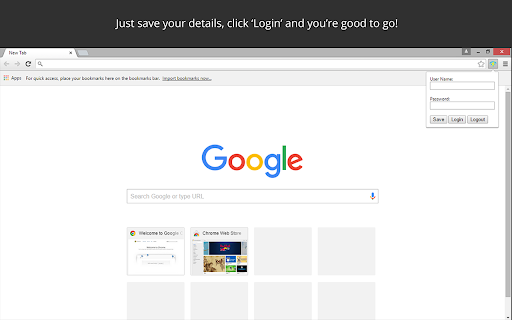

An extension that automatically logs you into VOLSBB (VIT College Wifi) All you need to do is click on the icon, enter your details, then press 'Save'. Click on 'Login' to log in to VOLSBB. To change your username/password, simply type it again in the popup and click 'Save'. The extension will automatically try to log you when you start up chrome or when the pronto authentication page is open. This normal behavior! Just sit back, relax and let the app do the work for you. This app has been tested to work in VIT Vellore, but can theoretically work with any Pronto Authentication System. To see the source code and for more info, visit - https://github.com/cybergla/pronto-auto-login. This extension does NOT record your usernames or passwords. All your data is stored securely with your Google account. DISCLAIMER: This product is still in beta and you may notice some bugs.

SwiftSlots
SwiftSlots by IEEE-VIT helps VIT students create the best FFCS timetable based on course and slot preferences. SwiftSlots is a tool designed by IEEE-VIT to simplify the course selection process for VIT students. This extension helps students navigate VIT's Fully Flexible Credit System (FFCS) by enabling them to create an optimized timetable based on their chosen courses and slot preferences. SwiftSlots allows users to extract course details directly from VTOP, select their preferred courses, and filter by morning or afternoon sessions. With just a few clicks, SwiftSlots generates a personalized PDF with all possible slot combinations, ensuring students get the best schedule that meets their needs.

SpeedMate: Speed Test & Internet Connection Monitor
SpeedMate Speed Test is the ultimate Chrome extension for measuring speed, testing internet connection quality, and troubleshooting connectivity issues in real time—and it’s free to use! Key Features of SpeedMate Speed Test: ⚡ Speed Testing: Measure your Download, Upload, and Ping speeds to ensure smooth streaming, gaming, and video calls. 📊 Live Latency Monitoring: Visualize real-time latency to detect and resolve lag issues quickly. 🌐 Internet Connection Testing: Automatically test new connections and stay ahead of potential issues. 📈 Performance Indicators: Track and compare past speed tests to monitor trends over time. 🛠️ Capabilities Overview: Quickly check if your network can handle bandwidth-heavy tasks like music streaming, video conferencing, and gaming. 🔔 Real-Time Alerts: Stay informed of internet slowdowns or connection disruptions. Built by the Team Behind Fix-IT Mate: SpeedMate Speed Test is powered by HubbleIQ, the creators of Fix-IT Mate, the go-to solution for autonomous tech support. Together, these tools deliver a seamless experience for diagnosing and resolving tech and connectivity issues. Who Is SpeedMate Speed Test For? 🛠️ IT Professionals & Network Engineers: Proactively manage and troubleshoot network performance. 💻 Remote Workers & Students: Ensure seamless video calls, online meetings, and uninterrupted learning. 🎮 Gamers: Minimize lag and enjoy uninterrupted, high-speed gaming. 🏠🏢 Home & Office Users: Optimize internet performance wherever you are. Why Choose SpeedMate Speed Test? 🎉 Free and Easy to Use: Accessible to all skill levels, with no cost to get started. ✅ Trusted Technology: Built by the creators of Fix-IT Mate, ensuring reliability and innovation. Advanced Tools: Combines speed testing, real-time connection monitoring, and proactive insights for better internet performance. Ready to Boost Your Internet Performance? Install SpeedMate Speed Test now for free on the Chrome Web Store and experience faster, smoother connections. For enterprise solutions, SDK details, or to learn more about Fix-IT Mate, visit HubbleIQ.com.

NeoExamShield
Prevents malpractice by blocking unauthorized extensions and websites during tests on the Iamneo portal. NeoExamShield is designed to support the integrity and fairness of the IAMNEO assessment platform. This extension helps maintain a secure examination experience by monitoring and restricting the use of unauthorized browser extensions during assessments. In addition to extension monitoring, NeoExamShield also enforces exam-specific access rules by blocking access to certain external websites as defined in its configuration. These restrictions are applied using pre-defined JSON rules included in the extension to ensure a controlled and distraction-free testing environment. NeoExamShield operates solely within the IAMNEO exam platform and does not collect personal data or monitor user activity outside the scope of exam security requirements.

Network Information
Useful information about your system's connection including, type, speed, and rtt. Network Information is an extension that provides information about your system's connection. It is working based on a new JavaScript API called "navigator.connection". When you open the toolbar popup UI, there is a big speed gauge at the top center which shows the "downlink" speed for your browser. This speed refers to the estimated bandwidth in megabits per second (not related to the current internet speed). Other metrics for the network information API are connection type and round trip time (rtt). There is a reload button at the top right corner of the screen which is for reloading the app UI. The next button is for resetting the app to factory settings. The third button on the right toolbar is for switching the interface theme to dark. There is also a wifi icon at the middle right section of the screen which shows the online or offline status of your browser. If you found a bug to report, or have a feature request in mind, please fill out the bug report form on the add-on's homepage (https://mybrowseraddon.com/network-information.html).
