
khkpfnickpejcjhajmkljfadcaegphkd

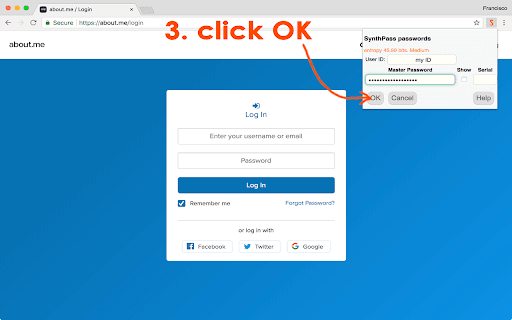
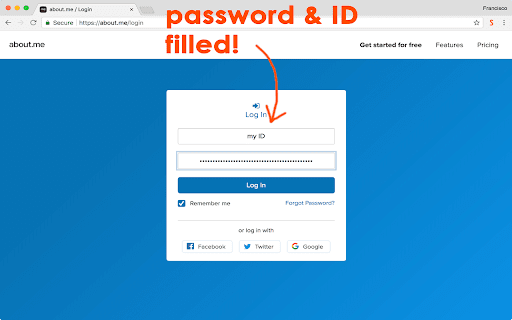
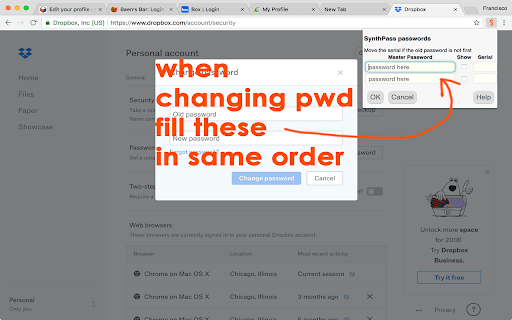
SynthPass: The Zero-Vault Password Synthesizer Conventional password managers are part of the problem. They ask you to trust a "vault"—a centralized database of your most sensitive secrets that lives on a server, waiting to be breached. SynthPass is the solution. It doesn’t store your passwords; it synthesizes them. ELIMINATE THE TARGET With SynthPass, there is no database for a hacker to steal. Your passwords exist only for the split second they are generated, calculated mathematically from the domain name and your Master Key. Because no secrets are stored, there is no central vault for an attacker to find—even if your computer is seized or a server is compromised. NEW IN v2.0: ENHANCED SOVEREIGNTY Version 2.0 introduces a superior synthesis engine for even stronger cryptographic results. The v2.0 Standard: Our most robust generation logic to date, now set as the default. Classic Mode Toggle: Total backward compatibility. If you have legacy passwords generated with the original engine, simply check the "Classic mode" box to generate them exactly as before. CORE ARCHITECTURE Master Key Security: Your Master Key is never stored. It resides in volatile memory only as long as you are using it, before a mandatory Security Auto-Wipe purges it after five minutes of inactivity. WiseHash™ Logic: We don't just hash your key; we "stretch" it. Our WiseHash algorithm evaluates the entropy of your Master Key and applies a variable number of SCRYPT iterations. The weaker the key, the harder the math—forcing hackers to waste years of compute time on simple guesses. Infinite Serials: When a site forces a password change, don't change your Master Key. Just increment the optional Serial; SynthPass remembers the serial and your User ID locally so your password remains unique and high-strength. THE VAULT (LOCAL-ONLY STORAGE) For data that cannot be synthesized, SynthPass provides a secure Vault. Specific Passwords: If you must use a certain non-synthetic password, store it here. Zero Cloud: Everything in the Vault is encrypted with your Master Key and synced only via the browser’s internal files—never our servers or a third-party cloud. MOBILE & EXTERNAL ACCESS Since the logic is purely mathematical, you can generate your passwords on any device using our secure web apps: UPGRADE TO PRIVACY BAR Looking for more than just passwords? Privacy Bar is our comprehensive security suite that includes the full SynthPass 2.0 engine alongside post-quantum encryption, steganography, and secure file management. If you use Privacy Bar, you already have the power of SynthPass 2.0 integrated into your digital sovereignty toolkit. Stop storing your secrets. Start synthesizing them.

Amaranth Password Manager
Filling password for you using Amaranth algorithm We all know that using same password everywhere is extremly unsafe because websites cannot be trusted to protect them from hackers. So once one of your passwords is leaked, the other accounts are still safe. However, it is impossible to remember all passwords for different websites. So there are several solutions for password management, like LastPass, 1Password or KeePass. But are they really safe? LastPass had been hacked. Keep them local? You must synchronize manually. How can we balance the safety and convenience? Amaranth provides a simple password management solution. You just need to remember only one password (we call it main password), and set different site id for accounts on different sites (you can directly use the brand name like google or apple). Amaranth will calculate the password for you. Only you have main password, and site id, Amaranth can calculate correct password for you. If any of this 2 is wrong, Amaranth will provide different password. The benefits of this are that you only need to remember this specific main password IN YOUR BRAIN, and Amaranth can give you any password you need at any devices without synchronization and storage. So Amaranth is unhackable because it dose not store any of your password. It only provides an algorithm to generate them. It also comes with different type of password in case there is requirement in websites or services. For example, some website require longer password length (more than 10) but some service (like bank) require PIN as password. Amaranth provides 4 kinds of passwords which is PIN, Short, Classic and Long. According to HOW SECURE IS MY PASSWORD?, the Long type password needs 3 TRILLION YEARS to crack (as in 2016). The benifits of using Amaranth: Safe, unhackable. Even your computer is stolen, the passwords will never leak. Easy to remember. User just need to remember a main password and a rule of site id. Main password is only used to generate password, never used in actual websites. No need to think a new password for new account. There is also a shortcoming, if you choose this solution, you need to change your current passwords.

URSA Privacy
High strength symmetric encryption for your favorite email, plus real-time secure chat ⚠️ NOTICE: THIS EXTENSION HAS EVOLVED INTO PRIVACY BAR ⚠️ This legacy standalone tool is no longer actively maintained. The exact same functionality has been integrated, upgraded, and fully secured inside our flagship extension: Privacy Bar. Looking for pure Symmetric Encryption? Privacy Bar handles it entirely offline and has multiple modes in addition to what URSA offers. Looking for Read-Once payloads? Privacy Bar generates self-destructing messages out of the box. Looking for Page Isolation/Sandboxing? Privacy Bar features an enhanced, isolated "Safe Space" tab. 👉 Search the Chrome Web Store for "Privacy Bar" or visit privacybar.net to upgrade to the complete, modern suite. URSA sits near your tray bar to provide secure and easy symmetric encryption of text, images, and files. This is the process: 1. Click the bear icon to load URSA into a new tab. 2. Type the secret key into the top box. The recipient must know this key. 3. Type your message, possibly containing rich formatting, images, and even files into the large box, then click Encrypt. The recipient will decrypt the encrypted message, which can be sent by email or some other means without fear of its being decrypted, by typing the same key, pasting the encrypted message, and clicking Decrypt. If you feel really paranoid, URSA can encrypt into a cover image, so that it cannot be detected that anything is there. The image looks the same after the secret data have been injected. If you find yourself exchanging frequent messages with someone, you can switch into real-time chat, which can include text, files, audio, and even video! URSA's main encryption algorithm is XSalsa20, included within the NaCl encryption library. This algorithm has extensively been vetted by experts for over ten years without flaws being found. There are also two experimental algorithms: Pad, which uses a large piece of text (from a book, or a webpage) as key and is theoretically unbreakable, and Human, which can be performed by hand if necessary. URSA is fully compatible with PassLok Privacy, its larger sibling, also in this Web store. PassLok adds several asymmetric encryption modes, as well as secret splitting and digital signatures. There is also a web app at https://passlok.com/ursa You can check the integrity of the web version of URSA with this data: Current version of URSA is: 4.3 SHA256 of the single-file version, which can be downloaded from the above link: 62ac-893d-a6df-edfc-dbd9-a849-5404-5b13-6701-d0da-87c2-8d0b-bc44-5153-742b-96b0 See the developer reading this on video: https://www.youtube.com/watch?v=nzTyfvgrHgc

Little Synth Piano
Little Synth Piano is a compact and simple Use add-on for playing and learning the piano. A lightweight and simple-to-use add-on for playing and learning the piano is called Little Synth Piano. It is entirely constructed using web technologies (HTML, JS, CSS). Using either the mouse or the built-in keyboard, you can play your favourite sound. Little Synth Piano is a compact and simple-to-use add-on for playing and learning the piano. It is entirely based on web technologies. Using the mouse or built-in keyboard, Overall, this app is a lightweight and incredibly user-friendly piano and guitar sound or drum software that runs in your browser.

Entropass
Entropass is an open-source decentralized maximum-security password manager. It automatically generates passwords using an algorithm based on a master password, a private key file, and the domain of the current site so that you never have to store or remember your site passwords. This lets you have a unique password for every site that you visit without ever worrying about synchronizing or backing up a password database, which means that you don't have to trust and be tied to a cloud provider like LastPass or 1Password. This concept is not new, but unlike previous applications, Entropass uses both a master password and a private key file instead of just a master password. While other systems can be cracked by brute-forcing the master password, Entropass is impossible to crack without the private key file that is stored only on your devices. In other words Entropass utilizes the "something you know, something you have" security policy, making it much more secure than purely password-based methods.
