
khkhfdckilojgneleiifofcaihjjohpi

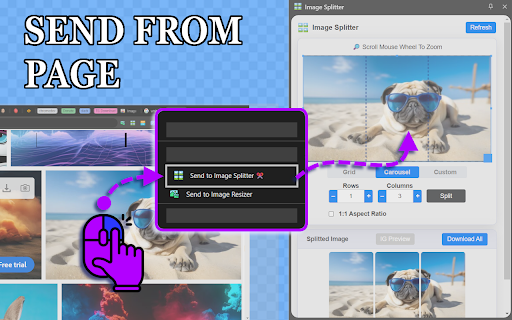
🪟 Split or change size of image, crop, resize & create photo grids effortlessly using Image Splitter! You perfect grid maker! 🤔 Are you looking for a powerful image splitter that can help you crop image, change size of image, and create stunning photo grids? Our Chrome app makes image editing easier. You can make assets for the right YouTube thumbnail size. You can design an Instagram grid or prepare a photo carousel for social media. 🚀 Key features of our Image Splitter: 1️⃣ Easy Photo Splitting: Split image into multiple parts with just a few clicks 2️⃣ Customizable Settings: Adjust rows and columns to create the perfect 3x3 grid or any other configuration 3️⃣ Instagram grid preview: Preview your split images directly on an Instagram profile without uploading 4️⃣ Secure and Fast Processing: All image editing happens on your device, ensuring privacy and speed 5️⃣ Versatile Image Upload: Drag-and-drop or send images directly from web pages 6️⃣ Interactive Preview: Zoom and examine your split images before finalizing 💡 Why choose our image splitter? Our tool isn't just a simple photo splitter or picture splitter. It's a comprehensive image grid app that caters to all your splitting picture needs. If you want to split an image online or use it as an Instagram image splitter, our platform can help. ✂️ How to split the picture in 5 easy steps: 1. Upload your picture to our image splitter 2. Choose your desired layout (e.g., 3x3 grid) 3. Adjust settings using our intuitive grid maker 4. Preview your split image to ensure perfection 5. Download your newly created splitted image or individual segments 🌟 NEW PRO FEATURE: Instagram Grid Preview Preview your split images directly on an Instagram profile without uploading: 1. Log in to Instagram 2. Click 'IG Preview' in Image Splitter 3. Navigate to any Instagram profile 4. Find and Click 'Splitted Preview' above the profile grid 5. Hover over the grid to see your split images in action! 🔧 Flexible splitting modes: ➤ Grid Mode: Perfect for creating instagram grid layouts ➤ Carousel Mode: Ideal for carousel instagram posts ➤ Custom Mode: Full control for unique split image projects 🖥️ Multiple image splitter opening options: ➤ SidePanel: Quick access from Chrome's action icon ➤ Popup Window: For focused editing sessions ➤ New Tab: Full-screen image splitting experience 📏 Supported formats and sizes: ➤ File types: PNG, JPEG, JPG, WEBP, BMP, and TIFF ➤ Max file size: 10MB ➤ Ideal for youtube thumbnail size: 1280x720 pixels ➤ Perfect for instagram grid: 3x3, 3x2, 3x1, and more! 🎨 Perfect for creatives and social media enthusiasts: • Design eye-catching youtube thumbnail size graphics • Create seamless instagram grid layouts • Prepare engaging carousel instagram posts • Use as a photo grid maker for stunning collages • Split image for various social media platforms 📱 Perfect for social media managers and influencers If you manage social media accounts or build your personal brand, our image splitter is a helpful tool. You can use it to: - Create consistent instagram grid layouts - Design attention-grabbing youtube thumbnail size graphics - Prepare carousel instagram posts that boost engagement - Split image for various platform requirements - Use the photo grid maker for creative collages 📌 How do I split a picture into pieces for Instagram? 🔹 Simply upload your image, choose your desired photo grid layout, and follow the steps listed in Instagram Grid Preview section! 📌 Can I use this for puzzle feeds? 🔹 Absolutely! Our image splitter is perfect for creating Instagram puzzle graphics. 📌 What image size should I use? 🔹 While our tool works with any size, we recommend following our dimension guide for optimal results on Instagram. 📊 Recommended dimensions for instagram grid posts: ▸ 3x1: 3240 x 1080px ▸ 3x2: 3240 x 2160px ▸ 3x3: 3240 x 3240px ▸ 3x4: 3240 x 4320px ▸ 3x5: 3240 x 5400px ▸ 3x6: 3240 x 6480px 📌 How can I create carousel slides for Instagram? 🔹 Use our Carousel Mode to easily divide your image into perfect slides for Instagram carousels. 💻 Compatibility and ease of use: Our splitter app works seamlessly across devices. You can easily split a photo, crop an image, or change the size of an image. This works on both desktop computers and mobile devices. Just a few clicks are all you need. No need to download any software - our online photo splitter is always accessible through your Chrome browser. 🔒 Security and privacy: We understand the importance of your images. That's why our picture splitter processes everything locally in your browser. No uploads to external servers mean your photos remain private and secure. 🌟 Start splitting, start creating! Ready to take your images to the next level? Try our image splitter today and experience the difference it can make in your visual content creation process. Whether you're splitting image for Instagram, creating a youtube thumbnail size graphic, or just exploring your creativity, our tool is here to help you achieve your vision. ✨ Download now and start creating!

PaintCloud image editor for photos & graphics, and image converter
The PaintCloud Image Editor extension is a powerful and easy-to-use image editing tool that offers a wide range of features to enhance and manipulate images, photos and graphics on-the-go. With this extension, users can crop, resize, rotate, flip, draw, add shapes and text, apply filters, adjust brightness, contrast, saturation, and more. Key features of the extension include: • Easy-to-use interface: The extension provides a user-friendly interface that allows users to easily navigate through various editing tools and options. • Crop and resize: Users can crop and resize images to meet their specific requirements and dimensions. • Option to support various display sizes. (allows you to use the editor features on your web pages at least over 550 * 450 sizes • Drawing and shapes: Users have the option to draw freehand on images or add predefined shapes like squares, circles, and arrows. • Text overlay: Users can add text overlays to images, choosing from a variety of fonts, sizes, and colors. • Filters and adjustments: The extension offers a range of filters and adjustments to enhance the appearance of images, such as brightness, contrast, saturation, hue, and more. • Undo and redo: Users can easily undo or redo any changes made to the image, providing flexibility and control over the editing process. • Other multiple functions: Load image to canvas, flip, rotation, free drawing, line drawing, shape, icon and mask filter. • Has a white and black theme, and you can modify the theme file to customize it. Overall, the PaintCloud Image Editor extension is a versatile and comprehensive tool for editing images, photos and graphics on-the-go, offering a wide array of features to meet the needs of both casual users and professionals alike.

UPResize - Bulk image convert
Use our extension to edit height, width, round images and convert to any format, downloading one or multiple images at once! Use UPResize to increase your productivity, edit one or multiple images in bulk to resize them, round the edges, convert to PNG, JPEG or WebP formats, after editing your images, download them!

Draw any face - Loomis method
Drawing faces can be challenging, especially when aiming for specific details. Even small variations in measurements can drastically alter the appearance of a face. This Chrome extension is designed to assist artists struggling with facial proportions. Built on the principles of the Loomis portrait method, it enables users to sketch faces with precision. Additionally, it empowers artists to depict any desired facial features accurately. Over time, this tool aids artists in developing a keen instinct for facial nuances. By understanding the unique characteristics of each individual's face, artists can enhance their ability to capture likeness in their sketches. Please feel free to reach out with any questions or suggestions for improvement. I'm always eager to assist! 😊

ImageColors
ImageColor is a creative tool for finding precise colors in any image ImageColors is a design tool for finding the exact colors in any image. By uploading an image and clicking anywhere on it, you can find precise RGB, Hex, and CMYK values for your next design. Invert the image to find complementary colors, and use the Grayscale filter for shades of gray.
