
khjplfeenogbefkbcaehnbdangjalaoh
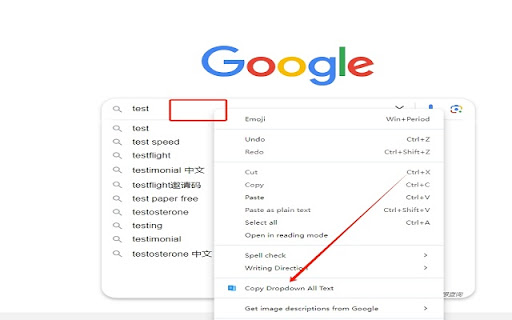


Copy the select element and Google, Bing, Baidu engines, and copy the content of the search suggestion keyword dropdown menu related Copy the select element, Google, bing, baidu, search engine all text drop-down box copied to the clipboard. When you wish to copy the dropdown box or the predictive text from the search box, this is an efficient way to do so. For example, suppose you are visiting various search engines, such as Google, Bing, Baidu, and YouTube that are compatible with this software, and you wish to swiftly copy all options in the dropdown box to the clipboard. You can follow these steps: 1、Open the search engine webpage from which you would like to copy. 2、Enter the keywords in the search box, and the related search suggestions will appear in the dropdown box. 3、Place your cursor over the input area, right-click, and find the "Copy Dropdown All Text" menu and click on it. 4、In this way, you can copy the content of the related search suggestions in the dropdown box to your clipboard.

Dropdown Copy Helper / 下拉复制助手
A Chrome extension to copy all dropdown options from input fields on supported websites like Google and YouTube. 从支持网站的下拉选项中复制所有内容。 A drop-down box content copy assistant program that can copy all content from drop-down boxes on supported websites such as Google and YouTube. Simply open Google, enter content in the search box, and when you see recommended content below, right-click in the input box and select Copy All Dropdown Items to copy all content in the drop-down box to the clipboard.

AITDK SEO Extension - Traffic/Keywords/Whois/SEO analyzer
Your all-in-one SEO extension, providing free website traffic, keyword density, Whois, and SEO analysis features AITDK SEO Extension - Your All-In-One SEO Extension. Free traffic & keywords & whois & website SEO analyzer. AI TDK SEO Extension is a versatile browser extension designed to provide comprehensive website analysis. With its powerful features, AITDK SEO Extension offers the ability to track website traffic, perform Whois lookups, keywords density check, and conduct SEO analysis. By utilizing this extension, users can gain valuable insights into the performance and visibility of their websites. The traffic tracking feature allows users to monitor visitor activity and engagement, while the Whois lookup functionality enables the retrieval of domain registration details. Additionally, the SEO analysis tool helps users optimize their websites for search engines by providing valuable metrics and recommendations. AI TDK SEO Extension is a valuable tool for website owners and administrators seeking to enhance their online presence and improve their website's performance.

Copy Dropdown Lists
One-Click Copy for Dropdown Lists on E-Commerce and Search Engine Sites Easily copy dropdown keywords and related suggestion terms from e-commerce platforms and search engines with just one click. Perfect for keyword research, SEO analysis, and writing high-converting product listings, saving you time and effort. 📩 Contact Us If you have any questions or suggestions, feel free to contact us: https://www.aliprice.com/information/index?page=contact

Dropdown Extractor
Dropdown Extractor extension allows you to copy all items from a dropdown to your clipboard. – Click the extension icon → extractor becomes armed – Open a dropdown on the page – Click one of its options (not needed for native dropdowns) – All dropdown items are copied to the clipboard The extractor automatically expires after a short timeout if no dropdown items are extracted. You can choose what to copy via options: – Item text — what you see on screen – Item value — the underlying value – Both — copied using a configurable format (tab, space, dash, etc.) If enabled in the options, Safe capture prevents option clicks from triggering actions while extracting. This lets you copy dropdown items without selecting an option. Safe capture does not apply to native dropdowns. – Native – ARIA listbox (role="listbox") – React Select – MUI Autocomplete – Radix menu …and many others We are constantly adding new supported types. If you found one that’s not yet supported, please let us know!
