
hhfkpjffbhledfpkhhcoidplcebgdgbk
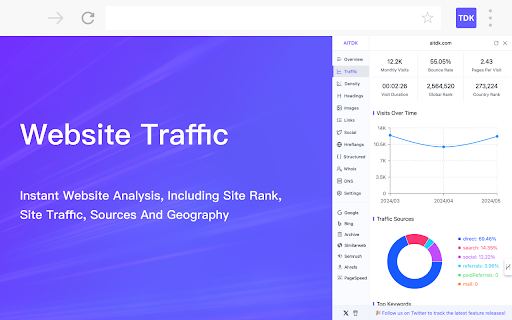


Your all-in-one SEO extension, providing free website traffic, keyword density, Whois, and SEO analysis features AITDK SEO Extension - Your All-In-One SEO Extension. Free traffic & keywords & whois & website SEO analyzer. AI TDK SEO Extension is a versatile browser extension designed to provide comprehensive website analysis. With its powerful features, AITDK SEO Extension offers the ability to track website traffic, perform Whois lookups, keywords density check, and conduct SEO analysis. By utilizing this extension, users can gain valuable insights into the performance and visibility of their websites. The traffic tracking feature allows users to monitor visitor activity and engagement, while the Whois lookup functionality enables the retrieval of domain registration details. Additionally, the SEO analysis tool helps users optimize their websites for search engines by providing valuable metrics and recommendations. AI TDK SEO Extension is a valuable tool for website owners and administrators seeking to enhance their online presence and improve their website's performance.

Copycat
This extension creates a right-click menu that provides enhanced copying capabilities. You can configure the preferences in the options page. A part of the commands can be bound as browser shortcuts.

TrendsBar - Google Trends Assistant
Maximize Your Google Trends Analysis TrendsBar is a browser extension designed to assist with Google Trends, aimed at helping users view and compare keyword trends in bulk, enhancing the efficiency of keyword discovery. 💥 TrendsBar Features Feature 1: Batch Open Seed Keywords Trend Pages With just one click, quickly view trend changes for multiple seed keywords, helping you expand your thinking and discover more potential business opportunities! Feature 2: One-Click Keyword Comparison Simply hover over keywords on Google Trends pages for instant comparison, visually presenting keyword traffic trends to support your precise decision-making! Feature 3: Smart Keyword Analysis Supports keyword translation, calculates and displays keyword scores, and allows you to jump to keyword analysis. Embedded with PowerWord Dictionary, Wikipedia, and Bing Search, quickly understand keyword meanings and the search intent behind them, helping you gain deep insights into user needs! 📑 TrendsBar Changelog 0.5.1: Support the new trends explore page, fix some bugs. 0.5.0: Added analysis record functionality, supports viewing analysis history, bookmarking keywords, and configuring regions. 0.4.4: Update the default analysis link and add a keyword organization feature. 0.4.3: Fixed related queries display issue with translation enabled. 0.4.2: Added analysis assistant, supporting keyword translation and keyword score calculation. 0.4.1: Fixed keyword comparison in right-click menu. 0.4.0: Supports batch keyword analysis with time/region comparison links. Reset to defaults before use. 0.3.6: Support launching TrendsBar through right-click menu to analyze or compare selected keywords. 0.3.5: Fixed an intermittent issue where configurations could be unexpectedly reset. 0.3.4: Added support for internationalization (i18n) and fixed the issue of keywords not refreshing in the input box. 0.3.3: New configuration page added, allowing editing of analysis links and optimizing overall style. 0.3.2: Added a hover toolbar for the current keyword, supporting quick deletion, analysis, and adding/removing quotation marks. 0.3.1: Fixed a bug where a configuration would be reset. 0.3.0: Introduced keyword analysis functionality, supporting hover keyword operations on the trending page. 0.2.0: Added the ability to edit bulk seed keywords. 0.1.1: Supported access data for specified comparison keywords. 0.1.0: First release of TrendsBar. 🔒 Privacy Statement TrendsBar does not upload or store any user data; all data within the extension is stored locally, ensuring the security of user information.

SiteData - Traffic Checker/Ads Transparency/SEO analyzer
Traffic checker, SEO analyzer with DR, traffic, keywords, AdSense reverse lookup, Google Ads transparency, and related sites. 🚀 SiteData — Free website traffic and domain rating lookup tool & AdSense reverse lookup tool & Google Ads campaign analysis tool SiteData is a free, privacy-friendly browser extension that helps you quickly check website traffic trends, keyword distribution, and traffic sources, and discover related websites through reverse lookup using Google AdSense Publisher ID. It also supports viewing related sites and campaign activities of Google Ads advertisers. 📊 Website Traffic Query: View page views, user engagement, popular pages, and Domain Rating (DR). 📈 Traffic trends over the past three months: intuitively perceive website growth or decline. 🏷️ Reverse AdSense lookup: Discover all associated sites under the same account based on the website's Publisher ID. 📢 Google Ads Advertiser Retrospective: View all associated sites, keywords, and advertising activities under an advertiser's name. 🔎 Keyword Intelligence: Discover website ranking keywords and potential optimization points. 🌐 Outbound domain traffic details: View external link redirects and traffic flow. 🗂️ Domain registration information query: Quickly obtain registration time, expiration time, and WHOIS data. ✨Google search results directly display a site's traffic, DR (Local Traffic), and domain registration date. It can also automatically highlight the domain registration date and DR value according to your settings. Install the SiteData plugin Open any website and click the plugin icon. You can view: traffic, sources, keywords, outbound domains, AdSense ID, and Google Ads campaign performance. Quickly discover the websites, accounts, or domain assets associated with this site. Zero barrier to entry: Install and use immediately, no API key required. A one-stop research tool: simultaneously track traffic, monetization, SEO, and domain information. The product interface supports switching between 54 global voices. 2.0.2: Traffic acquisition interface optimized; user-defined configurations within the plugin can now be synchronized to the cloud. Automatically display each site's traffic, DR, and domain registration time on the Google search results page. Supports custom filtering and highlighting conditions (such as highlighting new domains and sites with high DR). • A new plugin, "Settings Page," has been added, allowing configuration of advanced features such as highlighting logic and displayed fields. 1.1.2 • Added CSV export functionality • Real-time website traffic display in the plugin icon area 1.1.1 • Added Google Sign-in • Supports Domain Rating queries • Optimized API stability and security 1.1.0 • Google Ads advertisers → Reverse lookup of related sites and ad placement behavior 1.0.8 • Displays the target website's Google Ads performance and popular keywords. • Displays the number of pages from the target site indexed by Google. • Improves overall API speed. 1.0.7 • When the plugin is enabled, it automatically obtains website traffic for the current tab. 1.0.6 • Filter websites by domain creation time and traffic • Optimize request logic

SeekAll
One Click, Seek All Results for You SeekAll One Click, Seek All Results for You. With SeekAll, searching across multiple platforms is as easy as a single click. Whether you're browsing for fun or working on a project, you'll get comprehensive results instantly. SeekAll Changelog 1.6.3 Fixed some unusable AI searches and added DeepSeek search. 1.6.0 The version optimized the one-click search function by right-clicking after selecting text; added the custom combination function, and you can click the shortcut combination button to search with one click. 1.5.4 The version added category sorting and website sorting functions, you can customize the order you want. 1.5.3 The version modify various small details, optimize the experience, add multi-language interface, and support Chinese and English display. 1.4.1 The version adds the custom search engine function, allowing you to add various search engines you want. 1.4.0 The version adds a sidebar vertical tab mode, allowing you to more easily manage multiple open tabs and tab groups. 1.3.1 The version supports the choice of opening in a new window or a new tab, and is no longer limited to a maximum of 3 selections. SeekAll Supported Search Engines: - AI Search Engines: Perplexity, ThinkAny, Devv, and more. - AI Assistant: ChatGPT, Claude, Kimi, and others. - Traditional Search Engines: Google, Bing, DuckDuckGo, and others. - Social Media Platforms: YouTube, Twitter, FaceBook, and more. Key Features of SeekAll: 🔍 Multi-Engine Search: Enter your query once and get results from multiple search engines at the same time. Easily compare and analyze, saving you time and effort. ⚙️ Customizable Search Engines: Personalize your search experience by adding, removing, and organizing your favorite search engines into categories. Create a search platform that works just the way you like it. 📑 Efficient Tab Management: Vertical tab management in the sidebar lets you quickly switch between tabs and groups, boosting your productivity whether you’re browsing or working. 💻 Flexible Search Options: Choose how you want your search results to open—whether in a new window or tab. Customize your experience with options like displaying follow-up queries or replacing default tabs. Why Choose SeekAll? 🚀 Simplify Your Search Process: No more jumping from one search engine to another. SeekAll brings all the results to you at once, making your search more efficient. 🔒 Privacy Matters: We respect your privacy—SeekAll doesn't store your search data, ensuring your information stays safe. Try SeekAll Today Download SeekAll now and experience a smarter, more efficient way to search the web!
