
kgejhghjgpndnehjgldgaknbiadbjoom


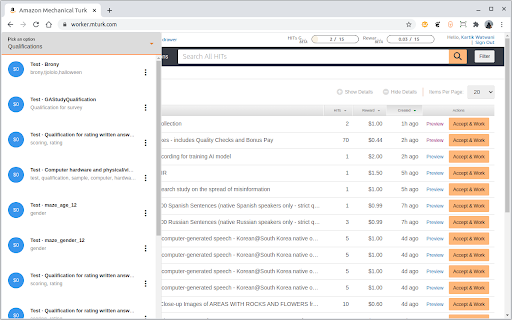
Increase your mturk earnings by automating HIT acceptance based on your preferences and using Machine Learning. For Amazon Mechanical Turk(MTurk) workers, this browser extension helps workers increase their earnings by automatically accepting new tasks based on their pre-set preferences as soon as they are posted and provides features to enhance efficiency. ★ Accept tasks based on your liked and disliked tasks history. ★ Accept tasks that have favorite keywords. ★ Block tasks that contain blocked keywords. ★ Accept tasks only from favorite requesters. ★ Filter tasks based on requester hourly wage, activity level, approval rate. ★ Return tasks automatically when away from the desktop. ★ View HITs queue, new qualifications easily on every MTurk page. ★ Reactions by workers for HITs and requesters. This tool reduces the time workers spend searching for tasks and helps the user get high-paying tasks, resulting in higher earnings and increased efficiency. For any questions, comments, or suggestions, contact support@turk-guru.com. The beta version can be found here: https://chrome.google.com/webstore/detail/turking-guru-beta/bcoojbcnbhappkcapafhmmldpnoemooc

Turk Guru BETA | For MTurk
Increase your mturk earnings by automating HIT acceptance based on your preferences and using Machine Learning. FOR BETA TESTING. For Amazon Mechanical Turk workers, this tool helps you accept new tasks based on your preferences: ★ Accept tasks based on your liked and disliked tasks history. ★ Accept tasks that have favorite keywords. ★ Block tasks that contain blocked keywords. ★ Accept tasks only from favorite requesters. ★ Filter tasks based on requester hourly wage rate, activity level, approval rate. ★ Return tasks automatically when away from the desktop. ★ Zero click HITs queue drawer. ★ Reactions by workers for HITs and requesters. This tool reduces the time worker spends searching for tasks and helps the user get high-paying tasks, which results in higher earnings and increased efficiency. If you have any questions, comments, or suggestions, contact at support@turk-guru.com THIS EXTENSION IS FOR BETA TESTING. The stable version can be found here: https://chrome.google.com/webstore/detail/turking-guru/kgejhghjgpndnehjgldgaknbiadbjoom

Product Review Lens
Provides users with additional useful information about products on Amazon.com.

MeasuringU-IQ survey extension
This extension supports MeasuringU surveys. This is a package to allow for the recording of the user's screen when taking a survey on our survey platform MU-IQ. It only works when you are taking one of our surveys. The extension displays tasks in small window in your browser. It records how long it takes you to complete a task and where you click on the page. It can easily be uninstalled from Chrome at any time.

URL Historian
URL Historian - Enlightening the social impact of the web through your web use URL Historian is a Chrome extension developed by New York University’s Center for Social Media and Politics (CSMaP). URL Historian allows participants to share data that contributes to better understanding of how our ever-shifting online environment impacts politics and democracy. URL Historian collects browsing data from registered research participants who agree to be part of a study. When the plug-in is activated and registered, it automatically begins collecting URLs visited. Participants can pause this collection at any time through the extension interface. Participants can also block specific domains from being collected through a blacklist feature provided in the extension. Participants can also opt-in to sharing data from YouTube page Data collected through URL Historian is anonymized and used for academic purposes only. All collected data is securely stored on Amazon Web Services (AWS) and only accessible by CSMaP researchers. Participation in web browsing collection is completely voluntary. The extension also offers multiple options for allowing and limiting the types of data that are collected. URL Historian also allows participants to delete data that was shared for up to ten days after it was collected. If more than ten days have passed since data was collected, participants can contact NYU CSMaP Engineers at csmapsupport@nyu.edu to request their data be deleted. Please be aware that URL Historian collects the web browsing data of anyone using Google Chrome on the computer that URL Historian is installed on. If you share this computer with anyone, you should inform them that URL Historian is installed, and show them how they can pause the app and/or delete their browsing history when they use the computer. For more information on how to install and configure the URL Historian extension, visit https://www.csmapsurveys.org/csmap_url_historian.html. For any questions on using the extension, requesting data deletion, or other technical problems, please reach out to csmapsupport@nyu.edu. For more information about the Center for Social Media and Politics research, visit https://csmapnyu.org/.
