
kfmcnbhcjcmfmjmnefhhmcjifakidfnp

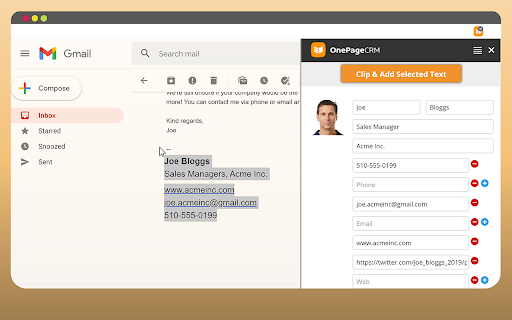


OnePageCRM Lead Clipper is a free browser extension for lead generation. It helps you capture contact details from any web page and auto-create new contacts in your CRM with follow-up reminders next to them. FEATURES • Scrape and extract contact details from any web page (including social media). • Capture contact information from multiple web pages: the captured information will remain in the Clipper’s form even when you close the original page. • Update the existing contact details in one click: if you already have a contact in your CRM, we will recognize it. • Quickly switch between multiple CRM accounts: you don’t need to sign in and out every time. • Toggle the form from left to right: nothing should stand between you and your next captured lead. • Add follow-up reminders and tasks to newly created contacts. • Get browser and desktop notifications: never miss a follow-up. For more information on how Lead Clipper works, check out our Support site. If you have any issues or feedback, send us an email at support@onepagecrm.com ABOUT ONEPAGECRM OnePageCRM is an action-focused CRM software. — No more dead databases: focus on building relationships and closing deals. — Never lose sight of your targets: complete one task at a time. — Straightforward and easy-to-use: a CRM solution for sales teams of all sizes. Don’t have a OnePageCRM account? Start your free 21-day trial at onepagecrm.com NOTE: To use the Lead Clipper, you need to have an active OnePageCRM account. OnePageCRM's pricing and plans are available here: https://www.onepagecrm.com/crm-pricing/

Klenty: Email Outreach & Tracking from Gmail
Klenty is a engagement platform that can help sales teams reach out to prospects by sending personalized emails and automated follow-ups at scale. Using Klenty, you can automate all the repetitive activities involved in your sales process like sending cold emails, follow-ups, tracking engagement metrics, etc - so that you can focus more on activities like building relationships and closing deals. WHAT CAN YOU DO WITH KLENTY CHROME EXTENSION? Klenty’s chrome extension can help salespeople: - Send one-to-one personalized emails, schedule follow-ups and track them from Gmail. - Engage with your contacts from Pipedrive, Salesforce, and Freshsales CRM without having to switch between tools. KLENTY CHROME EXTENSION IN GMAIL This chrome extension is perfect for outbound and inbound sales reps using a Gmail account to engage with leads. You will be able to save a lot of time and improve your productivity. - Know what happens after you click send. With Klenty’s extension, you can keep a track of email engagement like opens, clicks, and replies. - Create personalized emails instantly using our template library from within Gmail - Avoid the hassle of remembering to follow-up. Let Klenty do that for you. Write your emails and schedule to send them later. - Set-up reminder notes and tasks for yourself and Klenty will remind you by sending you an email. - You can easily add prospects to klenty cadence from Gmail and send perfectly-timed automated follow-ups. - Track the daily performance of your emails instantly using the live feed. HOW DO YOU INSTALL AND USE IT IN GMAIL? - Get Klenty chrome extension from the chrome webstore. - Sign in to Klenty. If you don’t have an account, create one. - Go to Gmail and when you hit compose, the Klenty options will show up at the bottom of the window - Now, you’ll be able to perform tasks like tracking your emails, setting up reminders, and all the other functionalities mentioned above. This chrome extension is perfect for outbound and inbound sales reps using Pipedrive, Salesforce, and Freshsales CRM to manage leads and engage with them by sending personalized emails, automated follow-ups, and tasks. - Push prospects from CRM to Klenty without leaving the CRM - Select multiple contacts and add them email campaign in a single click - Send hundreds of personalized emails easily using mail merge - Never miss out on an opportunity to follow-up with your prospects. Create tasks in Klenty see them in your CRM HOW TO INSTALL AND USE FROM CRM? - Get the chrome extension from chrome webstore - Connect your CRM and Klenty - Login to your CRM and open the Klenty extension within the CRM - Klenty will automatically detect all the prospects in your CRM - Now, you can perform any of the tasks that you’d like to do - push prospects to Klenty and other prospect actions

Cloze Sidebar for CRM
See everything about your contacts and deals in one place - automatically Emails, files, meetings, phone calls, messages, notes, follow-ups and more. With ZERO data entry. "Best Personal Assistant I have ever used, and I've used them all." - @SealMaster_CO "Fantastic integration across multiple sources to create a single view of your relationships!" - SUJONEROPRJA "I closed three orders in the first 24 hours of use! This has never happened with any other CRM I've tried!" - Nicholas Hughes Cloze is like a personal assistant for your professional relationships that is always prompting you at the right moment and remembering what you don’t. It pulls from your apps to automatically create one view of every person and company - all their contact details, and your complete history - every email back and forth, your phone calls together, meetings, notes, files, social, and messages. It's all organized for you - without any busy work. With everything in one place, Cloze figures out who is important and keeps them top of mind, and will even remind you to reach out to a contact and refresh a fading relationship. CLOZE SIDEBAR¹ • See the context of people, companies, projects, and deals right beside your CRM • CRM's Supported: Salesforce.com, SugarCRM, PipeDrive, HubSpot CRM • Also Supported: Gmail, LinkedIn, Twitter, Github UNIFIED CONTACT MANAGEMENT • Brings all your contacts into one place • Automatically keeps contacts up-to-date • Enrich contacts from email signatures¹ • Organized by when you last talked, first met, location and more PROFESSIONAL-CLASS EMAIL • Bookmark a message and Cloze will remind you to follow-up later • Get reminded if you don’t receive a reply to an important email¹ • Be notified when a recipient opens an email or clicks on a link you sent¹ • Templates: Create and reuse template emails¹ Share them across your team² • Mail merge: Personalize email sent to many people at the same time¹ • Scheduled send: Write your email now, have Cloze deliver it later¹ • Supports Gmail, iCloud, Office365, Exchange, Outlook, Yahoo!, IMAP CRM WITHOUT THE BUSY WORK • Track the activity around projects and deals automatically¹ • Automatic reminders when it’s time to reach out to key contacts¹ • Next steps: Automatic reminders of what's next for any deal • Add To-Dos to track things you have to get done¹ • Agenda: one place to see all your meetings, reminders and follow-ups¹ • Pipeline: see all the email, calls, files, notes, meetings, and to-dos related to any deal in your pipeline¹ • Company views: see your complete history with a company without any setup¹ ONE VIEW OF EVERYTHING • Emails: Automatically organizes mail by people, company, project and deal • Calls: Automatically log your calls (AT&T, Verizon, T-Mobile USA, Sprint, RingCentral)¹ • Files: Automatically link files to your contacts (Dropbox, Google Drive, OneDrive, Slack)¹ • Notes: Automatically match notes to contacts (Evernote, OneNote)¹ • Messages: Track your Slack conversations about your clients and customers¹ • Calendar: Meeting context at your fingertips (Google Calendar, Office365, Exchange, Outlook, iCloud)¹ • Social: Twitter posts, Facebook and LinkedIn page activity AWESOME SEARCH • Search for contacts the way you think (“marketers at IBM”) • Organize and find contacts and deals by keywords • One place to search across Gmail, Google Calendar, Google Drive, Office365 mail and OneDrive, Slack, Dropbox, Evernote¹ WORK AS A TEAM² • One team-wide view of all communication for every deal and project • Always know who last talked to any customer, client, or prospect • Assign and track who's responsible for contacts, next steps and to-dos • Manage your all of your company's contacts, projects and deals in one place Cloze is free to use. ¹ Cloze Pro adds these features and is available as a 14-day no-obligation free trial or by monthly or annual subscription as an in-app purchase. ² Your Cloze Pro subscription entitles you to all Cloze Business features. Prices vary by location. Subscriptions will be charged to your iTunes account and will automatically renew unless cancelled at least 24 hours before the end of the current period. Once paid, a subscription is non-refundable for that period. Cloze is available on Chrome, iOS, Android and the web - your account works everywhere. • We won't spam your contacts • We won't sell your information • It's your information not ours

Nutshell CRM for Gmail
Save time and stay organized with Nutshell for Gmail. Nutshell is the best Next Action Sales B2B CRM on the market that helps sales teams, marketing teams, support teams, success teams and entire organizations work together to close more deals, retain more customers and increase revenue in order to grow their businesses. Nutshell is simple enough that you can set it up for your team in just a few weeks and sophisticated enough for your business to use as you continue to scale and grow. Nutshell helps you grow and grows with you. Nutshell seamlessly integrates with Google. With this Chrome extension you can bring Nutshell to your Google Workspace email inbox and calendar. This integration allows you to: - Create contacts and tasks - View scheduled activities - Track communication timelines - Write notes - See which emails have been shared with your teammates in Nutshell - Share email threads and messages directly from Gmail, without having to forward or bcc them to Nutshell - Bring the power of Nutshell's email templates and Personalized email sequences into your Gmail inbox In addition to our seamless integration with Google, Nutshell can integrate with many of the apps your business likely already uses or will use in the future. Other reasons why many business professionals choose to use Nutshell are: - Unlimited data and contact storage - Free, world-class live chat support - Flexible monthly plans that allow you to get your team the features they need without breaking the bank - Flexible sales automation, pipeline automation and email automation - Ability to view your pipeline in Board, List, Chart and Map view - AI to make using a CRM more efficient - Reporting & Analytics - Lead attribution to help you inform your marketing campaigns - Custom Webform builder - So much more! And CRM isn't all we do! Nutshell also has add-on features that help you fill your pipeline, maximize your efforts and grow your business. - Nutshell Campaigns - email marketing software built right into Nutshell that allows you to turn your contacts into Audiences and send them beautifully designed, no-code emails. - Landing Pages - landing page software that allows you to build beautifully designed, no-code landing pages for your marketing campaigns. - Revenue Booster - includes Nutshell Scheduler, our online meeting scheduler tool, and Email Power up to make this extension even more powerful - PeopleIQ - people identification software to help you find the right contacts at the businesses currently in your pipeline CRM, and website visitor identification software to help turn cold website visits into hot leads. - CompetitorIQ - online competitor tracking software to help you establish a baseline compared to your competitors online marketing presence - AppConnect - let our software engineers build and monitor your integrations with Nutshell Nutshell for Gmail requires a Nutshell account. Not a customer? Start a free 14-day trial at nutshell.com/signup. WE’RE HERE FOR YOU If you need a hand, please contact us at support@nutshell.com, or visit our help center at https://support.nutshell.com.

Zoho CRM for Gmail
A quick way to manage and add leads, contacts to Zoho CRM from Gmail. • Create new leads and contacts right from Gmail. • See complete lead/contact detail when you open a mail. • Add tasks, events, log calls for a customer. • Create deals and notes for instant update. • FREE extension; no credit card required. • Installs in seconds, easy to use. ⦿ Manage your Zoho CRM from Gmail. Why switch windows when you can manage your CRM from Gmail? Zoho CRM for Gmail shows you a complete customer profile immediately upon opening an email from the customer. Instantly view customers’ contact information without opening Zoho CRM. You can create new Contacts and Leads, and log calls, add tasks, events, allowing you to keep better track of prospective deals and customers. ⦿ Keep track of all your information. Convert leads to contacts, add, edit and delete notes, events, tasks, log calls using this powerful extension. It's easy to use interface helps you see all the information when you need it. ⦿ Make the most out of your CRM investment. Increase your ROI by entering timely and accurate information about your leads and contacts in your CRM system. Create tasks and notes to keep your CRM always updated.
