
kflcemlcbknfiaaodobaikfopglkmpnf


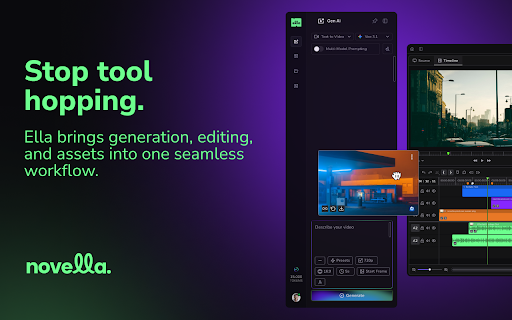


Generate, edit, and export video using the best AI models without juggling tabs, tools, or workflows. Ella by Novella — The All-in-One AI Video Workspace 🔥 The entire AI video stack. One browser sidebar. Generate, edit, and export video using the best AI models without juggling tabs, tools, or workflows. Ella lives right alongside whatever you're doing online, and it's smarter than ever. 💪 What You Can Do with Ella 🎬 Generate with AI Access dozens of leading generative AI models in one place. Create visuals, clips, and concepts instantly. No platform switching, no context loss. ✍️ Refine Prompts Anywhere See text anywhere on the web? Capture it directly into Ella's prompt field and use it as your starting point. Ella can also refine prompts from any text field in your browser, so your best ideas are always one click away. ✂️ Edit in the Cloud Import footage and assets, then shape structure, timing, sound, and visuals in Ella's built-in video editor. No desktop software. No downloads. ⚙️ Now Built for Power Users ✔️ Customizable keyboard shortcuts — set them up your way ✔️ Toolbar docks left or right, and fits how you work, not the other way around ✔️ Capture text from anywhere in the browser into your prompt ✔️ Advanced features built for creators who move fast ✔️ One extension instead of a dozen open tabs Ella removes friction from the creative process so you can focus on making, not managing. 👥 Who Ella Is For 👉 Click "Add to Chrome" and pin Ella to your toolbar. 👉 Sign up or log in to your account. 👉 Click the Ella icon to open the sidebar and start creating. 📌 What is Ella? A Chrome extension that brings AI generation, video editing, and export into one unified workspace right in your browser sidebar. 📌 Which AI models does Ella use? Ella connects you to dozens of leading generative AI models in a single interface. No switching tools or tabs required. 📌 Can I refine prompts from other websites? Yes. Ella can capture text directly from your browser and load it into the prompt field and it can refine prompts from any text field on the web. 📌 Can I customize how Ella looks and behaves? Yes. You can dock the toolbar on the left or right side of your screen and configure keyboard shortcuts to match your workflow. 📌 Is Ella cloud-based? Yes. No heavy downloads, no expensive hardware. Access your work from anywhere. 📌 Will Ella slow down my browser? Ella is built to be lightweight, running in a sidebar without interrupting what you're already doing. 📌 Is my content secure? Yes. Your projects and assets are handled securely, with privacy and creator control built in. 📌 Is Ella free to use? Ella offers free access, plus paid subscription plans and credit bundles. 📌 Who is Ella best for? Creators, editors, marketers, and power users who want a faster, more flexible AI video workflow.

Ventrilo AI: Your tabs, connected
The AI assistant that turns your tabs into finished work: fills in replies, docs and forms, without copy-paste. You’ve already done the research. The problem is your browser doesn't know it yet—so you waste time manually moving context between tabs, re-explaining what you're looking at, or starting over in a blank box. Ventrilo connects your open tabs to your workflow, so you can stop the copy-paste relay and get things done. • Synthesize Your Workspace: Pull information across multiple open tabs into a single answer, draft, or comparison. Ventrilo "sees" your context so you don't have to explain it. • Instant Drafting & Filling: Apply for jobs, reply to emails, or complete complex docs. Ventrilo uses the data already in your tabs to populate fields for your review. • Visual Intelligence: We read the actual visual layer of PDFs—including charts, tables, and LaTeX—not just the text layer. • Grounded Accuracy: Get answers based on the specific pages you’ve selected, keeping your results relevant and verifiable. • User-Directed: Ventrilo works with the pages you give permission to use. • Total Transparency: You always see exactly which pages are being used and can adjust permissions in real-time.

AI Image Generator - Create, Edit & Transform Any Image from Text or Photo
Turn any text or photo into stunning AI images with AI image generator: text to image, image to image, AI photo editor & download. 🎨 AI Image Generator — create stunning images from text or photo, right in your browser Turn your ideas into professional-grade visuals in seconds. With this AI image generator Chrome extension, anyone can generate image from text or transform a photo into something entirely new. No design skills, no expensive software needed. 🚀 How to get started 1️⃣ Install the AI image generator extension from the Chrome Web Store 2️⃣ Type a text prompt describing the image you want to create 3️⃣ Or upload any photo to transform it with image to image AI 4️⃣ Fine-tune the result with the built-in AI image editor 5️⃣ Download instantly. No watermarks, no hassle ✨ Key features of the AI image generator ➤ Text to image AI generator Describe anything you can imagine and include the style right in your prompt. Write ""a golden retriever in a sunny meadow, photorealistic"" or ""futuristic city skyline at night, digital art"". Our AI image generator tool turns your exact description into a stunning visual. Powered by Nano Banana Pro for top-quality results. ➤ Image to image AI Already have a photo? Upload it and let image to image AI transform the style, mood, or composition while keeping the essence of the original. The image to image generator gives your photos a completely new look in seconds. ➤ AI image editor Fine-tune any generated or uploaded image with the built-in AI image editing tools. Adjust, enhance, and perfect your visuals until they match your exact vision. ➤ Download with no watermarks Save any AI generated image to your device in one click. No watermarks on your exports. 🆓 FREE TO GET STARTED Try this AI image generator for free. No credit card required. Generate your first images today and upgrade when you're ready for more. - Designers who want to prototype ideas and generate assets fast - Marketers who need unique visuals for campaigns and social media in seconds - Content creators who never want to run out of original images for blogs or YouTube - Entrepreneurs building their brand with custom visuals without a design budget - Anyone who has an idea. If you can describe it, you can generate image from it 💡 How to write great prompts for AI image generation ▸ Be specific. Instead of ""a dog"" try ""a golden retriever in a sunny meadow, photorealistic"" ▸ Include the style in your text: ""oil painting"", ""3D render"", ""pencil sketch"", ""anime style"" ▸ Add lighting and mood: ""golden hour light"", ""dramatic shadows"", ""soft pastel tones"" ▸ For image to image: choose photos with clear subjects for best results ▸ Experiment freely. The AI image generator tool handles the rest 📱 Perfect for every use case Our AI image generator supports all major platforms and content needs: - Social media posts and ads for Instagram, Facebook, Twitter - Blog illustrations and YouTube thumbnails - Product mockups and brand visuals - Marketing campaigns and landing pages Whether you need a quick social media graphic or a detailed product visual, this AI image generator online delivers polished results every time. This ai image maker uses state-of-the-art machine learning to understand your prompt, compose the scene, apply the style, and render a complete image automatically. Just type or upload and the AI image generator tool handles the rest. That is the power of modern AI image generation in your browser. 📌 How does the AI image generator work? 💡 Type a text prompt including style, mood, and details, or upload a photo. The AI image generator creates an image using advanced machine learning. The whole process takes just seconds. 📌 How do I set the style of my image? 💡 Include the style in your text prompt. Write ""photorealistic"", ""watercolor"", ""3D render"", ""anime"" or any description you like. The AI image generator tool reads your full prompt and matches your creative vision. 📌 Can I edit an image after generating it? 💡 Yes. The built-in AI image editor lets you fine-tune any generated or uploaded image. Adjust, enhance, and perfect your visuals without leaving the extension. 📌 Does image to image AI preserve my original photo? 💡 The image to image generator keeps the core composition of your photo while applying a new style, mood, or look based on your prompt. 📌 Is there a watermark on generated images? 💡 No watermarks. Every image you create and download is clean and ready to use. 🎉 Start creating AI images today Install the AI image generator extension, type your first prompt, and see your idea turn into a stunning visual in seconds.

Text to Video - AI Video Creator | Pictory
Convert any text or URL into a professional AI-generated video with captions, visuals, and voiceovers — powered by Pictory 🎬 Turn Any URL or Text into a Video Instantly The Text to Video Chrome Extension by Pictory lets you transform any online article, webpage, or script into a complete video, all without leaving your browser. 📋 Paste a URL or text, and our AI automatically extracts the main ideas, writes a script, selects visuals, and adds captions and voiceovers. Whether you’re a marketer, educator, or content creator, you can turn blogs, research papers, or news articles into ready-to-publish videos in minutes. ⚙️ How It Works Step 1 – Capture a URL or Enter Text While browsing any webpage, click the Pictory Chrome Extension. The extension automatically captures the URL. Step 2 – Choose Video Type Select your preferred video style: 💡 Explainer 📣 Marketing 💼 Internal Communication 🎓 Tutorial This helps the AI tailor the tone and flow of your script. Step 3 – Generate Your Script Click “Generate Script.” Pictory AI will summarize the webpage or process your text input to create a concise, editable script optimized for video storytelling. Step 4 – Edit and Customize You’ll be redirected to your Pictory workspace, where you can: • Review and edit the generated script • Adjust visuals, captions, and audio • Apply your brand kit (logo, fonts, colors) • Choose voiceovers and music Step 5 – Generate and Download Video Preview your project and download a high-quality video, ready to share across social platforms, websites, or presentations. ✨ Key Features 🔗 URL to Video: Convert any online article or web page into a summarized AI video. 📝 Text to Video: Paste any text, and Pictory turns it into visuals, captions, and voiceover. 🧩 AI Script Summarizer: Automatically extract key ideas from long-form content. 🎨 Fully Customizable: Edit scenes, captions, visuals, and add your brand kit. 🎙️ Voiceover and Subtitles: Choose professional AI voices and auto-generate subtitles. ⚡ One-Click Workflow: Seamlessly integrated with your browser and Pictory account. 👥 Who It’s For 📈 Content marketers repurposing blogs and news articles into videos. 🎓 Educators turning lessons or research into visual explainers. 🏢 Corporate teams creating internal communication videos. 🎥 Creators and entrepreneurs sharing insights on YouTube, LinkedIn, and TikTok. 💎 Why Choose Pictory Pictory’s award-winning AI video platform powers this extension, enabling effortless text-to-video and URL-to-video conversion. 🌍 Trusted by over one million professionals worldwide, it combines script generation, video editing, and brand management in one seamless workflow. 🔒 Privacy & Permissions This extension requires minimal access: • Reads the active webpage only when you click the extension • No background tracking or data storage • Processes text securely via your authenticated Pictory account

Kimavi: Generate Step-by-Step How-To Guides, Videos, and GIFs
Effortlessly create step-by-step How-To Guides using Generative AI. Produce stunning documents, videos, and GIFs. ✨Create Quick & Easy How-To Videos, DOC, GIF and Slides with Kimavi Generative AI🚀 Unleash the power of Generative AI with Kimavi and transform the way you create How-To content! Dive into a world where videos, DOC, GIFs, and slides are not just made—they're engineered to captivate, educate, and inspire. Say goodbye to the old ways and hello to a future where creativity meets efficiency. 🌈📚 🎥 Easy How-To Videos: Turn ideas into engaging tutorials with just a few clicks. No camera shyness, no complex editing. 🌐 Collaborative DOC, GIFs & Slides: Share your vision and collaborate effortlessly, enhancing team synergy and customer connections. ⏩ Speedy Creation: Experience up to 10X faster production rates. Your creativity, supercharged by AI. 🎨 Customizable & User-Friendly: From branding to voiceovers, Kimavi’s features are tailored to fit your unique style and message. 🔐 Privacy-Focused: Keep sensitive information under wraps with smart blurring features. Why Choose Kimavi? 📈 Boost Productivity: Generative AI makes it fast and intuitive to create diverse content formats. 🤝 Foster Collaboration: Seamlessly work together within your team and beyond. 🛠️ No Expertise Needed: Our platform is designed for everyone, removing barriers to creative expression. 🔍 Easily Organized: Find and use your creations with simplicity, enhancing accessibility and utility. 🔊 AI-generated audio: Say what you need without saying a word. ✂️ Drag-and-drop editing: Simplify your creation process. 🌍 Text-to-speech in 100+ languages: Speak to the world in any tongue. 🎨 Custom branding: Make it unmistakably yours. 🕵️♂️ Information blurring: Protect what's private. Transform Your Content Creation: Kimavi isn’t just another tool; it’s your gateway to effortlessly crafting exquisite, effective, and engaging How-To guides. From detailed documentation to snappy social media content, unlock a new realm of possibilities. 🌟Ready to make your knowledge shine? Visit www.kimavi.com and start your journey today!🌟
