
kcleenakjlelbmchbkfpgoldgglhdpne

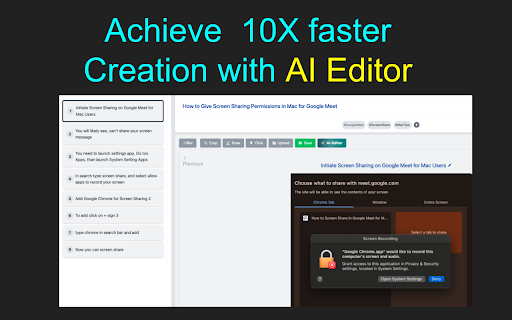

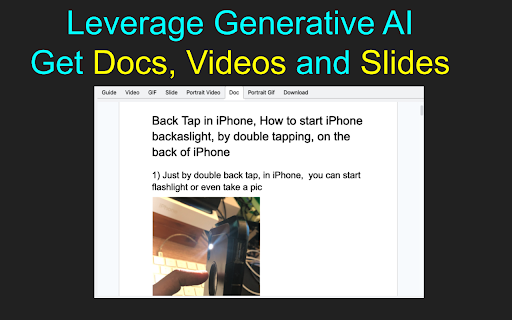

Effortlessly create step-by-step How-To Guides using Generative AI. Produce stunning documents, videos, and GIFs. ✨Create Quick & Easy How-To Videos, DOC, GIF and Slides with Kimavi Generative AI🚀 Unleash the power of Generative AI with Kimavi and transform the way you create How-To content! Dive into a world where videos, DOC, GIFs, and slides are not just made—they're engineered to captivate, educate, and inspire. Say goodbye to the old ways and hello to a future where creativity meets efficiency. 🌈📚 🎥 Easy How-To Videos: Turn ideas into engaging tutorials with just a few clicks. No camera shyness, no complex editing. 🌐 Collaborative DOC, GIFs & Slides: Share your vision and collaborate effortlessly, enhancing team synergy and customer connections. ⏩ Speedy Creation: Experience up to 10X faster production rates. Your creativity, supercharged by AI. 🎨 Customizable & User-Friendly: From branding to voiceovers, Kimavi’s features are tailored to fit your unique style and message. 🔐 Privacy-Focused: Keep sensitive information under wraps with smart blurring features. Why Choose Kimavi? 📈 Boost Productivity: Generative AI makes it fast and intuitive to create diverse content formats. 🤝 Foster Collaboration: Seamlessly work together within your team and beyond. 🛠️ No Expertise Needed: Our platform is designed for everyone, removing barriers to creative expression. 🔍 Easily Organized: Find and use your creations with simplicity, enhancing accessibility and utility. 🔊 AI-generated audio: Say what you need without saying a word. ✂️ Drag-and-drop editing: Simplify your creation process. 🌍 Text-to-speech in 100+ languages: Speak to the world in any tongue. 🎨 Custom branding: Make it unmistakably yours. 🕵️♂️ Information blurring: Protect what's private. Transform Your Content Creation: Kimavi isn’t just another tool; it’s your gateway to effortlessly crafting exquisite, effective, and engaging How-To guides. From detailed documentation to snappy social media content, unlock a new realm of possibilities. 🌟Ready to make your knowledge shine? Visit www.kimavi.com and start your journey today!🌟

Breached
Find out which sites you're visiting have been pwned, using the haveibeenpwned.com database Breached is a browser extension that lets you know when you're visiting a site that has been pwned in the past. You can click the button to find out more about those breaches. Breached uses [Have I Been Pwned](https://haveibeenpwned.com/) to learn about breaches. No information about the sites you visit is sent anywhere -- all checks are local.

Crit Design
Crit Design is a screen capture browser extension powered by AI from GPT4o, Gemini Vision Pro, Claude Sonnet and Llava-34B that helps in: 🔎 Improve SEO: Climb search engine mountains with expert tips. 👉 Add Nudges: Use behaviour science to make visitors fall in love with your site. 📕 Create UX Survey: Create survey that ready to use for researchers 👽 Find Competitors: Analyze any competitor sites 🔮 Define Persona: Unmask your competitors: Analyze their sites and understand their users 👀 Create Alt Text: Crit Design writes alt text for images so everyone can enjoy your website. ⭕️ Find Type: Say goodbye to typos with Crit Design's eagle eyes. How it works: 1. Install the extension. 2. Capture the website: Screenshot, upload, or paste the URL. Boom! 💥 3. Get your instant analysis. 📌Which browser that we support? Arc, Chrome, Edge, and FireFox(Converter required) 📌Any real-world use cases? Our fellow UX researchers are already using it to anticipate competitor user personas. Developers in our BETA program have utilized it to generate ALT text, enhancing accessibility. Others are using it to improve SEO, create A/B testing text and analyze new competitors. 📌What are the differences between Crit Design and ChatGPT Plus? ChatGPT and other tools require multiple steps: capturing a screenshot, uploading it, and submitting a request – a time-consuming process. Crit Design simplifies this to just 3 steps: 1.Capture a screenshot using the browser extension 2.Ask the AI 3.Receive insightful feedback in seconds --- 🔥 1.41 Updates • Claude Sonnet is here to blow your mind! • Upgraded GPT4-v to GPT4o • Newly redesign the way to see the result from your favourite model.

InfoSE
Quickly access relevant information for selected word Introducing "InfoSE," the ultimate extension for lightning-fast access to relevant information right at your fingertips. With InfoSE, effortlessly explore top relevant results for selected word, neatly organized within accordion-style panels, each offering a concise summary for quick insights. Key Features: Effortless Access: Simply highlight any word or phrase on your browser, and InfoSE springs into action, fetching relevant information instantaneously. Accordion Interface: InfoSE presents search results in a sleek accordion format, allowing you to expand and collapse each panel effortlessly. This intuitive design enables efficient browsing without cluttering your screen. Comprehensive Summaries: Dive into succinct summaries within each accordion panel, providing essential details without overwhelming you with excessive information. Whether it's definitions, explanations, or background context, InfoSE delivers the highlights at a glance. Wikipedia Integration: Seamlessly explore Wikipedia entries directly within InfoSE. With a single click, delve into comprehensive articles, gaining in-depth understanding on your chosen topic without leaving your browsing session.

Peek for YNAB
Check on your YNAB category and account balances, and quickly add transactions. The Peek for YNAB extension gives you a snapshot of your current YNAB category and account balances. You can pin your favorite categories and accounts, view recent transactions, and add transactions right from the extension. Split transactions and transfers are fully supported. You can also setup customizable notifications and alerts for each budget. Peek for YNAB is a third-party extension, and is not maintained or supported by YNAB (the company). Please do not reach out to YNAB's official support channels for help or issues related to this extension. Instead, please refer to the extension's help page: https://peekforynab.com/help
