
kfhbhjigpkcbpmknfomdobahejfajado
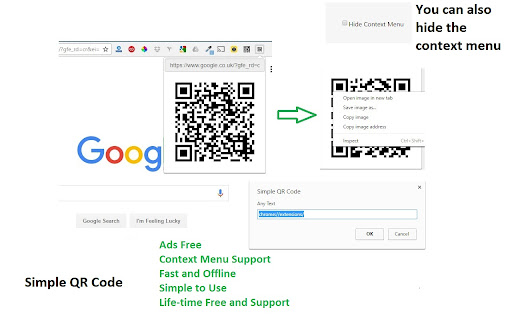
Offline QR Code Generator/Editor (URL and Text) Features: **Absolutely Offline and Fast** **Context Menu Support (Any Selected Text to QR)** **Absolutely simple, powerful and Ads-Free!** **Life-time support, Free For Ever** **Easy to use*** **Allow QR Modification (Click the Image)** **No Author links or other shits** This Simple Chrome Extension (Clean UI with no Author or other links) allows you to get the QR image for the current Tab URL. You click the extension icon and then you will get the QR image. Simple as that, no deep shit. You can right click to copy, open in new tab or save the image. This plugin requires No Internet Connection (via qrcode.min.js) You can also select any text and click the 'Get QR' in the context menu. If no selection is found, the current tab URL will be converted to QR. The QR image will be shown in the same page and again, you can click the QR image to modify the text. If you don't like context menu, you can hide it in the option page. From version 0.6, the QR will NOT be shown using Bootstrap Modal because it may conflict with the page and slow down the browser. Just remember, less is more. Please rate it. Suggestions, Feedback and ratings are much appreciated. You can also click the QR image to modify the text. If you like this plugin, could you buy me a coffee? :) https://www.paypal.me/doctorlai/5 bitcoin:1J88t5UAgKBHhMgzkyH9bpY5mPdCYAe5XQ Update History 22-Dec-2021 1.3.3 Manifest V3 - Remove Context 18-Mar-2019 1.3.2 Remove Bootstrap, Add Quiet Zones 10-Sep-2017 1.2 Add Version 28-Jan-2017 1.1 Add Locale 17-Nov-2016 1.0 Fix Multiple Context Menu 16-Nov-2016 0.9 Add Options Page - Allow Hiding the Context Menu 16-Nov-2016 0.8 Add Context Menu - Get QR of Current URL 16-Nov-2016 0.7 Allow Modification when you click the QR image (in page) 16-Nov-2016 0.6 Remove Modal because of Conflicts 15-Nov-2016 0.5 Add Context Menu (Any Selected Text to QR) 13-Nov-2016 0.4 Update Text after QR is modified 13-Nov-2016 0.3 Offline using qrcode.min.js 13-Nov-2016 0.2 Code Cleanup 13-Nov-2016 0.1 Init Release

QR Code Generator
Fast and simple QR Code Generator Instant QR Code Generator for any task Turn any information into a QR code in just a couple of clicks. This simple and fast Chrome extension allows you to create QR codes from: • any text • a website link (URL) • a phone number for quick dialing • contact information How it works: 1. Click the extension icon on the Chrome toolbar 2. Enter text, paste a link, or type a phone number 3. Get your QR code instantly 4. Download the image or share it with friends and colleagues Features: 🚀 Maximum speed — generation takes seconds 📥 Download QR code in high quality 📱 Versatility — the code is easily readable by any smartphone 🔒 Complete privacy — the extension does not collect or share your data • Quickly share a link from a mobile device • Encode a business card or contact information • Create a QR code for a Wi‑Fi password • Transfer text that is inconvenient to type on a phone The extension is ideal for marketers, webmasters, managers, and anyone who regularly works with QR codes.

QR Code Generator
Generate QR code from any text and save it as an SVG image QR Code Generator is an extension that helps you easily make QR codes in your browser. Simply click on the toolbar button to open the app. You can open this add-on in a stand-alone window (default context) or toolbar popup, as well as a new tab. To choose a context for opening the app, please right-click on the toolbar button and then select your desired context. Please note that all changes are stored in the memory. Once the app is open, please add a text in the text area within the app (bottom section). Next, click on the right-arrow button next to the text-area to generate the QR code. To see the last 10 generated QR codes, please click on the left sidebar. If you click on each item in the sidebar, it will be rendered on the main screen. On the top-right corner, there is a download button to download the current QR code as an SVG image file. Below that, there are reload (to reload the UI), support, and donation buttons. Note: you can also select a text on any webpage and then right-click and choose - Generate QR Code - from the context menu to generate a QR code. If you found a bug to report, or have a feature request in mind, please fill the bug report form on the add-on's homepage (https://mybrowseraddon.com/qrcode-generator.html).

The Quick QR Code - Multi-scene decoding tool
Full-featured QR Code Extension(The Quick QR Code): QR code generation, camera decoding, screenshot decoding, picture decoding, etc. Probably the best qr code generation and recognition plugin on the market.Adhering to the tiny but useful ideas, Here are some of its features: 1. Quickly generate QR code 2. Camera decoding and picture decoding 3. Web page screenshot decoding 4. QRCode can be downloaded and saved 5. Support dynamic IP replacement 6. Support QRCode generation and recognition 7. Support identify the QR code in the video 8. Support history and history import and export 9. More international language support 10. Support offline operation 11. Support for short links 12. Support novice guidance 13. Support shortcut keys 14. Quick and friendly experience

The QR Extension
Quick QR Code generator with options like edit, colors, width. To generate QR codes quickly based on current website link of the tab and also edit quickly.
