
eefoinodjigoedmfjkbikmdhecggljgc
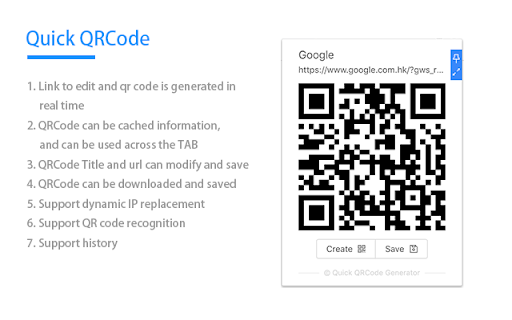



Full-featured QR Code Extension(The Quick QR Code): QR code generation, camera decoding, screenshot decoding, picture decoding, etc. Probably the best qr code generation and recognition plugin on the market.Adhering to the tiny but useful ideas, Here are some of its features: 1. Quickly generate QR code 2. Camera decoding and picture decoding 3. Web page screenshot decoding 4. QRCode can be downloaded and saved 5. Support dynamic IP replacement 6. Support QRCode generation and recognition 7. Support identify the QR code in the video 8. Support history and history import and export 9. More international language support 10. Support offline operation 11. Support for short links 12. Support novice guidance 13. Support shortcut keys 14. Quick and friendly experience

QR Code Generator
QR Code Extension: A faster, more direct way to create and share QR codes, even better than short links. QR Code Generator, the ultimate tool for effortlessly shortening URLs and transforming them into QR codes. This tool is your quick solution to creating and sharing QR codes. Simply right-click, and within moments, your content is ready in QR form, as a short URL online. If you just install this extension dont forget reload the page before using. We aim to be the best in the world of QR extensions, so your feedback is invaluable. If you encounter any bugs, have feature suggestions, or just want to share your thoughts, don't hesitate to drop us a review or comment. Your insights drive our improvements.

Extension Manager
Manage extensions, Quickly enable/disable, Support batching operation, Smart sorting. Fast, Simple and Secure. 1. One Key fast enable/disable extension 2. Lightning Group: Quickly enable/disable extension groups according to the scene (except for locked or theme class extensions) 3. Smart Sort: intelligent sorting according to your frequency of use (default sort by name) 4. Right-click Menu: provides shortcut functions such as lock, uninstall, option configuration, home page, APP running, etc. 5. Smart Search: Quickly find the extension you need with keywords or phrases 6. Reminder: display the extended status in real time, remind reset after use, reduce resource consumption (except for locked or theme class extension) 7. View Selection: Provide list view and grid view, in line with user habits 8. Group management: general group and fixed group, flexible management 9. Extension Naming: Give your extension an alias you like 10. Automatic matching: You can turn extensions on and off according to different websites 11.Support dark mode

Aria2 Explorer
Speed up your downloads with Aria2, manage your download tasks easily. Aria2-Explorer captures browser's download task and exports it to Aria2 via JSON-RPC interfaces to complete download task. Aria2 is a lightweight multi-protocol & open-source command-line download utility. It supports HTTP/HTTPS, FTP, SFTP, BitTorrent and Metalink. 1. For Windows, please install Aria2 Manager: https://apps.microsoft.com/detail/9p5wq68q20wv?cid=cws Other platform, please download Aria2 utility: https://github.com/aria2/aria2/releases/latest. 2. For Windows, please run Aria2 Manager . Other platform, please run Aria2 in the Terminal with typing aria2c --enable-rpc. 3. Install this Chrome extension. 4. Enable auto-capture on the extension options page and configure others as you need. (For Motrix user, please use http://localhost:16800/jsonrpc as the RPC URL) After these steps, you could enjoy the multi-threads and BT download experience inside the Chrome. Warning: Please turn off auto-capture function, when you are using other extension to download network resources. Otherwise, there will be conflict and exception arisen. Features: [ ZERO collection of user data and privacy ] 1. Auto capture browser download tasks - Capture notification - Support magnet links - Toggle auto-capture by shortcut (Default: Alt + A) - Set all Aria2 options manually before download - Filter task by the domain, file extensions or file sizes Filter priority: domain > file-ext > file-size, white-list > black-list 2. Auto-select Aria2 RPC server by matching the preset download URL pattern 4. Synchronize and store all settings on the cloud 5. Support for zh-CN/zh-TW/en/fr/it/ja/ko/ru/uk languages 9. Support shortcuts in the options page (Save: Alt + S Reset: Alt + R Download: Alt + J Upload: Alt + U)

FeHelper - JSON格式化、编解码、二维码、开发者工具箱
FeHelper is a powerful developer tool designed for front-end developers. It integrates various practical tools to help developers improve work efficiency. However, FeHelper strictly adheres to the principle of single function activation. By default, FeHelper only provides the JSON auto-formatting function, and all other functions are disabled by default. If users need them, they can go to the plugin configuration page to install and enable them. The following are the main functions of FeHelper: ## JSON Tools: - JSON beautifier: Automatically detects and formats JSON data, supports manual formatting, decoding of messy codes, sorting, BigInt processing, editing, downloading, and skin customization, greatly facilitating developers' processing of JSON data. - JSON comparison tool: Supports automatic key-value comparison of two JSON contents, highlights differences, and helps developers quickly identify data changes. ## QR Code Tool: - QR code generator: Supports custom color and icon QR code generation, suitable for a variety of application scenarios. - QR code decoder: Supports multiple modes of QR code decoding, including decoding after pasting a screenshot, which is convenient and fast. ## Encoding tool: - String encoding and decoding: Supports multi-format information encoding and decoding, such as Unicode, UTF-8, URL, Base64, MD5, etc., to meet different encoding requirements. Code beautification tool: Supports code beautification for multiple languages, including Javascript, CSS, HTML, XML, and SQL, helping developers maintain clean and tidy code. Code compression tool: Provides simple code compression functionality, supports HTML, Javascript, and CSS code compression, and optimizes web page loading speed. ## Developer Tools: - AI assistant: A super intelligent dialogue tool powered by AI, supporting code writing, code modification, scheme design, and other tasks to improve development efficiency. - Simple Postman: An interface debugging tool that supports GET/POST/HEAD request methods, automatically formats JSON content, and simplifies the API testing process. - Websocket tool: supports packet capture testing for Websocket interfaces, including connection testing for ws services, message sending testing, result analysis, and more. ## Other tools: - Time (stamp) conversion: mutual conversion between localized time and time stamp, supporting second/millisecond, world time zone switching, clock display in various time zones, etc. - Random password generation: Generate passwords by randomly combining various characters, supporting specified length and character type to ensure password security. - My sticky notes: A sticky notes tool that supports creating directories to categorize and manage notes. Notes can be exported/imported with one click for convenient information management. - Markdown conversion: Markdown editing/preview tool, supports direct conversion of HTML fragments to Markdown, and supports downloading content in PDF format. - Webpage screenshot tool: It can take screenshots of any webpage, supporting both visible area screenshots and full-page scrolling screenshots. The final result can be previewed before being saved. - Page color picker tool: You can directly collect color values for any element on the webpage. Move the cursor to the location where you want to pick the color, and click OK.
