
kepjfakbnekbifkjnfhmoilbbnncnfjc

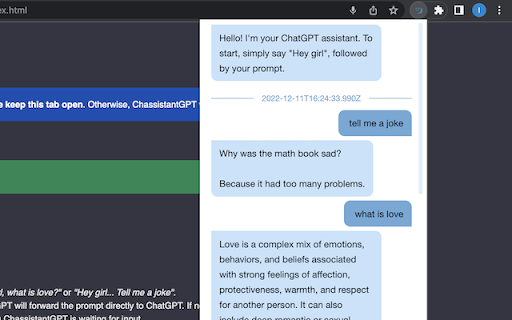
Use ChatGPT as your personal assistant ChassistantGPT is a ChatGPT voice assistant. It allows you to send prompts to ChatGPT via voice and hear the response from anywhere! ChassistantGPT supports 60+ languages and dialects. How To Use Say "Hey girl" followed by your prompt. For example: "Hey girl, what is love?" or "Hey girl... Tell me a joke". You can also configure a custom trigger phrase instead of "Hey girl". Alternatively, you may trigger ChassistantGPT by pressing Cmd/Ctrl + Shift + E from anywhere in the browser. If a prompt follows as part of the same sentence, ChassistantGPT will forward the prompt directly to ChatGPT. If not, a "beep" sound will follow (accompanied by switching of the popup icon to red), signifying ChassistantGPT is waiting for input. Before sending to ChatGPT, ChassistantGPT will say "OK, coming up". While waiting for a response from ChatGPT, the popup icon will turn green. In addition to the voice response from ChatGPT, you can view the full conversation at any time by clicking on ChassistantGPT's popup. You may stop ChassistantGPT's voice playback at any time by pressing Cmd/Ctrl + B. If you closed the extension's tab, you can reopen it by reopening the browser or reloading the extension. Privacy ChassistantGPT relies on your existing session with ChatGPT. If you aren't logged in, please do so at https://chat.openai.com/chat. The extension does not store any data. It does not transmit data from your device, except for the sentence that directly follows the "Hey, girl" command, which is sent straight to ChatGPT. The extension's only permission is limited access to `chat.openai.com` (webpage + fetch without CORS).

ChatGPT Token Counter
Counts tokens in the ChatGPT active conversation on chatgpt.com The ChatGPT Token Counter is a Chrome extension designed to help users keep track of their token count during long conversations with the ChatGPT language model on chat.openai.com. OpenAI is hiding what the context window is on the web version. ChatGPT 4o in Plus and Team should have a context window of 32,768 tokens (~24,000 words). 3 words ~ 4 tokens. When your conversation becomes longer than that, ChatGPT will start to "forget" what was discussed earlier. The box in the corner of the window lets you monitor the token usage and ensure that the conversations do not exceed the context window, which is particularly important for coaching, idea generation, and working with longer articles where retaining the context is crucial. With this extension, you will know when context can be missing and will have more productive and meaningful conversations with ChatGPT. This extension is written 99% by ChatGPT. The logo icon is created 100% by MidJourney. The number IS NOT exact but should be in the range of +/- a dozen.

ChatGPT Sidebar by cloudHQ
ChatGPT sidebar as your AI assistant on any page Welcome to the ChatGPT Sidebar by cloudHQ, an AI assistant that emerges from the side of any webpage you browse. As you navigate different webpages, your email inbox, or any online document, ChatGPT Sidebar can be accessed with just a click of a button. The information you get with this handy sidebar provides you with straightforward knowledge about whatever it is that you're browsing. Whether you're deciphering a dense article, exploring new topics, or just casually browsing, our ChatGPT Sidebar is designed to enrich your understanding, streamline information, and answer any queries you might have—immediately. How to use ChatGPT Sidebar? 1. Go to any website 2. Select the text 3. Click on ChatGPT Sidebar icon on the right side of your screen, select the prompt and click on "Send to ChatGPT". 1. Use ChatGPT prompts across websites for tasks like: ✔️ Summarize ✔️ Rewrite ✔️ Check Grammar ✔️ Translate ✔️ Clarify code ✔️ Summarize the web page ✔️ Your own prompts 2. Access our ready-to-use prompt library, where you can further customize any prompts for your own needs. 3. Full support for both ChatGPT-4 and ChatGPT-3.5 4. Full support for Open AI API Refine your web experience with ChatGPT, and become smarter in 1 click! 🌟 cloudHQ website: https://www.cloudhq.net/ App website: https://www.gpt-sidebar.com Pricing: https://www.gpt-sidebar.com/pricing Support page: https://support.cloudhq.net/category/browser-extensions/chatgpt-sidebar/ FAQ page: https://support.cloudhq.net/chatgpt-sidebar-faq-frequently-asked-questions/ Blog: https://blog.cloudhq.net

GPT Sales Assistant
Streamline Your Sales With ChatGPT. Introducing GPT Sales Assistant, a privacy-friendly Chrome extension that uses AI to generate entire emails and messages. It works on all websites and has enhanced support for Gmail. ✔️ Outcompetes all other tools in the market with the highest quality responses ✔️ Works on all websites, and even better on Gmail ✔️ Supports all languages Visit our website at https://gptsalesassistant.com and check out our product demo HOW TO USE ON ALL SITES: 1) Click on the GPT Sales Assistant extension icon 2) A popup window will appear 3) Briefly enter what you want to write about and hit the "Generate Response" button. HOW TO USE ON GMAIL: To generate an email reply in Gmail: 1) Go to Gmail, open an email, and reply to it. 2) Click the GPT Sales Assistant extension button in the Gmail reply box. 3) Briefly enter what you want to reply to and hit the "Generate Reply" button. To generate a new email in Gmail: 1) Go to Gmail, compose a new email. 2) Click the GPT Sales Assistant extension button in the Gmail textbox. 3) Briefly enter what you want to write an email about and hit the "Generate Email" button.

ChatGPT to Help
Get Instant Help Anywhere and Anytime with ChatGPT AI Assistant on Chrome With the ChatGPT2Help extension, you can integrate artificial intelligence into your writing process. Whether you're drafting an email, social media post, or article, ChatGPT2Help can provide suggestions and corrections in real-time, helping you to write more effectively. 🤖 Customize Your Own Prompts - Add unlimited personalize prompts - Set default prompts - Add, Edit, Update, Reorder freely 🌎 Easy Translation: - Translate text between 100+ languages with ease. - Get accurate translations. - Save time and resources with this feature. 👨💻 Shared AI Responses: - Sync AI-generated responses across multiple browser tabs. - Never miss a response or message with this feature. - Continue having conversation with AI with content from different browser tabs. 📧 Smart Reply to Emails: - Respond to emails faster with the help of smart reply technology. - Save time by using pre-written responses generated by AI. - Customizable options for frequently asked questions and common inquiries. 📝 Instant Online Explanations: - Get instant answers to anything you want to know online. - The extension uses ChatGPT to provide quick and accurate explanations. - Easily search for explanations within the software interface. ✨ Fast Content Marketing: - Scale up your content marketing efforts quickly and efficiently. - Improve your writing skills. - Tools to optimize and analyze your content to increase engagement. 📈 Boost Ad Conversions: - Improve your ad copy. - Increase your conversion rates with targeted messaging. - Get suggestions for better headlines, descriptions, and calls-to-action. ✍️ Finish Essays Faster: - Write faster and more efficiently. - Get suggestions for better sentence structure, grammar, and spelling. - Save time and meet deadlines with ease. 🧠 Brainstorming Tool: - Generate new ideas and concepts. - Enhance your creativity with this feature. - Use this feature to overcome writer's block or brainstorm for new marketing campaigns. 📱 Social Content Creation: - Create social media content quickly and easily. - Use selected text as a starting point for your content. - Use different tone and style to increase user engagement. More and More ...
