
kekpcmnonffnjfijpkbnmjcemjejnlih
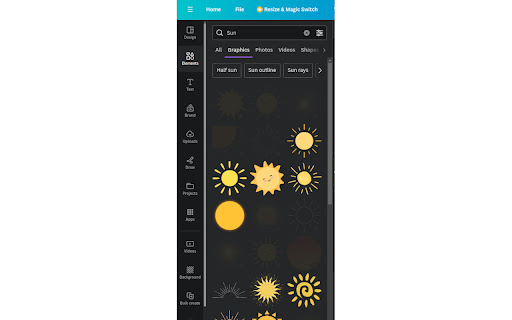
Chrome Extension for canva.com filter free resources Overview: Unlock the full potential of your creativity on a budge with our Chrome Extension, the Canva Free Resource Filter. This tool is meticulously designed for Canva users who wish to streamline their design process by focusing exclusively on free resources. Say goodbye to the frustration of finding the perfect design element, only to discover it's behind a paywall. Our extension seamlessly integrates with your Canva interface, ensuring you have access to a vast array of free images, templates, icons, and fonts, all at your fingertips. Key Features: - Exclusive Focus on Free Resources: Automatically filters out paid resources, allowing you to browse through Canva's extensive library of free elements without any distractions. - Seamless Integration: Designed to blend perfectly with Canva's user interface, providing a smooth and intuitive user experience that feels native to the platform. Privacy-Focused: We value your privacy. The extension operates without collecting or storing any personal data, ensuring your design process remains private and secure. Benefits: - Maximize Creativity on a Budget: Perfect for freelancers, small business owners, students, and anyone looking to create professional designs without financial constraints. - Save Time: Eliminates the need to manually sift through paid resources, significantly speeding up your design process. - Enhance Productivity: By focusing on free resources, you can streamline your workflow, making your design process more efficient and productive. How It Works: Once installed, the Canva Free Resource Filter automatically filters out all paid resources from your search results in Canva.

Custom Cursor for Chrome™
Fun custom cursors for Chrome™. Use a large collection of free cursors or upload your own. Customize your Chrome browser experience with our free collection of mouse cursors at Custom Cursor. At Custom Cursor we have created a giant collection of hand-drawn cute cursors. We have over 10,000 different packs available on our website for you to enjoy. With your help, our collection has grown so big that we divided it into categories that should fit every taste, like: - Minecraft; - Cute Cursors; - Anime mouse packs; - Memes; - Spy x Family pointer packs with Anya Forger; - Among Us; - Two types of Minimal pointers for work and studies; - Games; - Roblox; - And many, many other funny elements for you to play with. Some of our mouse pointer packs are bundled with the Custom Cursor browser extension, but most of them await you on our website. Keep an eye out for new and trending additions. To simplify navigation, we've organised our collection into Editor's Picks collections, each with a unique theme. Examples include: - Green arrows for autumn; - Christmas themed arrows; - Holidays editor's picks; - Halloween; - Custom Cursor collaboration with Daieny Schuttz; - Pink pointers editor picks; - Summer mouse decorations; - Rainbow colors; and much, much more on our website. If you can't find what you're looking for, use the "UPLOAD CURSOR" button to add your own. Manage your personal arrow collection on the Upload page and adjust cursor size in the "Manage" section. Newly added collections will be uploaded to the Custom Cursor for Chrome extension and can be found at the bottom of the collection list. Your added packs will appear in “My Collection”. Create your own collection of mouse cursors from any images with Custom Cursor Creator tool on our website. It will allow you to create new packs from almost any arrow or pointer shaped image on the internet. ------------------- ! After installing the extension, refresh previously opened tabs to use it on those pages. Note that the extension may not work on Chrome Web Store pages or the home page. Open another website (e.g., google.com) to test the extension. If you like the extension you can also check our Custom Cursor for Windows app. Preview arrow appearance by clicking on it in the extension window and moving the mouse to the empty space within the window.

Exploratory Testing Extension
Chrome extension for exploratory testing A Chrome extension designed for making web exploratory testing easier Features: - 🐛 Quickly create and track bugs, notes, ideas and questions - 📸 Capture full page or custom cropped screenshots - 🔗 Automatically track URLs for each annotation created - 🔍 Advanced filtering of annotations by type in reports - 📊 Visualize testing data through interactive charts - 👁️ View screenshot previews instantly on hover - 💾 Export testing sessions to JSON, CSV or HTML formats - 🤝 Share and collaborate by importing/exporting sessions

NFTier Chrome Extension
NFTier Rarity Engine Chrome Extension NFTier is an NFT Companion app. It allows you to view NFTs, their rarity, floor price, and traits. It primarily works in the Avalanche, and Fantom ecosystem, but is working to support collections in other chains like Ethereum, and HBAR. It displays popular NFTs Collections in your wallet, stats about their treasury and the wallet's balances for popular rebase tokens like TIME, OHM, LOBIS, and BTRFLY. Simply enter a valid eth based address that you want to track (eg: 0x9a0145d1b1b17293e7f722f80757d2b6489f0a4c) or connect with compatible wallet through wallet connect from your phone. This extension is published as v3 extension, and such, cannot manipulate dom elements, and does not interact with smart contracts directly (but rather, requests read-only data from the blockchain).

Google Translate Open SideBar in Chrome
Google Translate Extensions For Chrome. Google Translate Open SideBar in Chrome The only site and application that comes to mind for translation is Google Translate. Google Translate has made a difference in translation. Google Translate Extensions For Chrome. Google Translate Open SideBar in Chrome
