
kejgjahipnbalhiagmgdpbllffppcjik

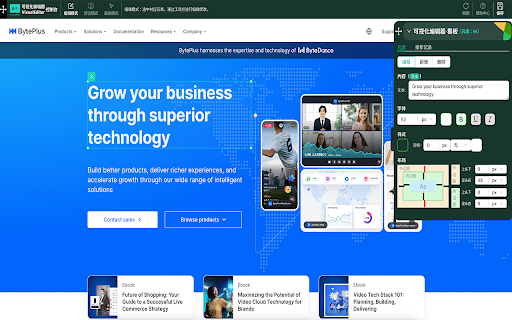
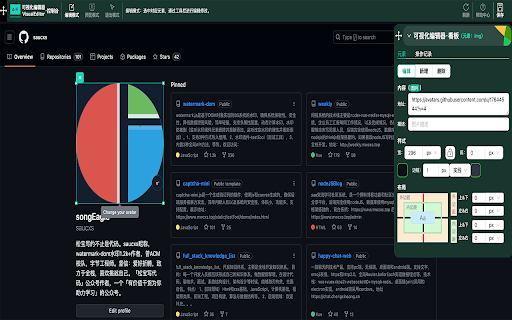
通过DataTester(AB) VisualEditor让网站优化变得更轻松,支持任意网页可视化编辑,降低使用AB成本,助力科学决策。 🔬介绍 VisualEditor是一款“无代码”修改网站元素的内容,样式,布局的工具,面向非研发同学使用,通过识别元素和可视化配置等方式来创建页面内容和交互体验,支持任意网页进行可视化编辑。 ☀️体验(欢迎试用) 火山引擎DataTester:https://www.volcengine.com/product/datatester BytePlus Optimize:https://console.byteplus.com/datatester 扩展地址:https://chrome.google.com/webstore/detail/visualeditor/kejgjahipnbalhiagmgdpbllffppcjik ✍️功能介绍 https://bytedance.feishu.cn/docx/Gr4XdR0i2oC7UJxbOvAc4Sk6nJb 🤝使用场景 1. 界面设计优化:通过AB可视化编辑器,产品运营可以轻松创建和管理不同版本的界面设计,以确定哪个版本更能吸引用户,提高用户留存率和转化率。 2. 内容优化:通过AB可视化编辑器,产品运营可以轻松创建和管理不同版本的内容,以确定哪个版本更能吸引用户,提高用户留存率和转化率。 3. 功能优化:通过AB可视化编辑器,产品运营可以轻松创建和管理不同版本的功能,以确定哪个版本更能满足用户需求,提高用户留存率和转化率。 4. 营销策略优化:通过AB可视化编辑器,产品运营可以轻松创建和管理不同版本的营销策略,以确定哪个版本更能吸引用户,提高用户留存率和转化率。 📖 核心能力 - 可视化编辑能力 - 按照「编辑行为」分类:编辑元素和属性,新增widgets组件,删除元素,编辑方式。 - 编辑:编辑文本,编辑链接,编辑图片,编辑可交互元素,编辑身份认证页面,编辑视频。 - 新增:新增元素,widgets,模板,AI文本建议,动态变量。 - 删除:隐藏,移除。 - 方式:编码Coding,可视化Visual - 按照「编辑复杂性」分类:基础视觉,高级视觉 - 基础视觉:设计网页元素 - 高级视觉:代码编辑器,新增Widgets组件,widgets模板组件 - 可视化编辑模式:iframe内嵌模式,Chrome扩展模式。 - 可视化编辑业务:可视化实验,多页可视化实验,MVT多变体实验,灰度发布。

Easy WebPage Editor
Easy WebPage Editor is a free Chrome extension,allows any website to be edited,used to edit web content in your Browser. Edit Mode When Edit Mode is ON,current webpage will become fully and simply editable as if your browser were a MS Word,you can change existing text on the page,change new font styles (bold, italics) on the text Delete Mode When Delete Mode is ON, when you move the mouse, a blue box will be displayed, click to delete all the content in the blue box;you can delete HTML elements that cause chaos on the page,For example:table、list、video and so on,these elements are difficult to delete when Edit Mode is ON Notes: the changes are only visible on your own machine. You aren't actually altering the website. Your edits will disappear after refreshing the page,You can screenshots the page,or save the modified document in HTML or MHTML or print it to pdf.

Web Edit
Easily edit websites temporarily with a click of a button. Easily edit websites temporarily with the click of a button. No coding or knowledge needed. Just a click to start editing and another to stop. Change any website's text effortlessly and save your changes as HTML. Format text in bold, italics, and underline. To use Web Edit, click the extension or use Ctrl/⌘ + Comma on website open you want to edit.

Easy Text Change - Select, Right Click & Change
Select text, right-click, enter new text, and see it change instantly on the page. Maybe you want to edit text before taking a screenshot, preview different wording, or just have some fun. Just select the text, right-click, choose the option, enter new text in the popup, and it updates instantly on the page. Simple and quick.

Edit website
Use Edit Website: Easily web edit, change text, and page edit on and off content instantly. Alter a website with ease Introducing the Ultimate Edit website Tool for Chrome Looking for a seamless way to edit website or experiment with webpage layouts? Whether you're a developer, designer, or casual user, the page edit extension empowers you to make quick and hassle-free modifications directly in your browser. With a user-friendly interface and powerful features, this tool makes editing websites easier than ever. 1️⃣ Testing website designs without diving into the backend. 2️⃣ Quickly editing website content for mockups or presentations. 3️⃣ Learning how to modify web page through an intuitive approach. 4️⃣ Customizin urls you visit to suit your preferences. 5️⃣ Experimenting with javascript edit site capabilities. ❇️ Features You'll Love ➤ Page edit Instantly: Modify any part of a web page—text, or paragraphs or indentations. ➤ Go ahead and do whatever you want anywhere on the internet. ➤ Toggle Edit On and Off: With a single click, enable or disable change webpage text mode. 🦸♂️ Who Is It For? - Developers: With the help of Edit websites - test modify web page. - Designers: Create visual mockups in real-time. - Marketers: Show clients quick demos with customized content. - Educators: Teach students how to alter a website in practical sessions. ▸ Modify web page for Mockups: Instantly change content or layouts to present ideas. ▸ Text Adjustments: Quickly change the text on a website for experimentation or demos. ▸ Mutating displayed data while playing online games to prank your friends 1) Live Demonstrations: Use functionality to demonstrate changes in real time. 2) Learning Tool: Understand how to alter a website using this hands-on tool. 3) Mutating any symbol you want anywhere on the internet. Unbelievable! 🛠️ How to modify web page? 1. Install the extension in Chrome. 2. Open any url you want to customize. 3. Click our magnificent app (pencil icon) widget to start. 4. Select and change webpage text 5. Toggle edit on and off to save or pause your work. ➤ Change Webpage Text: Discover how to transform data on any url effortlessly. ➤ Modify Web Page Layouts: Rearrange elements, hide content, or alter to experiment with layouts. ➤ Text Changer: Need a quick mutation on this url? Use mutate feature to adjust content on site. • Edit website Simple Interface: Start change webpage text with zero learning curve. • Versatile Usage: Perfect for editing websites on the go. • Fast and Efficient: No need to refresh or reload to see what you did.. • Safe and Reversible: All mutations are temporary unless you save them. 🔓 Unlock Your Creativity Have you ever wondered how to change text on any website? With edit website extension, you can transform any webpage into your creative playground. Adjust any symbol, don’t modify layouts and don’t experiment with styles using modify web page tools. Unleash your inner beast and tweak any url you visit. Want to modify any site for a demo? Or perhaps tweak a layout for inspiration? With this extension, you're just a click away. Except layouts, we don’t support this. - JavaScript Edit website Support: For users familiar with coding, simplify your modifications - Do not Modify Web Page Elements: this app can't do anything apart change webpage text. - Temporary modifications: All modifications are non-destructive, ensuring the original site remains intact. Are you looking to: 1. Edit website for design inspiration? 2. Discover how to alter a website without backend access? 3. Customize content for presentations or education? 4. Experiment with modifying symbols anywhere? 🎬 Start modify web page today Say goodbye to the frustration of trying to figure out how to edit a website. Whether you're working on mockups, learning design, or demonstrating visions one would never imagine, the change webpage text extension gives you the power to edit any page with ease. Install out application now and explore a new world of possibilities with modify web page and more. Transform the way you interact with web pages. From simple text modification to advanced layout changes, the Edit Anything extension is your all-in-one solution for editing websites. Don't just browse the web—shape it. Ready to experience the future of web editing? Add our application to Chrome and start your journey today!
