
ikaljdaffadnejolmbklgjnajafcdodj
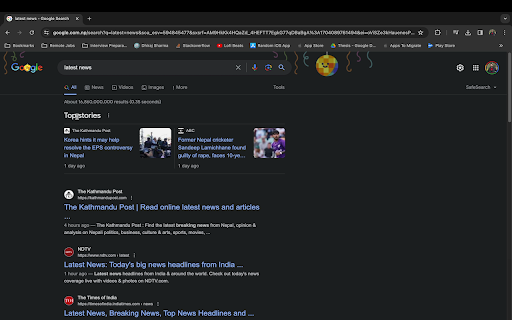


Select text, right-click, enter new text, and see it change instantly on the page. Maybe you want to edit text before taking a screenshot, preview different wording, or just have some fun. Just select the text, right-click, choose the option, enter new text in the popup, and it updates instantly on the page. Simple and quick.

Allow Copy +
🤩 If you like "Allow Copy +" rate 5 stars to extension 🤩 FEATURES: - remove copy protection, enable copy text, remove block selection; - allow right mouse click and turn on context menu; - activate / deactivate for specific domain; - sync with all chrome browsers with the same google account; - free and easy to use. 🚨🚧🚨BETA FEATURES: (Please, do not be scrupulous about these features, they are still in test mode) - grab text from image https://youtu.be/0rgolOJs_7g (extract text from images on linkedin wall, from instagram wall and some other websites); - extract text from google docs, and extract text from same technology used websites HOW TO USE: Just click ICON. GREEN - activated copying. ORANGE - deactivated copying. Activization works for the website(domain). HOW TO USE, DETAILY: Its turned off by default, and you can see ORANGE icon. To activate text selection and copying: - open copying protected web site; - click on extension's icon. After this the icon should be GREEN, it means that "Allow Copy +" is activated on current website. If you close and reopen current website the "Allow Copy +" will be activated. To deactivate for website just click icon one more time (the icon must changed to ORANGE color). - How do I copy a copy protected web page? - How can one copy text from a site in which the copy function is disabled? - How do I copy text from a protected webpage on Chrome? - How do I copy text from a content-protected website? - How can I copy text from a web page where the text is copy protected? - How do I copy text from a website that cannot be copied? - How do I copy text from websites that don’t allow it? - Why can't I copy text from some websites? - How do you force copy text from a website? - How do I copy past an unselectable text? - How do I absolute enable right click & copy if disabled? - How do I copy text when right click is disabled? - How do I enable right click copy in Chrome? - How do you copy and paste without right clicking? - Why can I not right click to copy and paste? I'm happy to help. Please, add review to "Allow Copy +" extension. Thank you.

Edit website
Use Edit Website: Easily web edit, change text, and page edit on and off content instantly. Alter a website with ease Introducing the Ultimate Edit website Tool for Chrome Looking for a seamless way to edit website or experiment with webpage layouts? Whether you're a developer, designer, or casual user, the page edit extension empowers you to make quick and hassle-free modifications directly in your browser. With a user-friendly interface and powerful features, this tool makes editing websites easier than ever. 1️⃣ Testing website designs without diving into the backend. 2️⃣ Quickly editing website content for mockups or presentations. 3️⃣ Learning how to modify web page through an intuitive approach. 4️⃣ Customizin urls you visit to suit your preferences. 5️⃣ Experimenting with javascript edit site capabilities. ❇️ Features You'll Love ➤ Page edit Instantly: Modify any part of a web page—text, or paragraphs or indentations. ➤ Go ahead and do whatever you want anywhere on the internet. ➤ Toggle Edit On and Off: With a single click, enable or disable change webpage text mode. 🦸♂️ Who Is It For? - Developers: With the help of Edit websites - test modify web page. - Designers: Create visual mockups in real-time. - Marketers: Show clients quick demos with customized content. - Educators: Teach students how to alter a website in practical sessions. ▸ Modify web page for Mockups: Instantly change content or layouts to present ideas. ▸ Text Adjustments: Quickly change the text on a website for experimentation or demos. ▸ Mutating displayed data while playing online games to prank your friends 1) Live Demonstrations: Use functionality to demonstrate changes in real time. 2) Learning Tool: Understand how to alter a website using this hands-on tool. 3) Mutating any symbol you want anywhere on the internet. Unbelievable! 🛠️ How to modify web page? 1. Install the extension in Chrome. 2. Open any url you want to customize. 3. Click our magnificent app (pencil icon) widget to start. 4. Select and change webpage text 5. Toggle edit on and off to save or pause your work. ➤ Change Webpage Text: Discover how to transform data on any url effortlessly. ➤ Modify Web Page Layouts: Rearrange elements, hide content, or alter to experiment with layouts. ➤ Text Changer: Need a quick mutation on this url? Use mutate feature to adjust content on site. • Edit website Simple Interface: Start change webpage text with zero learning curve. • Versatile Usage: Perfect for editing websites on the go. • Fast and Efficient: No need to refresh or reload to see what you did.. • Safe and Reversible: All mutations are temporary unless you save them. 🔓 Unlock Your Creativity Have you ever wondered how to change text on any website? With edit website extension, you can transform any webpage into your creative playground. Adjust any symbol, don’t modify layouts and don’t experiment with styles using modify web page tools. Unleash your inner beast and tweak any url you visit. Want to modify any site for a demo? Or perhaps tweak a layout for inspiration? With this extension, you're just a click away. Except layouts, we don’t support this. - JavaScript Edit website Support: For users familiar with coding, simplify your modifications - Do not Modify Web Page Elements: this app can't do anything apart change webpage text. - Temporary modifications: All modifications are non-destructive, ensuring the original site remains intact. Are you looking to: 1. Edit website for design inspiration? 2. Discover how to alter a website without backend access? 3. Customize content for presentations or education? 4. Experiment with modifying symbols anywhere? 🎬 Start modify web page today Say goodbye to the frustration of trying to figure out how to edit a website. Whether you're working on mockups, learning design, or demonstrating visions one would never imagine, the change webpage text extension gives you the power to edit any page with ease. Install out application now and explore a new world of possibilities with modify web page and more. Transform the way you interact with web pages. From simple text modification to advanced layout changes, the Edit Anything extension is your all-in-one solution for editing websites. Don't just browse the web—shape it. Ready to experience the future of web editing? Add our application to Chrome and start your journey today!

Enable Right Click ─ Allow Copy Everywhere
Allow copying and remove copy protection. Enable text selection, right-click menu, and context menu. Experience true freedom online with the Allow Copy Everywhere Chrome extension, designed to remove copy-paste restrictions on websites. This powerful Chrome extension lets users bypass copy protection on many popular sites, making it easy to copy text—even from pages that disable right-click or standard copy functions. ✔️ Key Features • Enable right click on protected websites • Allow copy and paste text • Unlock text selection • Remove copy protection • Restore context menu • Works on most websites automatically Restore Right-Click Access: Re-enable right-click functionality on restricted websites with ease. Ideal for researchers, students, and anyone who needs quick access to online content, this tool makes copying protected text as easy as a single click. Works on 1000+ websites including Medium, Coursera, Chegg and Udemy! ✔️ How It Works: 1. Install the Allow Copy Everywhere extension by clicking Add to Chrome. 2. Click the extension icon in your browser toolbar to activate it. 3. Select Free Copy and start copying text from any website—even those that block right-click. ✔️ FAQs • What does the Allow Copy Everywhere Chrome Extension do? The extension allows users to copy text from any website, even if the site has disabled right-clicking or copy functions. It's ideal for accessing content without restrictions. • Is it free to use? Yes, Enable Right Click is entirely free to download and use. • Will it work on all websites? The extension is designed to work on most websites with copy restrictions, though a few heavily protected sites may still block copy functions. Enable copy-paste everywhere and enjoy unrestricted access to web content. This copy-protection-disabling Chrome extension gives you full control, allowing you to restore right-click functionality and bypass copy restrictions effortlessly.

Activate Enable Right Click & Copy
Allow Right Click, Enable Copy and Paste in Every Site. Simple Allow Copy, Activate Enable Right Click, Copy Text Easily. Say goodbye to restrictions! Activate Enable Right-Click & Copy extension restores your browsing freedom by allowing right-click, text selection, copy, and access to the context menu on websites that block them. Whether you're trying to copy an article, highlight notes, or access the right-click menu – this tool puts the control back in your hands. Once installed, simply reload any open tabs to activate the features. 🤩 If you like Activate Enable Right Click, give us a 5-star rating! 🤩 🔹 Keyboard Shortcuts: Added visual hints for quick actions (Alt+C, Alt+A, Alt+O) 🔹 Badge System: Extension icon now shows live status with color codes: 🔴 Red: All features disabled 🟢 Green: Single feature active 🟠 Orange: Multiple features active 🔹 Right-Click Enabled: Instantly re-enable right-click functionality on sites that block it. Use your context menu as usual, without any limitations. 🔹 Text Selection & Copy: Freely select and copy any text - no more annoying restrictions or greyed-out content. 🔹 Allow Highlighting: Highlight important sections of a webpage just like you normally would. 🔹 Bypass Copy Protection: Automatically overrides most scripts that disable text copying or keyboard shortcuts like Ctrl+C and Ctrl+V. 🔹 Absolute Mode: Activates deeper overrides to break through aggressive copy-blocking techniques. Like having a universal master key for content. 🔹Image Reader (OCR): Ever see text in a picture on a website and wish you could just copy it like normal text? The OCR (Optical Character Recognition) feature does exactly that. It lets you grab text from any image you come across online, so you can use it however you want. 🔹 No More Popups: Removes copy-related pop-up warnings or confirmation dialogs for a smoother browsing experience. 📝 Note::- This extension works effectively on most websites, it may encounter challenges with exceptionally sophisticated methods used to disable copy-paste functionality. (Installing or uninstalling this extension may display promotional content.) 🔒 Privacy Assurance:- We want you to feel secure while using our extension. Rest assured, this software does not collect or transmit any personally identifiable information. It does not track your browsing behavior. The necessary information for the functioning of this software is solely stored on your own device. Our servers do not have access to this information, ensuring your privacy remains intact.
