
kedbaefjfjpplphppofakpfldhimhcio

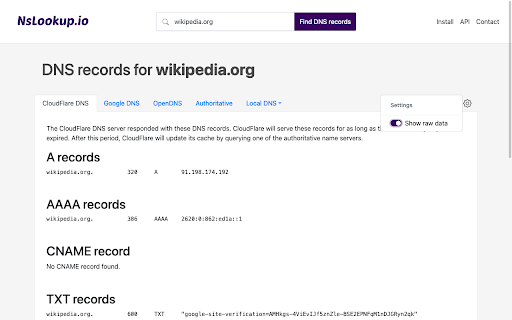

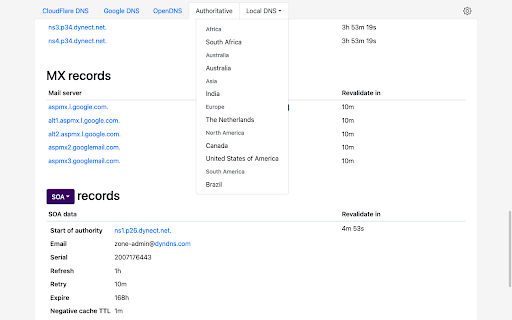

A simple and powerful tool for querying DNS records ★ Bypass DNS caching None of the DNS records are ever cached by NsLookup, so you're sure to get a fresh set of records every time. ★ Global DNS propagation Query DNS records from different locations to gauge the propagation process. ★ Discover root causes Quickly browse through a domain's DNS structure to find the root cause of connectivity issues. NsLookup shows all the DNS records for the website you're visiting. It has support for popular DNS servers like Google DNS, CloudFlare DNS and OpenDNS, but also local DNS servers all over the world.

DNS Checker - SEO and Domain Analysis
SEO and Domain Analysis Tool by DNS Checker. Provides SEO Report, Meta Redirects and 404s, Client IP, Domain IP & Geo Location, etc DNS Checker is a well-equipped source that offers you an ultimate DNS tools package. From Domain DNS Check to Public DNS Checker and Global DNS Checker, from IP Lookup to IP Blacklist check, from Networking tools to SEO-based tools. It provides a single platform for your every concern. DNSChecker's free Google Chrome DNS, SEO, and Domain Analysis extension helps you carry your online errands and get an edge to increase the chances of your website ranking. It analyzes your competitors' websites and provides in-depth information about their weaknesses. The extension also provides SEO and Domain DNS analysis reports with a detailed description that helps you better understand the competitors and rank your website consequently. Along with DNS Checker’s IP location lookup, DNS propagation checker, DNS record lookup, and other online tools, DNS SEO and Domain Analysis extension help you get a comprehensive SEO report, error 404, Website's Geo location, and IP address. The other benefits you get include; - Geo-location and IP address of any domain - Website's traffic ratio - Upgraded SEO Analysis of webpages - Number of links internal and external links - HTML (images and tags) analysis - Ranked keywords summary - Headings from H1 to H6 (tags and text) - Do-follow and No-Follow links summary - Additional Alt tags attribute analysis - Redirection and page ranking status - Website or webpage response time and speed results DNS Check SEO and Domain Analysis Features: Where optimizing your content on the site is the utmost in deciding whether your website will hit the SERPs high ranking or not, the optimization of your domains is also necessary. Consequently, DNS checker offers both analyses along with other features that help you optimize your web pages and analyze and explore gaps in your competitor's website and domains. DNS Domain analysis helps you understand your competitor's website status in-depth. For instance, you can find a competitor's domain ranking, rating, position, and hold in the respective market using DNS Domain check. Skimming through the DNS checker domain report, you can make better and more effective decisions regarding your website domain name purchasing. Consequently, you can find the following things using DNS Domain analysis; - Domain Geo-Information - Internet Protocol (IP) Geo-Information - Analyze the HTML state DNS SERP preview lets you gain better insights into your competitor's website. You can also use a DNS-free SEO tool to use the information to develop a strategy for your website's successful launch. By analyzing your content and website domain status using DNS analyze the webpages tool, you can easily optimize the On-page SEO of your content to ensure higher ranking, more traffic on the website, and expanded reach. With DNS Checker On-Page SEO Analysis, you can; - Check Broken Links - Check Headings - Check Meta Title and Description - Link Redirection check - Analyze On-page SEO - Canonical tag check In this section, the DNS Chrome extension provides a quick summary of the respective website, including; - GEO status (Domain name, IP Address, City, State, latitude, and longitude) - Traffic rank (Ranked position and State) - SEO Analysis (Meta title and description characters, and number of headings) - Your IP address and Country name SEO report analyzes the following website ranking factors to help you develop a content strategy to ensure your high ranking; - Meta title - Meta description - Used keywords - Heading tags - Word cloud - Alt Attribute - External and internal links (with their anchor texts) With the DNS link Redirection checker, you can easily find the ratio of redirect links on the site you're analyzing. It shows the website's raw headers with; - IP address - Site status - Date - Content-type - Server - Cache-control - And other useful information Domain Geo Report: DNS checker also serves you by providing your competitor's websites; - IP address - Geo information - City - State, - Country - Latitude - Longitude - ISP - ASN - Country and postal code IP Geo-Information: DNS checker IP location tool works parallel with SEO and Domain Analysis to provide your current; Lastly, DNS checker provides the following free tools to help you find all your solutions under one roof. DNS Tools include; - Domain DNS validation and DMARC lookup check DNS status according to the standards. - Reverse DNS Lookup offers IP to hostname details. - DNS Lookup converts domain or hostnames into IP addresses for better search results. - NS and MX Lookup maintain records of your searched domains. - Flush DNS deletes all the stored information in the cache. - You can check your domain health status with Domain DNS Health Checker. - TCP and UDP, and port scanners identify ports available for the public. - Mac Address Lookup and ASN Whois Lookup check vendor and ASN owner, respectively. DNS IP Tools consist of; - IP address and location lookup that gives location information. - Trace email tool tracks the locations of email senders. - IP to decimal converter simply converts the given IP address into a decimal number. - IP Blacklist checker searches for blocked IPs. Webmaster Tools include; - Website Link Analyzer checks both external and internal links. - Check Google Page Rank tool allows you to find the rank of any website page in Google. - Downloading tools include Vimeo and Facebook video downloaders that download videos from respective platforms.

Country Flags & IP Whois
Displays country flag of website's server location, Whois and Geo info A browser extension to display the page's server flag in the toolbar area indicating the current webserver's physical location. This is done by comparing the IP range with an offline database from MaxMind's GeoLite (there is no server interaction to get the info). Knowing the server location adds an extra layer of awareness to your browsing and is useful to indicate the native languages and legal jurisdictions that may apply. Additional information about Geolocation or Whois info can be obtained via the left- and right-click on the action icon. Features: 1. This is an open-source project (https://github.com/andy-portmen/country-flags/issues) 2. Identifies IP4, IP6, and private IP addresses 3. It is now possible to use the native DNS resolver if a user is under a SOCKS proxy (disabled by default; requires native integration) 4. Offline database updates once per 7 days using the window.caches API 5. Supports running a custom command when an IP is resolved; This command accepts [ip], [host], [curl], [enurl] and [url] keywords 6. Open requested service optionally in the background and/or adjacent to the current tab. Available tools in the right-click menu (only six services are visible in the main menu): 1. SSL Checker: Check SSL certificate 2. Traceroute: Display the route and transit delays of packets 3. Ping: Test the reachability of this IP address 4. TinyURL: Shorten the URL using TinyURL.com 5. DNS Lookup: Perform an authoritative DNS lookup 6. Whois Lookup: Find the registration and delegation of a domain name 7. HTTP Headers: List all the response HTTP headers 8. Copy IP: Copy IP address to the clipboard 9. Alexa: Website traffic, statistics, and analytics 10. WOT Scorecard: Website reputation ratings 11. Virustotal: A free virus, malware, and URL scanning service 12. Check Server Status: Helps find whether a website is down or not 13. Google Translate: Free service instantly translates words, phrases, and web pages 14. Google Cache: Google cached pages for any website 15. Wikipedia: Domain search 16. intoDNS: Checks the health and configuration of DNS and mail servers 17. Netcraft: Provides internet security services including anti-fraud and anti-phishing services 18. Wave Report: Provides web accessibility solutions 19. Validate.nu: HTML5 Validator 20. W3C CSS Validator: CSS Validator 21. W3C Validator: HTML5 Validator 22. Internet Archive: Free universal access to archived web pages 23. Google: Search by domain 24. Wolfram|Alpha: Access to the world's facts and data -- Permissions: For a comprehensive description of why these permissions are needed check https://add0n.com/country-flags.html#permissions

Vulners Web Scanner
Tiny vulnerability scanner based on vulners.com vulnerability database. Passively scan websites while you surf internet! Tiny vulnerability security scanner based on vulners.com vulnerability database. It provides you ability to passively scan websites that you surf, on known vulnerabilities.

IP Whois
View info about IP, DNS records, SSL, country flag, domain whois, location, stats and more of any website. This extension is designed to be fast and lightweight, allows you to view all information of any website: - Display the country flag of the website in the current tab. - Show the map, IPv4 and IPv6 adresses, hostname, and the hosting company/organization. - All DNS records. - Whois owner information. - Geolocalization (down to the city). - A fast link to the Wayback Machine. - SSL check tools. - White and dark theme support. - ... and much more Support the extension development! https://github.com/sponsors/SergiX44
