
kecpjkejogdfaibpnfeomdiodibnojll
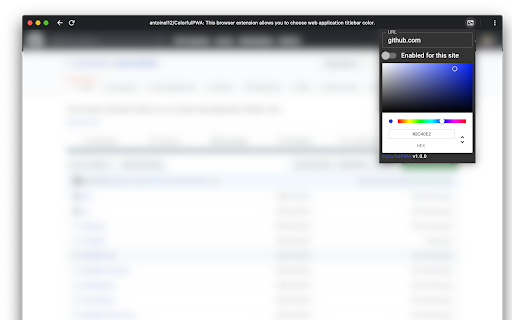

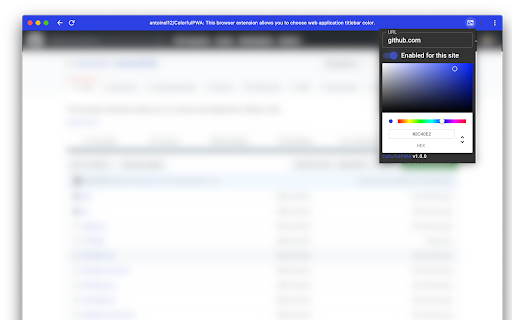
Colorful PWA is a Chromium based browser extension that let you choose title bar color. This extension allows you to choose web application titlebar color. ***This extension requires that you create shortcut as an app (in single window) for the website you are intending to change the color.*** See https://support.google.com/chrome_webstore/answer/3060053?hl=en for more details. It is especially useful web the web developper did not specified the color for his website and when the color inferred by Chrome is ugly. You can also use it to easily distinguish windows when you have lots of them opened or when you want to quickly discriminate the current environment (DEV, TEST or PRODUCTION) you are working on. No data is sent to a webserver, all informations are stored locally on your device. It is licensed under AGPL-3.0. More details and source code are available on extension's page on GitHub. For support please open a bug on GitHub. Release Notes: v2.0.0 - New Color Picker with the possibility to pick a color form the web page, Color selection for Inactive window, fixed bug that prevented extension to work on many websites: Google Photos, Calendar, Facebook, etc. and finally removed many dependencies to improve maintenance and protect against Supply Chain attacks. v1.0.1 - Migrated to Chrome Manifest v3. v1.0.0 - Initial release.

Website to App
Website to App is a productivity-focused Chrome extension that lets you open any website in a standalone window—giving it the feel of a desktop application. Whether the website is a Progressive Web App (PWA) or not, this extension allows you to run it outside the clutter of your browser tabs and bookmarks for a more focused, immersive experience. 🚀 Features 🔹 App-like Interface for Any Website Launch any site in a clean, standalone window—without browser tabs, address bar, or distractions. Perfect for tools, social platforms, messaging, or your daily websites. 🔹 Quick Toolbar Access Just click the extension icon on any site you want to launch as an app.

Multi-Email/App Taskbar/Dock PWA Unread Badge
Disclaimer: The developer of this extension in no way claims to be affiliated with Google**/Gmail**/Microsoft**/Outlook**. I acknowledge that I do not own their respective trademarks. This extension was developed for personal use and shared for others to use, if they wish to. This extension adds an unread count badge to the taskbar/dock icon of a PWA* Gmail**/Outlook** app. The app supports multiple Gmail**/Outlook** PWA accounts. Multiple account badges only work when each PWA is installed using a unique Google** Chrome browser profile that is setup with the unique Google** Account that you wish to access Gmail**/Outlook** emails with. Please note: this extension does not work, as intended/expected, with multiple Gmail**/Outlook** accounts within the same Google** Chrome browser profile, if each PWA is installed using the same Chrome Profile, it will show the unread count of each account on the same PWA taskbar icon by cycling through each account dependant on when you opened the PWA account on your device. So, please ensure you install multiple instances in separate Chrome Profiles. (Windows) How to install a PWA in Google** Chrome: 1. Navigate to the Gmail**/Outlook** URL, i.e. go to your Gmail**/Outlook** Inbox. 2. Click on the Google** Chrome browser settings button, ⋮ . 3. Click on menu option, "More tools". 4. Click on sub-menu option, "Create shortcut..." 5. Name the shortcut, e.g. GMail**/Outlook**. 6. (NB!) Ensure that you check/tick the checkbox labelled, "Open as window". 7. Once the new GMail**/Outlook** window opens, remember to pin the PWA to your taskbar to ensure that the extension adds the unread count to the pinned icon on the taskbar. 8. In Windows** 10 and 11, ensure that the Taskbar setting, "Show badges on taskbar buttons", is toggled on (i.e. enabled) to allow the unread count badge to be shown on the Windows** Taskbar. Once you have successfully made use of the extension, could you please rate it, and if you have any feedback, it will be appreciated too. This will give me an indication on whether or not I should enhance this extension further. I hope that this small extension helps you in some way, enjoy. *PWA, Progressive Web Application. **The trademarks mentioned are owned by their respective owners and Ocfinity and/or this extension are not affiliated with these companies. Updates: 2025-03-01 (0.2.6.6) - Added URL match for *://outlook.cloud.microsoft/*. Enable or disable the URL match** supported list using the extension details Site Access list. The new URL has not been tested - added on request only. 2023-01-24 (0.2.6.5) - Added support for Slack** PWA. Enable or disable the Slack** support using the extension options. 2022-12-30 (0.2.4) - Merged the extensions that were created for Gmail** and Outlook** into a single extension with the ability to enable or disabled each through the extension's options. Please ensure that the apps are enabled in the options if you are experiencing issues with this extension displaying the unread counts on the taskbar/dock respective icons. Bug Fixes: 2023-01-24 (0.2.6.5) - Addressed issue with saving extension options. 2023-01-09 (0.2.5) - Fixed the storage of the extension options settings that prevented the unread count remaining after a single count update was done.

Link Control
Link Control - Adjust the color of your previously viewed links. No more trying to tell the difference between blue and dark-purple at 2 a.m. Easily customize the color of your visited links by selecting from a range of predefined colors or choosing your own custom color. Use the included blocklist to prevent Link Control from running on certain sites, or, if you prefer, use the allowlist to enable Link Control only on certain sites. Good for users who have a tough time with colors or who are color-blind, as you can choose exactly the color you want for your visited and default (non-visited) links. For me, I work a lot at night and have a tough time distinguishing those regular blue links from the purple visited links. It started costing me time so I decided I would make this extension to help out myself and others. # Update - v2.0.2 - 04-16-2024 - Overhaul UI to make it easier to use - Add ability to additionally color the default (non-visited) links - Add allowlist (whitelist) in addition to the existing blocklist (blacklist) - Add additional contrast option

Liteit.app Installer - PWA Installer
Convert any website into an Installable Web App (PWA) with Liteit.app — enhanced UI, install button, and smart UX. Turn any website into an Installable Web App (PWA) with just a click. Liteit.app Extension gives you the power to install and customize websites as standalone apps — even if the site hasn’t added PWA support. Enjoy a seamless experience with enhanced UI, push notifications, and app-like performance across devices.
