
keafkoopbkbjlbbedmonhnfgfciaphdb


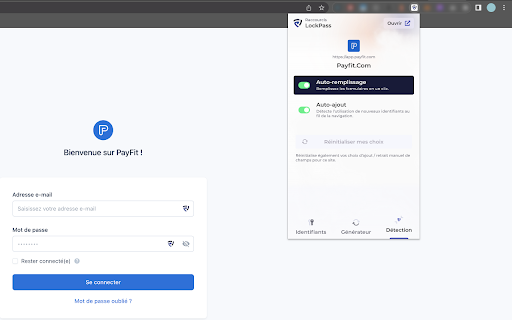
Secure the management of your professional passwords with the LockPass extension. Certified and sovereign European solution. Simplify and secure the management of your professional passwords with the LockSelf extension. The LockSelf extension allows you to take full advantage of the features of LockPass, the 100% European password manager (with encryption mechanisms certified by the French Information Systems Security Agency), developed by LockSelf. Automatically fill in your login details with a single click, while ensuring the security of your data. 🔐 Main features • Automated creation of strong passwords for all users. • Secure auto-completion of your login details and passwords on your web browser. • Direct connection and synchronisation with your LockSelf vault. • End-to-end encryption to protect your sensitive data. • Simplified and centralised management of your professional access. • Secured and compartmentalised collaboration by team and project. The LockSelf extension for your web browser integrates perfectly with your security ecosystem. It allows your employees to easily log in to their applications while complying with internal password and access rights management policies. Protect your access, save time and simplify daily password management with the LockSelf extension. A LockPass professional licence is required to use the LockSelf extension. Need a licence? Discover LockPass and create your trial account now: https://www.lockself.com/en/solutions/lockpass-password-manager LockSelf is a suite of sovereign cybersecurity solutions. The LockSelf digital safe allows you to: • Securely store and share all your company's passwords with LockPass. • Securely share files externally with LockTransfer. • Store, archive and share files internally with LockFiles. The solution can be hosted in a sovereign cloud or on-premises. Equip your teams with sovereign solutions to securely manage, share and store business passwords and files with LockSelf.

Proton Pass: Free Password Manager
Free and fully encrypted password manager to keep your logins and passwords safe. Free and unlimited password manager to keep your login credentials safe and manage them directly in your browser. Get the password manager created by the former scientists who met at CERN behind Proton Mail, the world’s largest encrypted email provider. Proton Pass is open-source, end-to-end encrypted, and protected by Swiss privacy laws. Pass offers more than other free password managers and has no ads or data collection. You can use it for free forever on all your devices to create and store unlimited passwords, autofill logins, generate 2FA codes, create email aliases, secure your notes, and more. * Protect your logins and their metadata with battle-tested end-to-end encryption While many other password managers only encrypt your password, Proton Pass uses end-to-end encryption on all your stored login details (including your username, the website address, and more). * Audit Pass’s open-source code Like all other Proton services, Pass is open source and built on the principle of trust through transparency. As scientists, we know that transparency and peer review lead to better security. All Proton Pass apps are open source, meaning anyone can verify our security claims for themselves. * How can Proton Pass be free forever? We offer Pass for free because everyone deserves online privacy and security. This is possible thanks to our supportive community on paid plans. If you would like to support our work and get access to premium features, consider upgrading your plan. * Protect more than just your passwords. Join over 100 million people who have signed up for Proton’s privacy ecosystem, which includes Proton Mail, Proton Drive, Proton Calendar, Proton VPN, and more. Take back control of your privacy online with our encrypted email, calendar, file storage, and VPN. With Proton Pass, you can: - Store and auto-sync unlimited logins on unlimited devices: You can create, store, and manage your credentials from anywhere with our browser extension and apps for Android and iPhone. - Sign in faster with Proton Pass autofill: You no longer need to copy and paste your username and password. Easily and securely log in with Proton Pass autofill technology. - Avoid weak passwords: With our built-in secure password generator, you can easily generate strong, unique, and random passwords based on the security requirements for every website you sign up to. - Safely store encrypted notes: You can save private notes in Pass and access them on all your devices. - Create unique email addresses with hide-my-email aliases: Proton Pass helps you hide your personal email address with email aliases. Keep spam out of your inbox, avoid being tracked everywhere, and protect yourself from data breaches. - Make 2FA easy with our built-in authenticator: With Pass’s integrated 2FA authenticator, using 2FA is finally fast and convenient. Easily add a 2FA code for any website and use it when you log in. - Easily organize and share your sensitive data with vaults (paid feature): Manage your logins, secure notes, and email aliases with vaults. In the next version of Pass, you’ll be able to share vaults with your family, friends, or colleagues. - Quick offline access to your login data: Access your stored passwords and notes in Pass from wherever you are, even when you don’t have internet connection. - Secure your Pass account with additional security measures: Protect all your data with another layer of protection, either with TOTP or U2F/FIDO2 security keys. For more information, visit: https://proton.me/pass Learn more about Proton: https://proton.me

LastPass: Free Password Manager
LastPass is an award-winning password manager for secure credential management on any device. LastPass is the easiest way to manage passwords—wherever you browse. Tired of forgetting passwords or resetting them constantly? Meet LastPass, the trusted password manager—used by millions of people and thousands of businesses—to keep passwords and other account info safe, secure, and always within reach. With LastPass, you only need to remember one master password. We’ll handle the rest—autofilling logins, generating secure passwords, and syncing across all your devices. Whether you're browsing on Chrome or logging into your favorite website, LastPass makes it effortless. WHY MILLIONS TRUST LASTPASS 🔐 Secure Password Vault: Store all your passwords, passphrases, passkeys, usernames, and payment methods in one encrypted place. ⚡ Autofill Made Easy: Instantly fill in login credentials on websites and in apps—no typing required. 🧠 One Master Password: Just remember one password—LastPass remembers the rest. 📝 More Than Passwords: Securely store credit cards, insurance info, social security numbers, and private notes. 🤝 Share Securely: Share passwords safely with family, friends, or coworkers. 🔒 Built-In Password Generator: Create strong, unique passwords and passphrases in a single tap. 🛡️ Multi-Factor Authentication (MFA): Add an extra layer of protection to your password app. GO PREMIUM FOR MORE POWER Try LastPass Premium free for 30 days and unlock: 📱 Unlimited device access across all platforms 🌐 Access on Edge, Firefox, and other browser extensions 🔗 Unlimited sharing of passwords and notes ☁️ 1GB of encrypted file storage 🛡️ Advanced MFA options like YubiKey 🚨 Emergency access for trusted contacts 💬 Priority customer support BUILT FOR SECURITY Your data is encrypted with bank-grade AES-256 encryption—only you can unlock your vault. Even we can’t access it. RECOGNIZED. RESPECTED. RECOMMENDED. There’s a reason LastPass is trusted by millions and featured in top publications like Forbes, PCMag, TechRadar, and ZDNet. We consistently lead the way in ease of use and customer support, earning top ratings on platforms like G2. When it comes to password managers, users and experts agree—LastPass delivers. DOWNLOAD LASTPASS TODAY Start using the smarter, safer way to manage your passwords and passkeys.

KeyGuard - Password Manager
Experience seamless password management with KeyGuard – save, autofill, and secure your credentials effortlessly. Meet KeyGuard, the ultimate password manager that keeps your online world safe, simple, and secure – and it's completely free. Never worry about forgetting or reusing passwords again. KeyGuard combines top-notch security with unbeatable ease of use and lightning-fast performance. Effortless Password Management: Manage your passwords with our clean, simple-to-use interface, designed to make securing your online accounts easier than ever. Instant Autofill for Seamless Browsing: Instantly save & autofill your passwords with our smart and responsive autofill feature. Unmatched Security: Your data is protected with industry-leading AES256 encryption – the gold standard in online security. Quick & Strong Password Generation: Create secure and unique passwords for every site with our easy-to-use password generator. Seamless Cross-Browser Syncing: Access your passwords on any device with smooth synchronization across Chrome, Firefox, and Edge. Get Started Today – It’s Free! Join the many users who trust KeyGuard to protect their digital experience. Take control of your passwords and enjoy a faster, safer, and smoother online experience. Install KeyGuard now and experience password management like never before. KeyGuard – The Secure, Simple, and Effortless Password Manager.

Passbolt - Open source password manager
Passbolt extension for the open source password manager for teams. Passbolt is an open source password manager designed for collaboration. You can securely generate, store, manage and monitor your team credentials. Get access to all of your logins and passwords from multiple browsers or even your mobile phone. Create strong random passwords, thanks to the fully customizable password generator, and share them instantly with your team. Passbolt is built on top of an open API made for developers and agile teams. Passbolt is extensible and yet usable by everyone. No technical knowledge is required to use it. This is why Passbolt is trusted by small businesses, as well as government offices, regulated industries, and privacy-conscious organizations: Boost collaboration & productivity: - Easily share one password, or a folder with a single user or a group of users; - Use personal or shared tags to identify passwords and secrets; - Give specific access rights to a user or group; - Get detailed reporting on access & change history. Security by design. Audited and certified: - True end-to-end encryption; - Interoperable cryptography based on OpenPGP; - Full control your own encryption key; - Access revocation that actually works; - Regularly audited by independent auditors. Made in Europe. Privacy by default: - Host it in our cloud, located in Europe; - Or self-host it for full data ownership; - No tracker, no strings attached. Passbolt source code comes under an AGPL license (yes even the commercial version) and is publicly available. You are free to audit it, contribute to it, or redistribute it. This add-on is required to use the software, in order to provide advanced security features as well as functionality such as password auto filling on web pages. Get started now: https://www.passbolt.com/cloud/signup Check the source code: https://github.com/passbolt
