
ghmbeldphafepmbegfdlkpapadhbakde


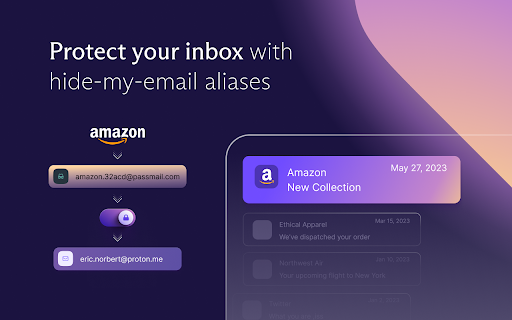
Free and fully encrypted password manager to keep your logins and passwords safe. Free and unlimited password manager to keep your login credentials safe and manage them directly in your browser. Get the password manager created by the former scientists who met at CERN behind Proton Mail, the world’s largest encrypted email provider. Proton Pass is open-source, end-to-end encrypted, and protected by Swiss privacy laws. Pass offers more than other free password managers and has no ads or data collection. You can use it for free forever on all your devices to create and store unlimited passwords, autofill logins, generate 2FA codes, create email aliases, secure your notes, and more. * Protect your logins and their metadata with battle-tested end-to-end encryption While many other password managers only encrypt your password, Proton Pass uses end-to-end encryption on all your stored login details (including your username, the website address, and more). * Audit Pass’s open-source code Like all other Proton services, Pass is open source and built on the principle of trust through transparency. As scientists, we know that transparency and peer review lead to better security. All Proton Pass apps are open source, meaning anyone can verify our security claims for themselves. * How can Proton Pass be free forever? We offer Pass for free because everyone deserves online privacy and security. This is possible thanks to our supportive community on paid plans. If you would like to support our work and get access to premium features, consider upgrading your plan. * Protect more than just your passwords. Join over 100 million people who have signed up for Proton’s privacy ecosystem, which includes Proton Mail, Proton Drive, Proton Calendar, Proton VPN, and more. Take back control of your privacy online with our encrypted email, calendar, file storage, and VPN. With Proton Pass, you can: - Store and auto-sync unlimited logins on unlimited devices: You can create, store, and manage your credentials from anywhere with our browser extension and apps for Android and iPhone. - Sign in faster with Proton Pass autofill: You no longer need to copy and paste your username and password. Easily and securely log in with Proton Pass autofill technology. - Avoid weak passwords: With our built-in secure password generator, you can easily generate strong, unique, and random passwords based on the security requirements for every website you sign up to. - Safely store encrypted notes: You can save private notes in Pass and access them on all your devices. - Create unique email addresses with hide-my-email aliases: Proton Pass helps you hide your personal email address with email aliases. Keep spam out of your inbox, avoid being tracked everywhere, and protect yourself from data breaches. - Make 2FA easy with our built-in authenticator: With Pass’s integrated 2FA authenticator, using 2FA is finally fast and convenient. Easily add a 2FA code for any website and use it when you log in. - Easily organize and share your sensitive data with vaults (paid feature): Manage your logins, secure notes, and email aliases with vaults. In the next version of Pass, you’ll be able to share vaults with your family, friends, or colleagues. - Quick offline access to your login data: Access your stored passwords and notes in Pass from wherever you are, even when you don’t have internet connection. - Secure your Pass account with additional security measures: Protect all your data with another layer of protection, either with TOTP or U2F/FIDO2 security keys. For more information, visit: https://proton.me/pass Learn more about Proton: https://proton.me

Decentraleyes
Protects you against tracking through "free", centralized, content delivery. It prevents a lot of requests from reaching networks like Google Hosted Libraries, and serves local files to keep sites from breaking. Complements regular content blockers. Websites have increasingly begun to rely much more on large third-parties for content delivery. Canceling requests for ads or trackers is usually without issue, however blocking actual content, not unexpectedly, breaks pages. The aim of this add-on is to cut out the middleman by providing lightning speed delivery of local (bundled) files to improve online privacy. • Protects privacy by evading large delivery networks that claim to offer free services. • Complements regular blockers such as uBlock Origin (recommended), Adblock Plus, et al. • Works directly out of the box; absolutely no prior configuration required. Note: Decentraleyes is no silver bullet, but it does prevent a lot of websites from making you send these kinds of requests. Ultimately, you can make Decentraleyes block requests for any missing CDN resources, too.

SimpleLogin by Proton: Secure Email Aliases
Easily create a different email for each website to hide your real email. Protect your inbox against spams, phishing, data breaches Use email ALIAS instead of your real email address to: - defend your mailbox from spams, phishing and data breaches. - protect your privacy from cross-site tracking. 1- Next time a website asks for your email address, give an alias instead of your real email. 2- All emails sent to an alias is *forwarded* to your personal email address. 3- Just hit "Reply" if you want to reply to a forwarded email: the reply is sent from your alias and your real email stays hidden. You can also easily send emails from your alias. SimpleLogin is an *open-source* email alias solution that allows you to quickly create an email alias. Use an email alias when: - subscribing to a newsletter - signing up for a new account - giving your email to someone you don't trust. Later on you can simply block an email alias if it's too spammy. When you give away your personal email online, there is a good chance that your email address would end up with a spammer or leaked during a breach. You could check whether your email is leaked using website like https://haveibeenpwned.com SimpleLogin could also help manage your business emails. If you own a domain and don't want to pay a full solution like GSuite, you could add the domain into SimpleLogin and create emails like contact@my-domain.com, partner@my-domain.com with aliases. All our business emails (the @simplelogin.io) are actually aliases. ## What distinguishes SimpleLogin - Generous free plan: there's no cap on bandwidth or number of replies/sends. The Free Plan is enough for protecting your personal email. Premium Plan targets at more "advanced" users with features like custom domain, unlimited alias, PGP, directories, etc. - Fully open source: both SimpleLogin server and client code (browser extension, JS library) are open source so anyone can freely inspect and (hopefully) improve the code. You would not trust a blackbox to handle your emails, do you? - The only email forwarding solution that can be self hosted, i.e. you can run SimpleLogin on your server. - Not just email alias: we are working on providing a similar technology for phone number and credit cards. Stay tuned! - Easily export your data: allows you to change the service provider if someday you decide to leave SimpleLogin.

KeePassXC-Browser
KeePassXC integration for modern web browsers Official browser plugin for the KeePassXC password manager (https://keepassxc.org). The thing computers can do best is storing information. You shouldn't waste your time trying to remember and type your passwords. KeePassXC can store your passwords safely and auto-type them into your everyday websites and applications.

Karakeep
An extension to bookmark links to karakeep.app An extension to bookmark links to karakeep.app.
