
kdpmhmcieiaddjoegooocahccoegbemo

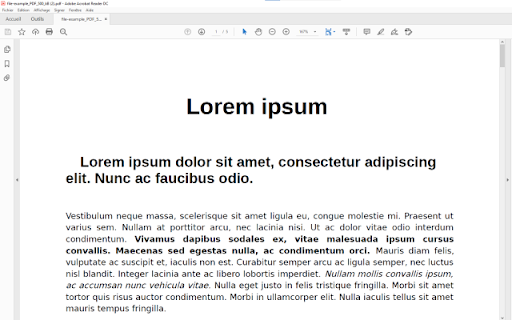
Open your PDF files using Adobe Reader now. Use acrobat reader to open PDF files. Want to open PDF files using your favorite PDF reader software Adobe Reader? You can do so now after you install our software extension. To begin using adobe acrobat to open PDF files, here are the steps you need to do. Ensure you have Adobe Reader installed on your computer. Double check and ensure adobe acrobat reader is installed Install our software extension "Open in PDF Viewer" Once you install our software acrobat free, please refresh all your existing Tabs/close browser and restart browser to let the extension load. Choose the PDF file you wish to open with Adobe Reader via the right click context menu button. Its that simple, just use the right click context menu to choose Adobe Reader when you want to open your PDF Files. This software also allows you to convert your PDF files to JPG/PNG format. While adobe pdf reader has many features, it is also a big download and if you just need a simple PDF viewer, the browser inbuilt PDF viewer will serve most needs. Please note this extension was NOT made by Adobe. It was made by a third party developer. All copyrights and trademarks belong to their respective copyright owners.

PDF Viewer Pro - View, Edit, Fill, Convert, Sign, and More
PDF Viewer Pro: Your all-in-one PDF solution. View, edit, fill, comment, and sign PDFs seamlessly in your browser. PDF Viewer Pro is an advanced and user-friendly browser extension that allows you to view and edit PDF files directly within your browser, all for free. As a leading solution in PDF reading, PDF Viewer Pro integrates seamlessly with Google Chrome, offering an exceptional PDF viewing experience and enhanced productivity. - **Comprehensive PDF Application:** PDF Viewer Pro is a fully functional PDF web application designed for your busy lifestyle. It provides a complete suite of tools accessible from any device, making it ideal for on-the-go use. - **Conversion Capabilities:** - Convert PDFs to and from Word, Excel, PowerPoint, JPG, JPEG, PNG, and HTML. - Convert images (JPG, JPEG, PNG) to PDF and vice versa. - **PDF Management:** - Merge, Split, and Extract PDF Pages - Edit, Rotate, and Delete PDF Pages - Compress PDF Files - Sign and Send PDFs for Signature - Protect and Unlock PDF Documents 1. Install the PDF Acrobat extension for Chrome. 2. Pin the extension for easy access. 3. Open any PDF file directly in your browser. 4. Choose from the available PDF Acrobat tools to edit or convert your PDF. - **Productivity Boost:** Enhance your workflow with features such as PDF compression, merging, splitting, and more. - Supports Microsoft Office formats including Word, Excel, and PowerPoint. - Provides integration with Adobe Acrobat for additional PDF editing and conversion tools. Experience a better PDF interaction by adding PDF Viewer Pro to your Chrome browser. Enjoy tools for editing, converting, compressing, merging, and managing PDFs all from one place. We hope PDF Viewer Pro enhances your PDF handling experience. We welcome your feedback and suggestions for further improvements.

Open in Foxit™ Reader
Send PDF (Portable Document Format) links to the Foxit™ Reader from right-click context menu or browser's action button This extension simplifies the use of Foxit Reader to open PDF links. How to Use: 1. Use the right-click context menu item to direct PDF links to Foxit PDF Reader. 2. Click the action button on PDF pages to transfer the PDF file to Foxit PDF Reader. 3. On the options page, customize the extension settings to open PDF links with Foxit Reader. Notes: 1. Because Foxit Reader cannot directly open remote PDF links, this extension initially downloads the PDF file to your browser's default download directory and then activates the external PDF reader. 2. To establish communication with Foxit Reader, install a small native client specific to this extension. This client is compatible with Windows, Linux, and Mac operating systems. ChromeOS is not supported. 3. Ensure you have Foxit PDF Reader installed on your device. This extension only simplifies Foxit Reader integration with your browser and does not perform the installation. --- Legal Foxit Reader is a registered trademark of Foxit Software Incorporated, registered in the U.S. and other countries. This extension is an independent project and is not affiliated with Foxit Software. It serves as a tool designed to enhance the PDF reading experience.

Fast PDF Reader
PDF Reader allows you to view PDF, DOC, XLS, PPT files directly in your web browser. Open, view and read PDFs with the fast PDF reader.

PDF Viewer
Read PDF File and highlight/make edits to the PDF File Want to view and edit PDF files quickly? Use this software extension to view PDF files instantly in your browser. If you wish to make any edits to the PDF file, you can do so via View and edit PDF files today with this software browser. This is a simple to use PDF Viewer. Disclaimer: Please note this extension is NOT made by Google and is made by an independent development team. All copyrights belong to their respective owners. Google doesn’t endorse or sponsor this extension. PDF Viewer for Google Chrome™ is not owned by, is not licensed by and is not a subsidiary of Google Inc.
