
kdcadgckcdgebkmhedjkebadbefeeona
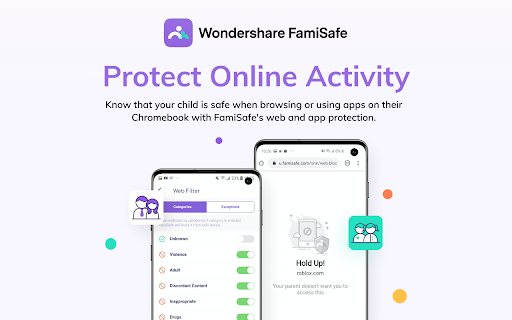

FamiSafe extension FamiSafe Chrome Extension works alongside the FamiSafe Jr App for Android to protect Chromebook devices. These are the companions of the FamiSafe Parental Control App, our app for the parent's device. Please only install this app onto the devices being used by a child or teen. Parents need to install FamiSafe Parental Control App on parent devices (usually on your mobile phone or pad). Then, download this Chrome Extension and the FamiSafe Jr App onto your child’s device or devices. Together, the two apps allow parents to manage a child’s screen time, track a child’s location, block inappropriate websites. And other features like game & porn blocking, suspicious photos detecting and suspicious text detecting on social media app like YouTube, Facebook, Instagram, WhatsApp and more on linked mobile, tablet or desktop devices across platforms including Chromebook, Android, iOS, macOS and other major operating systems. FamiSafe help kids cultivate healthy digital habits and create a safe online environment. Our FAQs: • Does FamiSafe screen time and parental control app work on other platforms besides Chromebook? FamiSafe can protect Android, iOS, Windows, Mac and Kindle. • Can I install FamiSafe on school-issued Chromebooks? If your Chromebook is managed by your child's school, please make sure they allow third party extensions in their Google Suite account so you can install the FamiSafe Extension on the device. • What languages do you support? FamiSafe is available in English, Spanish, French, Portuguese, German, Japanese and Korean. For support, contact us here: https://famisafe.wondershare.com/faq/

Ninja Adult Porn Blocker
The most powerful adult porn websites blocker with safe search enforcement. 💢 Block adult and porn websites. Filter Google, Bing, DockDockGo and Yahoo search results! 💢 ✅ Do you want to protect your family from adult content? We blocked over 50,000 URLs on the web. Most visited adult websites and adult keywords! So don't worry about using the Internet! 👉 Please let us know if you see an address not blocked. We'll add it in our database! 🍀 Enjoy from the clean web.

Safes
Monitor and filter out inappropriate websites and search results on your child's Chrome browser. Safety and Security with Safes, now as a Chrome Extension Safes is specifically designed for families. It is meant to be a tool to manage, supervise, monitor, and control online activity to prevent digital cyber threats. This application comes with a wide range of features and possibilities. It is trying to fit every need of a family in; from screen time habits to detailed reports of children’s activity. Safes is a prominent parental control app safeguarding families, and it’s now available as an extension for Chromebook. Safes come in two apps. One for parents, one for Kids. Parents can install their app to start monitoring their kids, using a variety of features and possibilities. These features include: Smart Screen, to manage Screentime With all these arms added to the family, Safes ensures safety and security, to help families maintain a healthy lifestyle.

Mobicip Parental Control with Screen Time
Create a safe experience for your family using Mobicip's powerful parental control software with internet filter and screen time. Mobicip is the most popular Internet filter and screen time parental control software for families to enjoy a safe and secure experience on Chromebook. With Mobicip, parents can: - Filter the internet & block objectionable content - Limit screen time - Monitor browsing history & online activity - Use intuitive web portal or mobile app in Parent Mode, 24x7 on the go Take charge of your family’s digital experience! Enjoy quality family time with Mobicip, the perfect app for today’s “constantly connected” digital family. 1. Set daily screen time limits on your child’s Chromebook to ensure healthy levels of digital immersion and manage bedtime and family time; or set recurring weekly screen time schedules. 2. Block websites, keep a watchful eye and draw a healthy boundary around the web. Stay on top of the usage/browsing history to spot online threats. Block pornography, gambling, violence and other inappropriate web content. 3. Instantly lock all devices for dinnertime or family-time. 4. Check your kids' browsing history on the go or set up weekly or daily reports to see a snapshot of their browsing trends. 5. Invite another parent to help manage and be informed of your kids' digital experience and ensure digital safety. 6. Keep track of the entire family's devices through an intuitive dashboard on the web or mobile 24x7 on the go. Family Time allows parents to lock down all the family devices instantly with a single touch for a certain period. Now family meals, bedtimes, family interactions and outdoor time can be completely device-free & without distractions! As your children and teens move across a wide variety of devices, Mobicip allows you to monitor and control all such devices irrespective of the platform or OS. “Mobicip is designed for the modern multi-device family, and its range of supported platforms is impressive” - PCMag. Parents can choose from our annual pricing bundles: $49.99 for 5 devices, $89.99 for 10 devices, $124.99 for 15 devices, & $159.99 for 20 devices. As an introductory offer, the 5-device plan is offered at $39.99 per year. Please visit our helpdesk (www.mobicip.com/support) for how-tos, videos, and articles. For additional assistance, contact us at support@mobicip.com.

Web Filter for Chrome
Web Filter for Chrome extension enables safe web filtering and Google safe search in Chrome. Block Adult Content & Enforce Safe Search Powerful web filtering extension for families, schools, and organizations. Automatically blocks pornography, adult content, and inappropriate websites while enforcing SafeSearch across all major search engines. Overview SPIN Safe Browser's Web Filter for Chrome provides instant protection against inappropriate online content. Designed for parents, educators, and professionals, this extension automatically blocks adult websites, enforces Google SafeSearch and YouTube Restricted Mode, and filters content even in Incognito Mode—delivering comprehensive internet safety without complex setup. Key Features Automatic Protection (Free Version) ✔ Instant Web Filtering – Blocks pornography, nudity, and adult content immediately upon installation ✔ Universal SafeSearch Enforcement – Automatically enables strict SafeSearch on Google, Bing, DuckDuckGo, and other popular search engines ✔ YouTube Restricted Mode – Filters out age-inappropriate videos for family-friendly viewing ✔ Incognito Mode Filtering – Maintains protection even in private browsing sessions ✔ No Extra Software Required – Works seamlessly within Chrome and Chromebooks with zero configuration Premium Features (Monthly and Yearly Subscription options available) Upgrade to SPIN Safe Browser Premium for advanced control: ✅ Unlimited Domain Allow list – Whitelist any number of trusted websites ✅ Unlimited Domain Block list – Add specific sites to your custom block list ✅ Allow-Only list Mode – Restrict browsing to only approved websites ✅ Custom Content Categories – Fine-tune filtering beyond default categories ✅ Passcode Protection – Prevent unauthorized changes to settings Parents & Families Protect children from accidental or intentional exposure to inappropriate material while browsing at home. Create a safer digital environment for all family members. Educators & Schools Perfect for Chromebook deployments in K-12 classrooms. Keeps students focused on educational content and away from distracting or harmful websites during school hours. Organizations & Workplaces Enforce company browsing policies, maintain productivity, and reduce liability by limiting access to non-work-related or inappropriate websites. Individuals Anyone seeking self-accountability or looking to maintain a distraction-free, content-safe browsing experience for personal development. Why Choose SPIN Safe Browser for Chrome? Immediate Protection – No waiting period or configuration required. Protection begins the moment you install. Comprehensive Coverage – Works across all search engines and video platforms, including enforced filtering in private browsing mode. Enterprise-Ready – Administrators in managed environments (schools, businesses) can deploy policies preventing extension removal, ensuring consistent protection across all devices. Trusted Solution – Part of the SPIN Safe Browser family, which includes mobile apps for Android and iOS, providing cross-platform protection. Installation & Setup 1. Install the extension from the Chrome Web Store 2. Automatic protection activates immediately 3. Recommended: Upgrade to Premium for advanced features 4. Optional: Set a passcode to lock your settings (Premium) Cross-Platform Protection Extend your web safety beyond desktop with SPIN Safe Browser for Android and iOS devices. Resources Support Portal: community.useboomerang.com/hc/en-us/sections/360000687332-SPIN-Safe-Browser-and-Manage-SPIN Privacy Policy: https://spinsafebrowser.com/spinprivacypolicy Feedback & Support: spinforchrome@nationaledtech.com
