
igommkoaokjcnklolmonbohidphnaibi

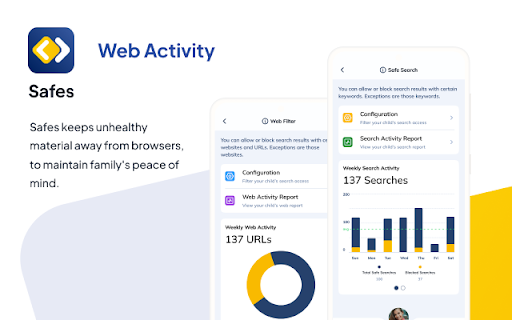


Monitor and filter out inappropriate websites and search results on your child's Chrome browser. Safety and Security with Safes, now as a Chrome Extension Safes is specifically designed for families. It is meant to be a tool to manage, supervise, monitor, and control online activity to prevent digital cyber threats. This application comes with a wide range of features and possibilities. It is trying to fit every need of a family in; from screen time habits to detailed reports of children’s activity. Safes is a prominent parental control app safeguarding families, and it’s now available as an extension for Chromebook. Safes come in two apps. One for parents, one for Kids. Parents can install their app to start monitoring their kids, using a variety of features and possibilities. These features include: Smart Screen, to manage Screentime With all these arms added to the family, Safes ensures safety and security, to help families maintain a healthy lifestyle.

Browse.live Web Safety
Browser Extension that Hides Unfair Ads and Unsafe Search Results --Browse Peacefully-- Browse.live Web Safety blocks all unfair ads based on our regularly updated Ad Polluter list (https://appesteem.com/polluters), giving you the cleanest and fairest browsing experience. --Use Our Unique Patented Technology-- The remaining ads are blurred with our unique, patented technology, helping you focus on the content that matters. You can always choose to see these ads by hovering over them. --Get Protection from Deceptive Apps-- Browse.live Web Safety warns you about potentially dangerous websites and links found in your search results. We constantly refine our list (https://appesteem.com/deceptors) of known deceptive sites and apps to improve your browsing safety. Browse.live Web Safety never collects your personal data. Browse.live Web Safety was created by AppEsteem, an app certification company that is trusted by the world’s leading cybersecurity companies to help protect more than 2 billion people from consumer fraud. Our mission is to bring safe and clean internet experiences to everybody.

Cleaner For Chrome
An effective tool for cleaning your browser and monitoring system resources Cleaner For Chrome™: Your Ultimate Chrome Browser Cleanup Tool Transform your Chrome browsing experience with Cleaner For Chrome™—a powerful, easy-to-use extension designed to keep your browser fast, clean, and efficient. Whether you're looking to clear cache, history, or cookies, Cleaner For Chrome™ offers a comprehensive solution for all your cleanup needs. Why Choose Cleaner For Chrome™? 🚀 Maximize Performance: Regularly clean your browser to improve speed and responsiveness. Cleaner For Chrome™ helps you swiftly remove unwanted files and data, enhancing your overall browsing experience. 🧹 Deep Cleaning: Our extension performs a thorough cleanup, addressing a wide range of data types, including: Application Cache Cache Cookies Downloads Stored Files Cache Forms History Browsing History IndexedDB Databases Local Storage Cache Certificates Plugins' Data Cache Service Workers ✨ No Ads, No Hassle: Enjoy a clean, ad-free interface that makes maintenance straightforward and effortless. ⚡ Fast and Efficient: Cleaner For Chrome™ operates swiftly to ensure your browser remains in top shape without compromising on speed or performance. 🎨 Minimalistic Design: Our user-friendly design focuses on ease of use and simplicity, making it easy for anyone to manage their browser’s cleanliness. 🔧 Comprehensive Support: Our dedicated support team is here to assist with any questions or issues you may have, ensuring a smooth experience. What Cleaner For Chrome™ Does NOT Remove: Autofill form data Stored passwords Local filesystem and storage Plugin data WebSQL and IndexedDB data Cleaner For Chrome™ is your go-to solution for a cleaner, faster, and more secure browsing experience. Download Cleaner For Chrome™ today and see the difference a cleaner browser can make! With Cleaner For Chrome™, your browser's cache, history, and cookies will be a thing of the past—efficiently cleaned, so you can enjoy a smoother, faster browsing experience.

SafeBrowse Parent Control
Protect kids from adult and harmful content on the web SafeBrowse Parent Control – Free parental control extension for Chrome. Block inappropriate websites, blur adult images, and filter bad words to keep kids safe online. BEST PARENTAL CONTROL EXTENSION FOR CHROME SafeBrowse helps parents protect children from adult content, inappropriate websites, and harmful material while browsing. Simple to set up, no account required. Your data stays on your device. ✓ Block inappropriate websites – Built-in blocklist of adult and unsafe sites. Add custom sites to block or allow. Block porn, adult content, and any domain you choose. ✓ Blur adult images – Automatically blurs inappropriate images on Google Images and risky sites when kids search adult terms. Safe searches (e.g. school, games) show normally. ✓ Word filter – Replaces bad words and inappropriate language with ***** on any webpage. Customize your word list in the dashboard. ✓ Parent and child profiles – Switch to Child profile when kids use the browser; switch to Parent to browse without restrictions. Each child can have their own profile. ✓ Activity reports and insights – See what each profile tried to access and when. Blocked site attempts, top blocked domains, and per-profile activity. Know what your kids are doing online. ✓ Ask parent – Kids can request access to a blocked site. Parents approve for 15 minutes, 1 hour, or always from the dashboard. ✓ Schedule blocking – Set time-based rules so the web is blocked or allowed during specific hours (e.g. homework time, bedtime). ✓ PIN protection – Lock settings with a PIN so only parents can change rules or switch profiles. ✓ Privacy first – No cloud required. Blocking and filtering happen on your device. Export or delete your data anytime. 1. Install the free parental control extension. 2. Set a PIN and create Parent and Child profiles. 3. Switch to Child profile when your child uses Chrome. 4. Open the dashboard (extension options) to view reports, adjust blocklists, and manage settings. WHO IS SAFEBROWSE FOR? • Parents who want to block inappropriate content for kids • Families looking for free parental controls for Chrome • Anyone who needs to filter adult websites and images • Households with shared computers used by children

Block Websites for Google Chrome™
Protect your time and experience by blocking waste websites. Do you need to focus at work/school? Are you always getting distracted by Facebook/Youtube/Instagram? Simply install our software Block Websites for Google Chrome™ today and you can focus 100% on you work again. To get started, simply do the following Install Block Websites for Google Chrome™ Choose the websites you want to block and the duration of time These websites will be blocked if you try to visit them before the timer has expired. This is a great way to force yourself to concentrate at work/school and not get easily distracted. The best thing is our software is 100% free. Get started using our software Block Websites for Google Chrome™ today! You can check our privacy policy at https://blocksite.freebusinessapps.net/privacy-policy Disclaimer: Please note this extension is NOT made by Google and is made by an independent development team. All copyrights belong to their respective owners. Google doesn’t endorse or sponsor this Chrome extension. Block Websites for Google Chrome™ is not owned by, is not licensed by and is not a subsidiary of Google Inc.
