
kdappijekicdbempkjaahnnmkookhfnj
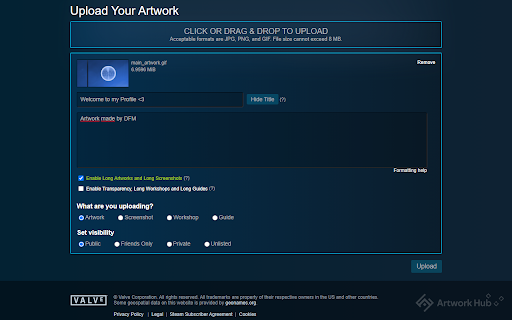

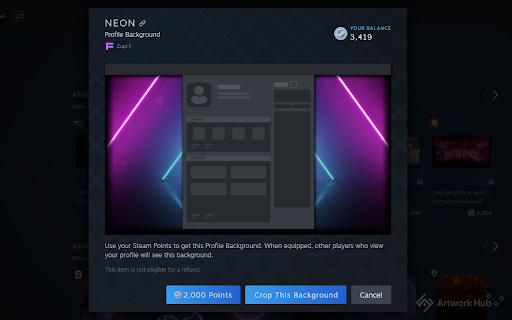


Steam Artwork Hub Essentials is an extension for Steam that allows you to upload long artworks, screenshots, workshops and guides. Steam Artwork Hub Essentials is a web browser extension for Steam that will allow you to upload long artworks and decorative long screenshots, workshops and guides to the Steam network easily, without using any upload codes. The extension also offers new profile themes and buttons that integrate with the Steam Points Shop, the Steam Marketplace and your Steam Inventory.

Steam Inventory Helper
Enhances Steam: auto-selling skins, affordable items from various sources, and much more. Enhanced Steam Experience with SIH Streamline your Steam trading and inventory management with powerful tools for easier item selling, price comparisons, and inventory valuation. - Fast Multi-Item Sales: List hundreds of items for sale with just a few clicks. - Detailed Item Information: See float values, pattern indices, and prices of applied stickers and charms directly on item listings. - Inventory Valuation: View the total worth of your inventory based on prices from your chosen marketplace or service. - Price Comparisons: Compare item prices across global marketplaces for more informed trading. - Stacking Feature: Group identical items for easier browsing and organization. - Profit Calculation: Calculate profitability of items on the Steam Market. - Trade Notifications and Quick Accept: Get real-time trade information, with optional quick-accept features to confirm incoming trades directly. - Inventory Insights: Check if items are currently in use within the game or are part of a pending trade. - Quick Purchase Options: Buy items on the Steam Marketplace faster, with a quick-set purchase button to complete your collection directly from the inventory. Additional functionalities and enhanced features are exclusive to Steam Inventory Helper! Some features require authentication in the Steam community. - Access to Steam Sites (`://*.steampowered.com/* & *://steamcommunity.com/*`): This allows the extension to enhance your experience on Steam-powered platforms, displaying item information, inventory valuation, and pricing features. - Access to Gainskins API (`://sih.gainskins.com/*`): Provides Steam item pricing within your inventory, allowing access to public data on games, user profiles, and item details for improved accuracy in pricing and item statistics. - SteamCharts Access (`://steamcharts.com/*`): Used to gather real-time game statistics and currency conversion rates for accurate market information. - Market.CSGO Access (`://market.csgo.com/*`): Enables integration with market.csgo for trade offers (only after the user enables this feature within settings). - SteamRep Access (`://steamrep.com/*`): Allows access to public profile information, such as trade bans, VAC bans, or community bans, helping you make safer trading decisions. - Host_permissions": "" Fetching data from Steam and other marketplaces: Required for integration and display of real-time item prices and other relevant information across various trading platforms. This enables users to view up-to-date data for effective price comparison and optimal purchasing. - notifications: Used to send important notifications to the user about trade statuses, price updates, and other real-time events related to item trading on Steam. - alarms: Required for scheduling periodic tasks, such as price and inventory updates, to keep user information current without impacting browser performance. - storage: Used to locally store user preferences and settings, enhancing personalization and usability without the need to reconfigure the extension each time it’s opened. - unlimitedStorage: Required for storing large volumes of price and inventory data, allowing the extension to deliver information quickly without the 5 MB standard limit. - background: This permission allows SIH to operate in the background to perform tasks like price updates and trade monitoring, improving the functionality and efficiency of the extension. - webRequest: Used for analyzing and adjusting network requests, which ensures proper integration with trading platforms and protects against fraudulent sites. Access to web requests allows SIH to integrate accurately with various trading platforms. - declarativeNetRequest: This permission helps filter and modify network requests to protect user data and provide only relevant information about trades and prices. It avoids the need to route data through our servers. - declarativeNetRequestFeedback: Used to receive feedback on the status of network requests, allowing SIH to provide users with accurate information while maintaining proper data security. - cookies: Used to store login status information, allowing SIH to operate without repeatedly requesting login credentials, while providing personalized access to Steam and trade data. - activeTab: This permission allows SIH to interact with the active tab, automatically loading prices and item information for the user without extra navigation steps. - management: Used to check compatibility with other installed extensions that might conflict with SIH, allowing SIH to warn the user of potential risks and maintain extension stability. For more information and updates, please visit our official channels: Please refer to our change logs and FAQs for updates.

PreMiD
Your Rich Presence for web services! Elevate Your Online Presence with PreMiD! PreMiD transforms your browsing experience by seamlessly integrating with Discord to display your current web activities as a ‘Watching xyz’, ‘Listening to xyz’ and ‘Now Playing’ status in your profile. Whether you’re diving into an exciting YouTube video or exploring other web services, PreMiD effortlessly conveys your online journey to your Discord profile. Broad Compatibility: With support for over 1000 websites, the scope of PreMiD’s reach is ever-expanding, fueled by a vibrant community dedicated to introducing new Presences regularly. Easy Setup: Begin by adding our extension and follow the steps prompted. Community and Support: Join our thriving community for updates, support, and more. Engage with us on our Discord server, explore our GitHub organization, or find solutions using the built-in troubleshooting inside the extension. If the built-in troubleshooting doesn’t solve your issue, join our Discord for help: https://discord.premid.app Contribute and Support: Your feedback fuels PreMiD’s growth. Consider leaving a review, sharing PreMiD with friends, or supporting our project through donations. Get started with PreMiD:

CS2 Trader - Steam Trading Enhancer
Extension to help with CS2 trading, trade-lock countdown, in-browser inspect, doppler phases, prices, float values, etc CSGO Trader is an open source browser extension that is designed to help with CS:GO trading. I started by adding functionality that Steam Inventory Helper lacked, but it already has SIH's most important features and much more. Check the video or visit https://csgotrader.app for feature showcasing! - Pricing info in inventories and trade offers - Total inventory value, trade offer value - Show profit for incoming trade offers, order by most profitable first - "Inspect in Browser..." button on market, inventories and trade offers - Item mass listing/selling - Shows when an item's trade lock will expire and adds a countdown - Shows floats and other technical info like paint index, paint seed, pattern index in inventories, offers and on the market - Order by float value on market pages, show more than the default 10 listings on the market - Doppler phases, fade percentages, marble fade patterns (fire and ice, blue tip, red tip, etc.) - Shows exterior on each item and adds links to other version to inventory and market pages - NSFW filter mode to avoid showing unsavoury things to your colleagues - Bookmark an item and get a notification when it is ready to trade - Real chat status on profiles (away, busy, snooze instead of just online) - Colorful inventories, changes each items' background based on its rarity - Scammers are market on their profile and in trade offers (if they are SteamRep banned) - CSGOLounge.com auto-bumping, make your trades more popular by keeping them on top - CSGOTraders.net auto-bumping, make your trades more popular by keeping them on top - Add or remove similar items from a trade, add whole page, add all similar items - Pricing providers: CSGO Trader, CSGOBACKPACK, CS.MONEY, Bitskins, LOOT.FARM, CSGO.TM - See the original currency and price an item was listed on the market - "Starting at" price info and sales volume info in everyone's inventory - Instant accept trade offer and decline trade offer buttons on the incoming trade offers page - Float rank (like 5th best in existence) data from csgofloat - Currency converter, percentage calculator in the extension popup. - Report known spam and scam comments automatically (like fake giveaway comments on profiles) - Reply to comments by tagging the other user's name - Generate a list of inventory items (to post advertisements, etc.) - +rep button on profiles to post your reputation message after trade - Check the value of multiple items in an inventory by selecting them - Sort inventories and trade offers by price, tradability, name or position - Set default sorting mode for inventories and trade offers - All inventory items are loaded automatically, no need to wait for loading when searching or switching pages - Sticker wear (condition percentage) in inventories and on the market - Copy a user's permanent profile link (scammers often change their links automatically) - Duplicate items count in inventories - Set rules to for incoming friend requests (accept, ignore or block on matching conditions) - See if an item is present in another offer - Auto-bump your Steam trading posts in groups and forums - Other small features, automations, conveniences If you want to know why the extension requires the permissions it needs, read: https://csgotrader.app/faq/#permissions Feel free to contribute (with code, graphics, translations or even with ideas) The open source code is available at: https://github.com/gergelyszabo94/csgo-trader-extension The developer: https://www.gergely-szabo.com/ Email support@csgotrader.app for bug reports, questions and assistance.

CSFloat Market Checker
Shows the float value, paint seed, and more of Counter-Strike (CS:GO & CS2) items on the Steam Market or Inventories CSFloat Market Checker uses the dedicated CS Float (formerly CSGO Float) API to allow you to retrieve the float values, 3d models, and screenshots of market items directly from the page! GitHub: https://github.com/csfloat/extension * Allows verification for trades on CSFloat Market * Allows you to retrieve the float, paint seed, and float rank of any market or inventory item * Allows you to fetch the 3D model and screenshot of the item directly on the page * Fetches all floats on the page fast and automatically on page load * User-definable filters to highlight items with low floats or certain paint seeds * Shows market item stickers at a glance and their wear * Change the amount of items on the page up to 100 Compatibility: * This extension has been tested to work with Steam Inventory Helper and Enhanced Steam * Since this extension doesn't hook and modify HTTP headers to bypass steamcommunity.com CSP, it should have greater compatibility with other extensions. Please report issues using our GitHub issue tracker (https://github.com/csfloat/extension/issues).
