
kaibcgikagnkfgjnibflebpldakfhfih
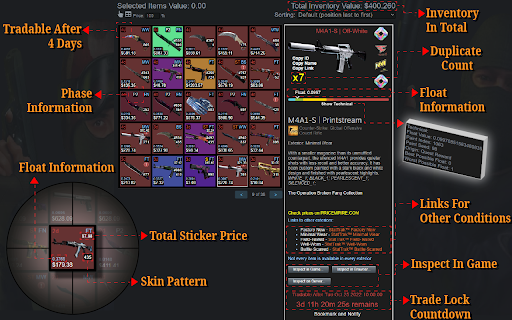


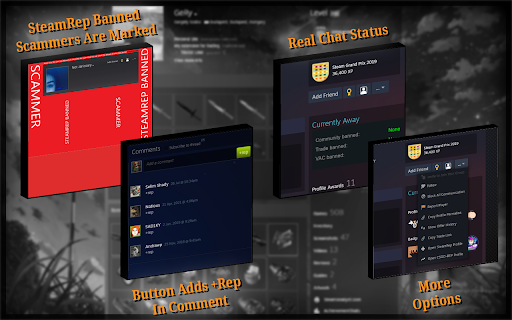

Extension to help with CS2 trading, trade-lock countdown, in-browser inspect, doppler phases, prices, float values, etc CSGO Trader is an open source browser extension that is designed to help with CS:GO trading. I started by adding functionality that Steam Inventory Helper lacked, but it already has SIH's most important features and much more. Check the video or visit https://csgotrader.app for feature showcasing! - Pricing info in inventories and trade offers - Total inventory value, trade offer value - Show profit for incoming trade offers, order by most profitable first - "Inspect in Browser..." button on market, inventories and trade offers - Item mass listing/selling - Shows when an item's trade lock will expire and adds a countdown - Shows floats and other technical info like paint index, paint seed, pattern index in inventories, offers and on the market - Order by float value on market pages, show more than the default 10 listings on the market - Doppler phases, fade percentages, marble fade patterns (fire and ice, blue tip, red tip, etc.) - Shows exterior on each item and adds links to other version to inventory and market pages - NSFW filter mode to avoid showing unsavoury things to your colleagues - Bookmark an item and get a notification when it is ready to trade - Real chat status on profiles (away, busy, snooze instead of just online) - Colorful inventories, changes each items' background based on its rarity - Scammers are market on their profile and in trade offers (if they are SteamRep banned) - CSGOLounge.com auto-bumping, make your trades more popular by keeping them on top - CSGOTraders.net auto-bumping, make your trades more popular by keeping them on top - Add or remove similar items from a trade, add whole page, add all similar items - Pricing providers: CSGO Trader, CSGOBACKPACK, CS.MONEY, Bitskins, LOOT.FARM, CSGO.TM - See the original currency and price an item was listed on the market - "Starting at" price info and sales volume info in everyone's inventory - Instant accept trade offer and decline trade offer buttons on the incoming trade offers page - Float rank (like 5th best in existence) data from csgofloat - Currency converter, percentage calculator in the extension popup. - Report known spam and scam comments automatically (like fake giveaway comments on profiles) - Reply to comments by tagging the other user's name - Generate a list of inventory items (to post advertisements, etc.) - +rep button on profiles to post your reputation message after trade - Check the value of multiple items in an inventory by selecting them - Sort inventories and trade offers by price, tradability, name or position - Set default sorting mode for inventories and trade offers - All inventory items are loaded automatically, no need to wait for loading when searching or switching pages - Sticker wear (condition percentage) in inventories and on the market - Copy a user's permanent profile link (scammers often change their links automatically) - Duplicate items count in inventories - Set rules to for incoming friend requests (accept, ignore or block on matching conditions) - See if an item is present in another offer - Auto-bump your Steam trading posts in groups and forums - Other small features, automations, conveniences If you want to know why the extension requires the permissions it needs, read: https://csgotrader.app/faq/#permissions Feel free to contribute (with code, graphics, translations or even with ideas) The open source code is available at: https://github.com/gergelyszabo94/csgo-trader-extension The developer: https://www.gergely-szabo.com/ Email support@csgotrader.app for bug reports, questions and assistance.

Repeek (formerly FACEIT Enhancer)
Repeek enhances your experience on FACEIT and adds useful features Trusted by over 1 million players worldwide, Repeek enhances your experience on FACEIT so you can focus on what matters. Highlights: - Ready up for matches automatically - Accept party invites automatically - See teams Elo in match rooms - See how much Elo you'll win or loose - See how much Elo you have won and lost in your match history - and more! All features are configurable to your personal preferences. Repeek is developed independently, and is not officially endorsed by or affiliated with FACEIT.

GamerPay extension
GamerPay integration with Steam This extension is a helping hand for all users selling CS2 items on GamerPay. Once a user has purchased one of more items from you, you can use this extension to auto-fill such item(s) in the Steam trade offer window, making the selling experience much smoother! Features: - Auto-fill items to the Steam trade offer - Fetch your full CS2 inventory to GamerPay incl tradelocked items *This extension is built upon the open-source foundation provided by CSFloat. We extend our gratitude to the CSFloat team for their invaluable work and contribution.

CSGOFLOAT | Float checker
Check CS2 skin float values, wear ratings, paint seeds, phases, sticker wear, and charm patterns — right on the Steam Market. CSGOFLOAT | Float Checker is an all-in-one CS2 skin analysis tool for the Steam Market. Whether you trade skins regularly or simply want to understand what you own, this extension gives you instant access to detailed item attributes — no extra tabs, no manual lookups. 🔍 What You Can Check When browsing CS2 (CSGO) market listings or inspecting inventory pages, the extension automatically loads key skin data: 1️⃣ Float Value: See the exact wear rating of any skin directly on the listing page. Understand how close an item is to Factory New or Battle-Scarred without opening external tools. 2️⃣ Paint Seed: Identify the paint seed that determines a skin's unique pattern. Essential for traders hunting rare pattern variations on knives and gloves. 3️⃣ Phase (Doppler & more): Instantly see which phase a Doppler, Gamma Doppler, or Marble Fade skin belongs to — no need to inspect in-game. 4️⃣ Sticker Wear: Analyze the condition of applied stickers. See the exact wear percentage for each sticker on a skin to properly evaluate craft value. 5️⃣ Charm(Keychain) Patterns: View charm details and patterns attached to CS2 items at a glance. ⚙️ Advanced Search & Filtering Go beyond simple browsing. Use built-in filters to narrow down Steam Market results by float range, specific paint seeds, phases, and more. Sort and compare listings to find exactly the skin you need, whether you are looking for a low-float play skin or a rare collectible. 🎯 How It Works 1. Install the CSGOFLOAT extension from the Chrome Web Store. 2. Open the Steam Market or any CS2 inventory page. 3. Skin data — float values, wear ratings, seeds, phases, stickers, and charms — loads automatically on the page. 4. Use the search and filter tools to refine listings and spot the best items. 🛠️ Built for Traders and Collectors Whether you are flipping Counter-Strike skins for profit or building a curated collection, CSGOFLOAT helps you make informed decisions. Every feature is designed to save you time and reduce the guesswork that comes with evaluating CS2 items on the Steam Market. This extension may display affiliate links to partner CS2 marketplaces. Such links are clearly labeled within the extension UI. The extension records anonymous click events on these links to measure their performance – no personally identifiable information is collected

Skinport Plus
Enhance your online trading experience on Skinport and Steam with Skinport Plus. Enhance your trading experience on Skinport (https://skinport.com) and Steam with Skinport Plus, a specialized tool that provides a secure environment for trading skins. Skinport Plus includes great additions for enhanced security, can verify whether your trading partner is an official bot, and detects potential security vulnerabilities through activated Steam Web API keys. Highlights: - Authenticity verification of the trading partner - Steam Web API Key security check - Phishing website blocker Data Privacy: Skinport Plus does not collect any personal user data. We firmly believe that your data is yours alone and we respect this principle in every aspect. Transparency: The project is Source Open and is available for everyone to view on GitHub. This means that anyone can review the code to verify our adherence to the highest security and privacy standards. GitHub Repository: https://github.com/skinport/skinport-plus
